
TYT MD 2017
TYT MD-2017 Li-ion Battery Instruction Manual
Model: MD-2017 | Brand: TYT
1. Introduction
Thank you for choosing the TYT Original 2200mAh 7.4V Li-ion Battery for your MD-2017 Dual Band DMR Two Way Radio. This battery is designed to provide reliable and extended power, offering approximately 24 hours of use under moderate conditions, making it ideal for activities such as hiking and traveling. This manual will guide you through the proper use and care of your battery to ensure its longevity and your safety.
2. Safety Information
Please read and understand all safety warnings before using the battery. Improper handling of Li-ion batteries can lead to fire, explosion, or other hazards.
- DO NOT DISASSEMBLE: Never attempt to open or disassemble the battery pack.
- DO NOT DISPOSE OF IN FIRE: Do not expose the battery to high temperatures or dispose of it in fire.
- DO NOT CHANGE OR CHARGE BATTERY IN HAZARDOUS LOCATION: Only charge the battery in a safe, well-ventilated area, away from flammable materials.
- DO NOT SHORT-CIRCUIT THE TERMINALS: Avoid contact between the battery terminals and metal objects.
- Air Pressure Adjusting Hole: Do not tamper with or cover the air pressure adjusting hole on the battery.
- Keep the battery away from water and moisture.
- Store the battery in a cool, dry place when not in use.
3. Product Overview
The TYT MD-2017 Li-ion Battery is a high-capacity power source specifically designed for the TYT MD-2017 DMR two-way radio. It features a robust design for durability and reliable performance.

Figure 3.1: Front view of the TYT MD-2017 Li-ion battery. This image displays the battery's front side, clearly showing the product label with model number (MD-2017), voltage (7.4V), capacity (2200mAh), and important safety warnings such as "DO NOT DISASSEMBLE" and "DO NOT DISPOSE OF IN FIRE."
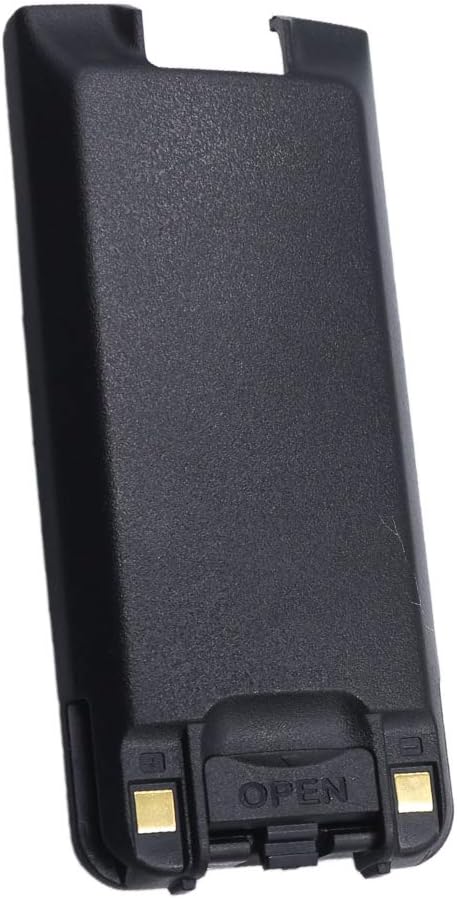
Figure 3.2: Back view of the TYT MD-2017 Li-ion battery. This image illustrates the reverse side of the battery, highlighting the battery release latch and the gold-colored charging contact points, which connect to the radio or charging cradle.
4. Setup
To prepare your TYT MD-2017 radio for operation, the battery must be properly installed.
- Align the Battery: With the radio powered off, align the battery pack with the battery compartment on the back of the TYT MD-2017 radio. Ensure the battery's contacts align with the radio's terminals.
- Insert and Slide: Gently insert the bottom of the battery into the compartment, then slide the battery upwards until it clicks securely into place.
- Verify Connection: Ensure the battery is firmly seated and does not wobble. A secure connection is crucial for proper operation and charging.
5. Operating
This section covers the basic operation and charging of your TYT Li-ion battery.
5.1 Charging the Battery
- Use only the original TYT charger or a compatible charger specifically designed for the MD-2017 battery.
- Connect the charger to a power source.
- Place the radio with the installed battery into the charging cradle, or connect the battery directly to a compatible standalone charger.
- Observe the charger's indicator light. It typically shows red during charging and green when fully charged.
- Do not overcharge the battery. Once fully charged, remove it from the charger.
5.2 Battery Usage
- The 2200mAh capacity provides approximately 24 hours of operation under moderate use conditions. Actual battery life may vary based on transmission frequency, power settings, and environmental factors.
- For optimal performance, avoid completely draining the battery before recharging.
6. Maintenance
Proper maintenance extends the life of your battery.
- Cleaning: Periodically clean the battery contacts and the radio's terminals with a clean, dry cloth to ensure good electrical connection.
- Storage: If storing the battery for an extended period, charge it to about 50% capacity. Store it in a cool, dry place, away from direct sunlight and extreme temperatures.
- Temperature: Avoid exposing the battery to extreme hot or cold temperatures, as this can degrade performance and shorten its lifespan.
- Disposal: Dispose of old or damaged batteries responsibly according to local regulations. Do not dispose of them in household waste.
7. Troubleshooting
If you encounter issues with your battery, try the following solutions:
- Battery Not Charging:
- Ensure the charger is properly connected to a power source.
- Check that the battery is correctly seated in the charging cradle or connected to the charger.
- Clean the battery and charger contacts.
- Try a different power outlet.
- Short Battery Life:
- Ensure the battery is fully charged before use.
- Reduce transmission power if possible.
- Avoid operating the radio in extreme temperatures.
- If the battery is old, its capacity may have degraded, and replacement might be necessary.
- Battery Not Powering Radio:
- Verify the battery is securely installed in the radio.
- Ensure the battery is charged.
- Check for any visible damage to the battery or radio contacts.
8. Specifications
| Feature | Specification |
|---|---|
| Brand | TYT |
| Model | MD-2017 (Battery for MD-2017 Radio) |
| Battery Type | Li-ion (Lithium Ion) |
| Capacity | 2200 mAh |
| Voltage | 7.4V |
| Manufacturer | Quanzhou TYT Electronics Co., Ltd |
| Recommended Use | Two-Way Radio |
9. Warranty and Support
Your TYT Original 2200mAh 7.4V Li-ion Battery comes with a 3-month warranty from the date of purchase. All items are double inspected before being sent out to ensure quality.
For warranty claims or technical support, please contact your original point of purchase or the TYT customer service department. Please have your purchase receipt and battery model information ready when contacting support.
Ask a question about this manual
Ask about setup, troubleshooting, compatibility, parts, safety, or missing instructions. Manuals+ will review the question and use this page’s manual context to help answer it.