
ZAVOR ZSEPR01
Zavor PRO Portable Induction Cooktop (ZSEPR01) User Manual
Model: ZSEPR01
Introduction
Thank you for choosing the Zavor PRO Portable Induction Cooktop. This manual provides essential information for the safe and efficient operation, maintenance, and troubleshooting of your new appliance. Please read it thoroughly before first use and keep it for future reference.
Important Safety Information
- The cooktop operates without flames or gas emissions, ensuring a safer cooking environment.
- The surface itself remains cool to the touch, reducing the risk of burns from the cooktop surface.
- A built-in Safety Lock button disables all touch controls on the panel to prevent accidental changes during operation or cleaning.
- Always ensure induction-compatible cookware is used. The unit will automatically switch off if no compatible cookware is detected.
Product Components and Features
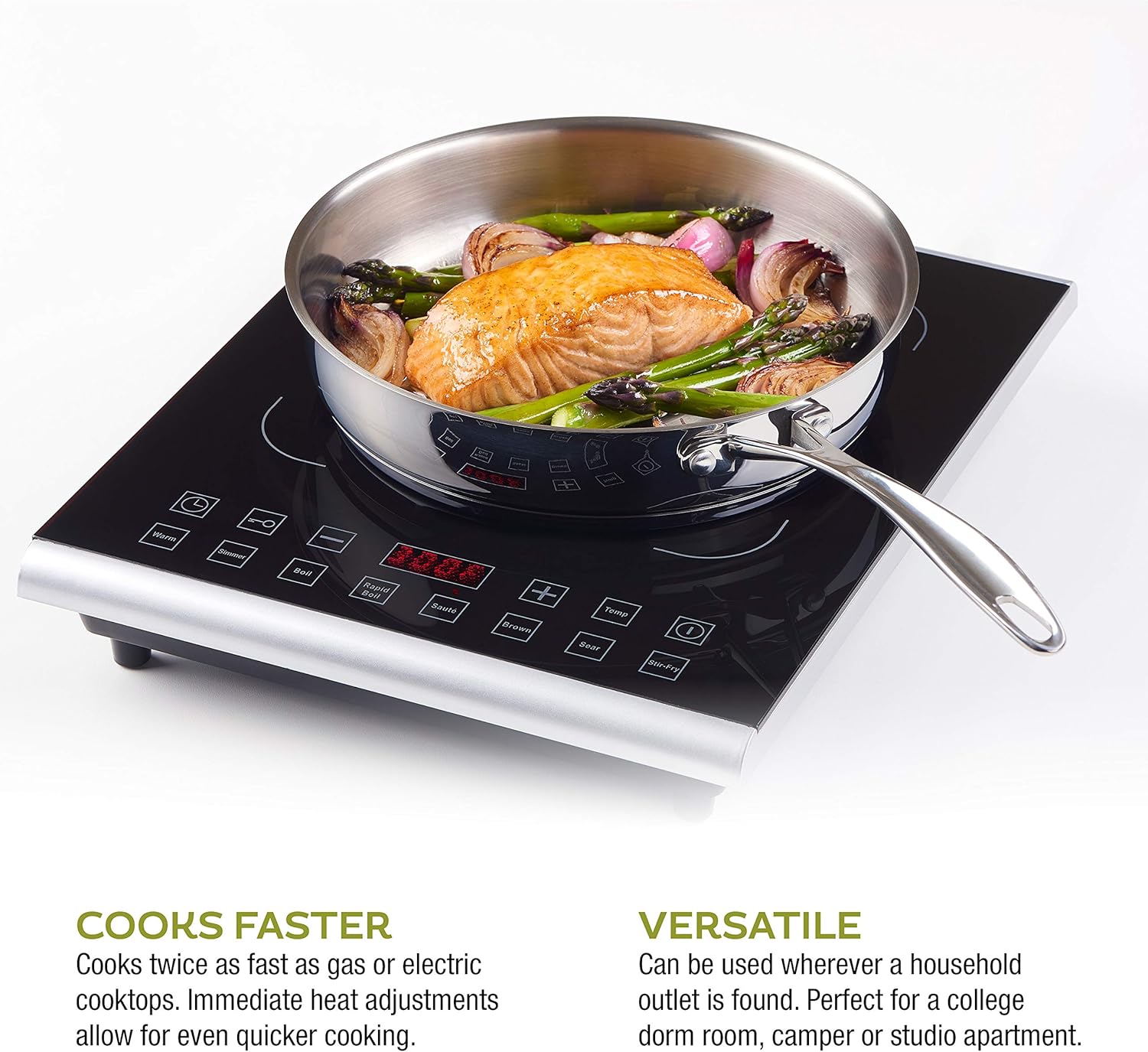
The Zavor PRO Portable Induction Cooktop is designed for ease of use and efficiency. Key components and features include:
- Digital Display: Shows cooking temperature and timer countdown.
- Quick Launch Buttons: 8 pre-set functions for common cooking tasks: Warm, Simmer, Boil, Rapid Boil, Sauté, Brown, Sear, and Stir-Fry.
- Temperature Control Buttons (+/-): Adjust temperature in 10-degree increments.
- Temp. Button: Activates the cooktop and displays the operating temperature.
- Timer: Built-in timer programmable up to 180 minutes.
- Safety Lock: Disables all touch controls.
- Glass Surface: Tempered glass, easy to clean, and does not transfer heat.

Setup Instructions
- Placement: Place the cooktop on a stable, flat, and heat-resistant surface. Ensure adequate ventilation around the unit.
- Power Connection: Plug the cooktop into a standard 110V electrical outlet.
- Cookware Placement: Place induction-compatible cookware centrally on the cooking zone.
Operating Instructions
Follow these steps to operate your Zavor PRO Portable Induction Cooktop:
- Turn On: Press the Temp. button to activate the cooktop. The digital display will show the current temperature setting.
- Adjust Temperature: Use the + and - buttons to adjust the temperature. The temperature range is from 140°F to 465°F, adjustable in 10-degree increments.
- Use Quick Launch Functions: Select one of the 8 quick launch buttons (Warm, Simmer, Boil, Rapid Boil, Sauté, Brown, Sear, Stir-Fry) for pre-set cooking temperatures and times.
- Set Timer: Press the Timer button and use the + and - buttons to set the desired cooking time, up to 180 minutes. The cooktop will automatically turn off once the timer expires.
- Activate Safety Lock: Press the Safety Lock button (key icon) to disable all touch controls. This is useful to prevent accidental changes or for cleaning the surface. Press again to unlock.
- Turn Off: Press the Power button to turn off the cooktop.


Video 1: Introducing the Zavor Induction PRO Cooktop. This video provides a visual overview of the cooktop's features and operation.
Cookware Compatibility
The Zavor PRO Induction Cooktop requires induction-compatible cookware. To check if your cookware is compatible, simply place a refrigerator magnet on the bottom of your pot or pan. If the magnet sticks, your cookware is compatible. The unit will not operate without compatible cookware and will automatically shut off if none is detected.

Cleaning and Maintenance
The tempered glass surface of the Zavor PRO Induction Cooktop is designed for easy cleaning. Spills will not stick or burn onto the surface, making it simple to wipe clean. Always ensure the unit is turned off and cool before cleaning. Use a soft cloth and mild detergent. Avoid abrasive cleaners or scouring pads that could scratch the glass surface.
Troubleshooting
| Problem | Possible Cause | Solution |
|---|---|---|
| Cooktop does not turn on or displays an error code (e.g., "E1") | No induction-compatible cookware detected or cookware is not centered. | Ensure induction-compatible cookware is placed on the cooking zone. Reposition cookware to be centered. |
| Cooktop turns off unexpectedly | Overheating or incompatible cookware removed. | Allow the unit to cool down. Ensure only compatible cookware is used and remains on the surface during operation. |
| Controls are unresponsive | Safety Lock is activated. | Press the Safety Lock button (key icon) to deactivate it. |
Specifications
- Model Number: ZSEPR01
- Color: Black
- Material: Stainless Steel
- Special Features: Automatic Shut-Off, Electric, LCD Display, Programmable, Temperature Control
- Heating Elements: 1
- Product Dimensions: 15"D x 11.8"W x 2.3"H
- Wattage: 1800 watts
- Controls Type: Touch
- Burner Type: Radiant (Induction)
- Item Weight: 7.37 pounds
- UPC: 850834008273
Warranty and Support
The Zavor PRO Portable Induction Cooktop comes with a 2-year warranty. For warranty claims, technical support, or any questions regarding your product, please refer to the contact information provided in your product packaging or visit the official Zavor website.
Ask a question about this manual
Ask about setup, troubleshooting, compatibility, parts, safety, or missing instructions. Manuals+ will review the question and use this page’s manual context to help answer it.