
1. Introduction
The GZLMMY AST01 US Socket Tester is designed to quickly and accurately detect the wiring status of standard US 3-prong electrical outlets. It identifies common wiring faults such as correct wiring, open ground, open neutral, live/neutral reverse, live/ground reverse, and live open. Additionally, it features a GFCI (Ground Fault Circuit Interrupter) test function to verify the proper operation of GFCI-protected outlets, enhancing household electrical safety.

Image 1: Front view of the GZLMMY AST01 US Socket Tester, showing the LED indicators and wiring fault chart.
2. Safety Information
Please read and understand all safety instructions before using this product. Failure to follow these instructions may result in electric shock, fire, or serious injury.
- This device is intended for testing standard US 3-prong outlets only. Do not use it with other types of outlets or voltages.
- Always ensure the tester is in good condition before use. Do not use if the housing is damaged or if the prongs are bent or broken.
- Do not attempt to modify or disassemble the tester. There are no user-serviceable parts inside.
- To ensure accurate test results and your safety, do not force the tester into an outlet or alter its shape.
- The 'Correct' indication means the pole is connected correctly, but it does not guarantee the resistance value meets designation standards.
- For a complete assessment of the protection system's functionality, a 'Creeping Switch Test' is required to obtain the earth resistance value.
- If any wiring fault is detected, or if a GFCI outlet fails to trip, consult a qualified electrician immediately.
- Keep out of reach of children.
3. Product Features
- GFCI Test Button: Checks US power outlet sockets for correct wiring and trip function for GFCI.
- Bright LED Display: Three clear LED indicators show wiring status, visible even in strong sunlight.
- Built-in Light: Allows for use in dark environments.
- Easy to Use: Features a large, easy-to-read fault chart directly on the device.
- 7 Wiring Patterns: Identifies Correct, Ground Open, Neutral Open, Live/Neutral Reverse, Live/Ground Reverse, Live Open, and Live Ground Reverse Missing Ground.
- Durable Construction: Impact-resistant ABS housing for increased durability.
- Wide Application: Suitable for use in schools, laboratories, factories, residential, and commercial buildings.
- Portable Design: Lightweight and compact for easy carrying and storage.
4. Package Contents
- 1 x GZLMMY AST01 Receptacle Outlet Tester
- 1 x English User Manual
5. Product Overview and Components
The AST01 tester is designed for straightforward operation. Its compact body houses the necessary circuitry and indicators for quick electrical diagnostics.
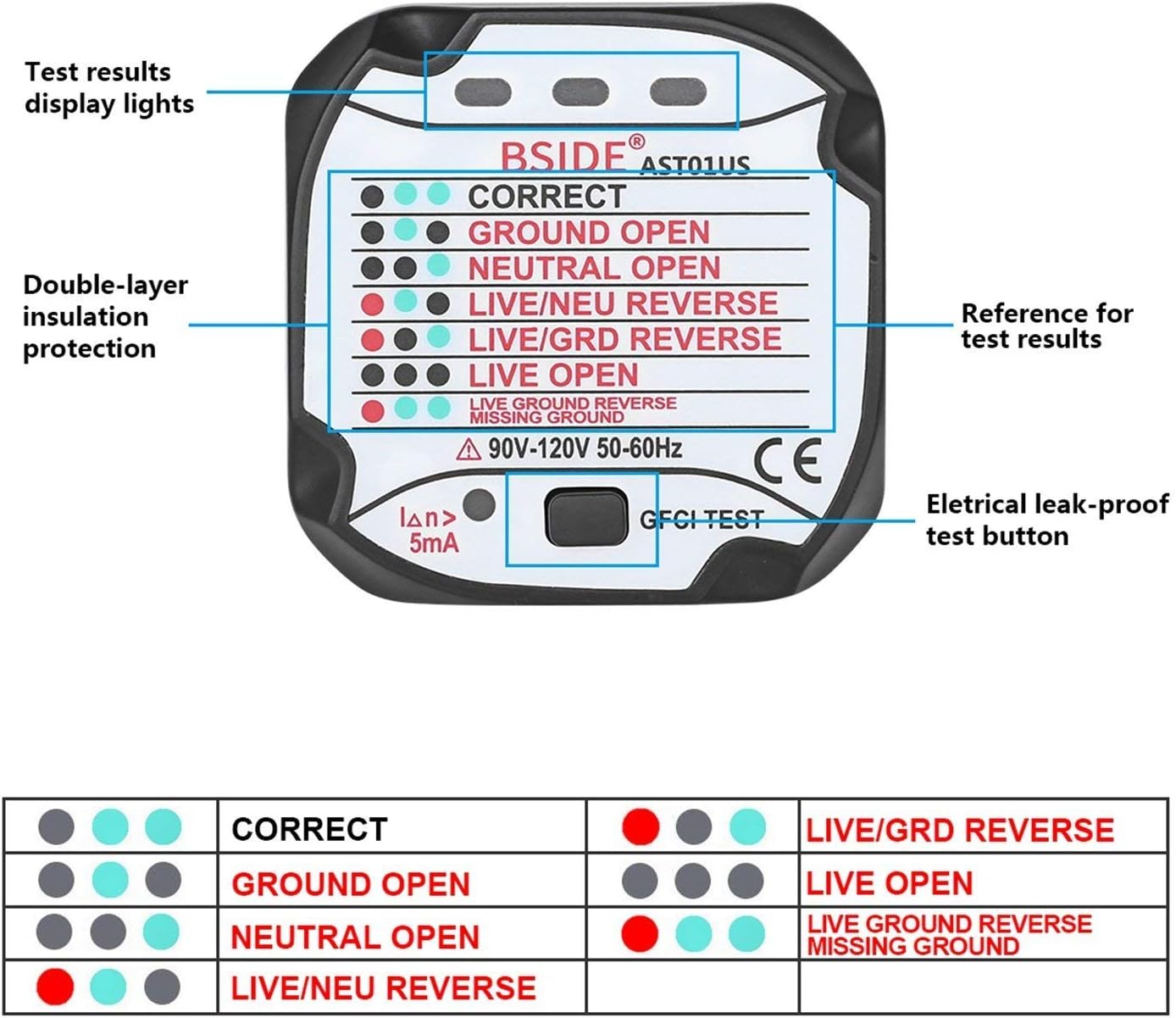
Image 2: This image highlights the key components of the AST01 tester, including the test results display lights, double-layer insulation protection, reference for test results, and the electrical leak-proof test button (GFCI test button).
The device features three LED indicator lights at the top, which illuminate in various patterns to indicate wiring conditions. Below these, a clear chart explains each pattern. A GFCI test button is located at the bottom for testing ground fault protection.

Image 3: This image provides the physical dimensions of the AST01 tester: approximately 52.8mm width, 53mm height, and 56mm depth, with a weight of 51g.
6. Setup
The GZLMMY AST01 Socket Tester requires no complex setup. It is a plug-and-play device.
- Ensure the outlet you intend to test is a standard US 3-prong outlet.
- Verify that the outlet is powered.
- Inspect the tester for any visible damage before plugging it in.
7. Operating Instructions
7.1 Basic Wiring Test
- Carefully plug the GZLMMY AST01 tester into the standard US 3-prong outlet you wish to test.
- Observe the three LED indicator lights on the top of the tester.
- Refer to the LED Indicator Chart (Section 7.3) or the chart printed on the device to interpret the displayed wiring condition.
7.2 GFCI Test
This test verifies if a GFCI-protected outlet is functioning correctly and will trip when a ground fault is simulated.
- Plug the GZLMMY AST01 tester into a GFCI-protected outlet.
- First, observe the LED indicators to confirm the outlet has correct wiring (usually two green lights).
- Press the 'GFCI TEST' button located at the bottom of the tester.
- A properly functioning GFCI outlet should trip, cutting power to the outlet. The LED indicators on the tester will turn off, and you may hear a click from the GFCI outlet.
- To restore power, press the 'RESET' button on the GFCI outlet itself.
- If the GFCI does not trip after pressing the test button, it indicates a potential fault with the GFCI outlet or its wiring. Consult a qualified electrician.

Image 4: This image demonstrates the GFCI test procedure. The tester is plugged into an outlet, and a finger is shown pressing the 'GFCI TEST' button to check the protection system.
7.3 LED Indicator Chart
The three LED lights (Left, Middle, Right) on the tester indicate the wiring status of the outlet. Refer to the table and image below for interpretation.
| Wiring Condition | Left LED | Middle LED | Right LED |
|---|---|---|---|
| Correct | Off | Green | Green |
| Ground Open | Off | Green | Off |
| Neutral Open | Off | Off | Green |
| Live/Neutral Reverse | Red | Off | Red |
| Live/Ground Reverse | Red | Green | Off |
| Live Open | Off | Off | Off |
| Live Ground Reverse Missing Ground | Red | Off | Off |

Image 5: This chart provides a visual guide to the LED indicator patterns and their corresponding wiring conditions.

Image 6: This image illustrates the bright LED display of the AST01 tester, ensuring clear visibility of the indicators.
8. Maintenance
- Keep the tester clean by wiping it with a dry, soft cloth. Do not use abrasive cleaners or solvents.
- Store the tester in a cool, dry place away from direct sunlight and extreme temperatures.
- Regularly inspect the prongs and housing for any signs of wear or damage.
9. Troubleshooting
- Tester shows no lights: Ensure the outlet is powered. If the outlet has power and the tester still shows no lights, the 'Live Open' condition may be present, or the tester itself might be faulty.
- GFCI does not trip: If the GFCI test button is pressed and the GFCI outlet does not trip, it indicates a potential issue with the GFCI outlet or its wiring. This requires immediate attention from a qualified electrician.
- 'Correct' indication but still concerns: The 'Correct' indication confirms proper pole connection but does not verify the earth resistance value. For a comprehensive safety check, a 'Creeping Switch Test' is needed to assess the protection system's effectiveness.
- Inconsistent readings: Ensure the tester is fully inserted into the outlet. If readings remain inconsistent, try testing another known good outlet to verify tester functionality.
10. Specifications
- Model: AST01
- Plug Standard: US
- Nominal Voltage (Un): 90-120V (AC) 50-60Hz
- Rated Residual Operating Current: 5mA
- Size: 52.8mm x 53mm x 56mm (approx. 2.08" x 2.09" x 2.2")
- Weight: 51g (approx. 1.8 ounces)
- Material: ABS
- Compliance: CE, FCC, RoHS
- Operating Temperature: Not specified (typically room temperature)
11. Warranty and Support
Specific warranty information for the GZLMMY AST01 US Socket Tester is not provided in the product details. For warranty claims, technical support, or further inquiries, please contact the manufacturer or your point of purchase directly. Retain your purchase receipt for any potential warranty service.