
Introduction
Thank you for purchasing the Harbor Breeze Sauble Beach 44-inch Indoor Ceiling Fan. This manual provides detailed instructions for the safe and efficient installation, operation, and maintenance of your new ceiling fan. Please read all instructions carefully before beginning installation and retain this manual for future reference.
Safety Information
- Ensure power is disconnected at the circuit breaker before installation or servicing.
- All wiring must be in accordance with national and local electrical codes.
- Consult a qualified electrician if you are unsure about wiring procedures.
- Mount the fan to a ceiling joist or support structure capable of supporting the fan's weight.
- Do not use dimmer switches or fan-controlling wall switches not specifically designed for ceiling fans, as this may damage the motor.
Package Contents
Verify that all components are present before beginning installation:
- Fan Motor Assembly
- 3 Reversible Blades (Nutmeg and Cocoa finish)
- Light Kit with Alabaster Glass
- 2 x 13-watt CFL Bulbs
- 4-inch Downrod
- Remote Control with Wall Mount
- Hardware Pack
Setup and Installation
Follow these steps for proper installation of your ceiling fan:
- Mounting Bracket Installation: Secure the mounting bracket to a ceiling joist or an outlet box rated for ceiling fan support. Ensure all screws are tightened securely.
- Downrod Assembly: The fan can be mounted with or without the included 4-inch downrod. For standard installation, insert the downrod through the canopy and connect it to the motor housing. For low-profile installation, follow the specific instructions in the included hardware pack for flush mounting. The fan supports flat ceilings or sloped ceilings with a maximum slope of 16 degrees.
- Wiring Connections: Connect the fan's electrical wires to your household wiring according to the provided wiring diagram. Ensure all connections are secure and insulated with wire nuts.
- Blade Attachment: Attach the three reversible blades to the motor housing using the provided screws. Ensure the desired blade finish (nutmeg or cocoa) is facing downwards.
- Light Kit Installation: Install the globe-style light kit to the bottom of the fan motor assembly. Insert the two 13-watt CFL bulbs into the sockets and secure the alabaster glass shade.

Image: The Harbor Breeze Sauble Beach 44-inch Indoor Ceiling Fan with its three blades and integrated light kit. The fan features an oil-rubbed bronze finish on the motor housing and a white alabaster glass shade for the light.
Operating Instructions
Your Harbor Breeze Sauble Beach ceiling fan comes with a remote control for convenient operation of both the fan and the light kit.
- Fan On/Off and Speed Control: Use the fan speed buttons (1, 2, 3) on the remote to select your desired fan speed. Press the '0' button to turn the fan off.
- Light On/Off: Press the light bulb button on the remote to turn the light kit on or off.
- Reverse Function: The fan features a reverse switch, typically located on the motor housing, to change the direction of blade rotation. In warm weather, set the fan to rotate counter-clockwise to create a downdraft for a cooling effect. In cool weather, set the fan to rotate clockwise to create an updraft, circulating warm air near the ceiling. Ensure the fan is off before changing the direction.
Maintenance
Regular maintenance ensures optimal performance and extends the life of your ceiling fan.
- Cleaning: Periodically clean the fan blades and motor housing with a soft, damp cloth. Do not use abrasive cleaners or solvents.
- Tightening Screws: Check all screws on the fan blades and mounting hardware annually to ensure they are tight. Loose screws can cause noise and wobble.
- Bulb Replacement: Replace 13-watt CFL bulbs as needed. Ensure power is off before replacing bulbs.
Troubleshooting
| Problem | Possible Cause | Solution |
|---|---|---|
| Fan does not start | No power to fan; Loose wire connections; Remote control battery low | Check circuit breaker; Verify all wire connections are secure; Replace remote control battery. |
| Fan wobbles | Loose blade screws; Unbalanced blades; Loose mounting bracket | Tighten all blade screws; Use a balancing kit (not included) to balance blades; Ensure mounting bracket is securely fastened. |
| Light does not work | Bulb faulty; Loose wire connection in light kit; Remote control battery low | Replace bulb; Check light kit wiring; Replace remote control battery. |
| Remote not working | Battery low or incorrectly inserted; Remote not paired with fan | Replace battery, ensuring correct polarity; Refer to remote pairing instructions in the full manual. |
Specifications
- Model: 40653
- Brand: HARBOR BREEZE
- Fan Size: 44 inches
- Blades: 3, reversible (Nutmeg/Cocoa)
- Finish: Oil Rubbed Bronze
- Light Kit: Globe style with Alabaster Glass
- Bulbs Included: 2 x 13-watt CFL
- Control: Remote Control (3 speeds, reverse function)
- Mounting Options: Downrod (4-inch included) or Flush Mount (for flat or up to 16° sloped ceilings)
- Air Flow Capacity: 1956 Cubic Feet Per Minute
- Wattage: 13 watts (for bulbs)
- Voltage: 230 Volts
- Item Weight: 16.69 pounds
- Product Dimensions: 22 x 11.5 x 10 inches
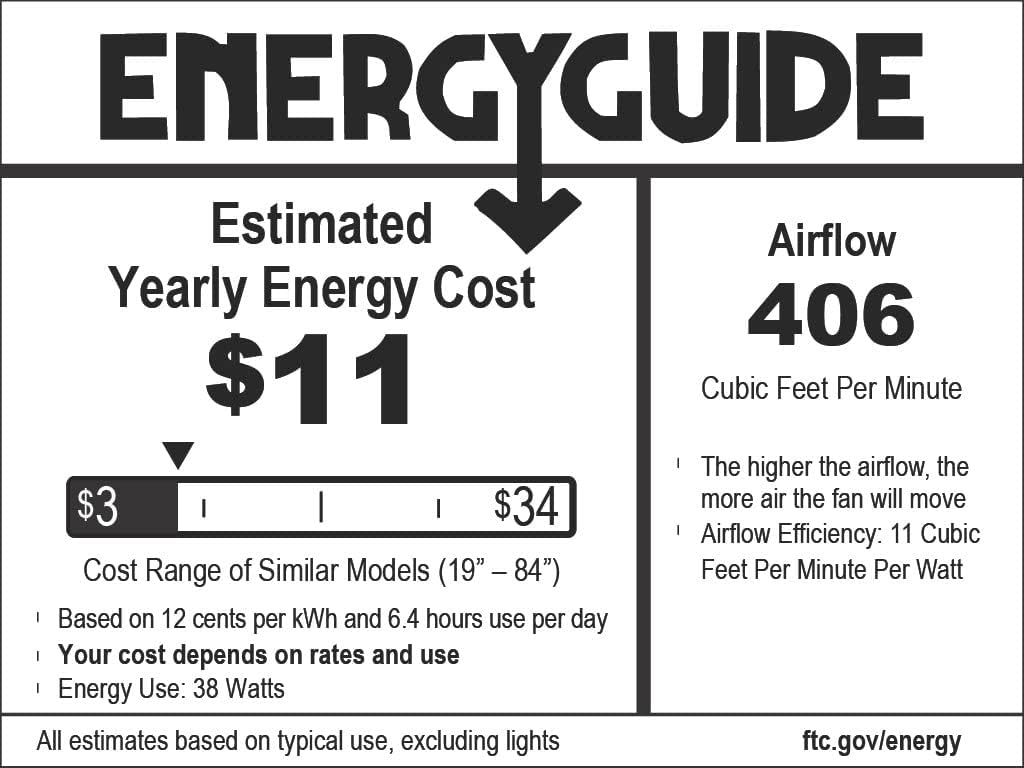
Image: Energy Guide label for the Harbor Breeze Sauble Beach 44-inch Indoor Ceiling Fan. It indicates an estimated yearly energy cost of $11, airflow of 406 Cubic Feet Per Minute, and an airflow efficiency of 11 Cubic Feet Per Minute Per Watt.
Warranty and Support
This Harbor Breeze ceiling fan comes with a Limited Lifetime Warranty. For specific details regarding warranty coverage, claims, or technical support, please refer to the warranty card included in your product packaging or contact Harbor Breeze customer service.
Additional protection plans are available for purchase:
- 3-Year Protection Plan: $28.99
- 4-Year Protection Plan: $29.99
- NEW Complete Protect: $16.99/month (covers all eligible past and future purchases)