1. Product Overview
The SIEMENS SITOP Modular 6EP1436-3BA00 is a robust, stabilized power supply designed for industrial applications. It converts a three-phase AC input voltage of 400-500V into a stable 24V DC output, capable of delivering up to 20 Amperes. This modular unit is engineered for reliability and efficiency in demanding environments, featuring a wide input voltage range and integrated protection functions.
Key features include:
- Three-phase AC input: 400-500V (320-550V AC range)
- Stabilized DC output: 24V / 20A
- Adjustable output voltage: 24V to 28.8V DC
- Output overvoltage protection: < 35V
- Current limitation: 23 Amperes
- LED indicators for operational status (24V OK, Overload, Shut Down)
- Compact, plug-in mount design
2. Important Safety Instructions
Read these instructions carefully before installation, operation, or maintenance. Failure to follow these instructions can result in serious injury or property damage.
- Installation and maintenance must only be performed by qualified personnel familiar with electrical systems and safety regulations.
- Always disconnect the main power supply before working on the device or its connections.
- Ensure proper grounding (PE connection) to prevent electric shock.
- Do not operate the device if it is damaged or if any covers are removed.
- Protect the device from moisture, dust, and extreme temperatures.
- Observe all local and national electrical codes and safety standards.
3. Installation and Connections
3.1 Mounting
The SIEMENS SITOP Modular power supply is designed for plug-in mounting. Ensure adequate ventilation space around the unit for proper heat dissipation. Mount the unit vertically on a DIN rail or suitable mounting surface, allowing sufficient clearance above and below for airflow.
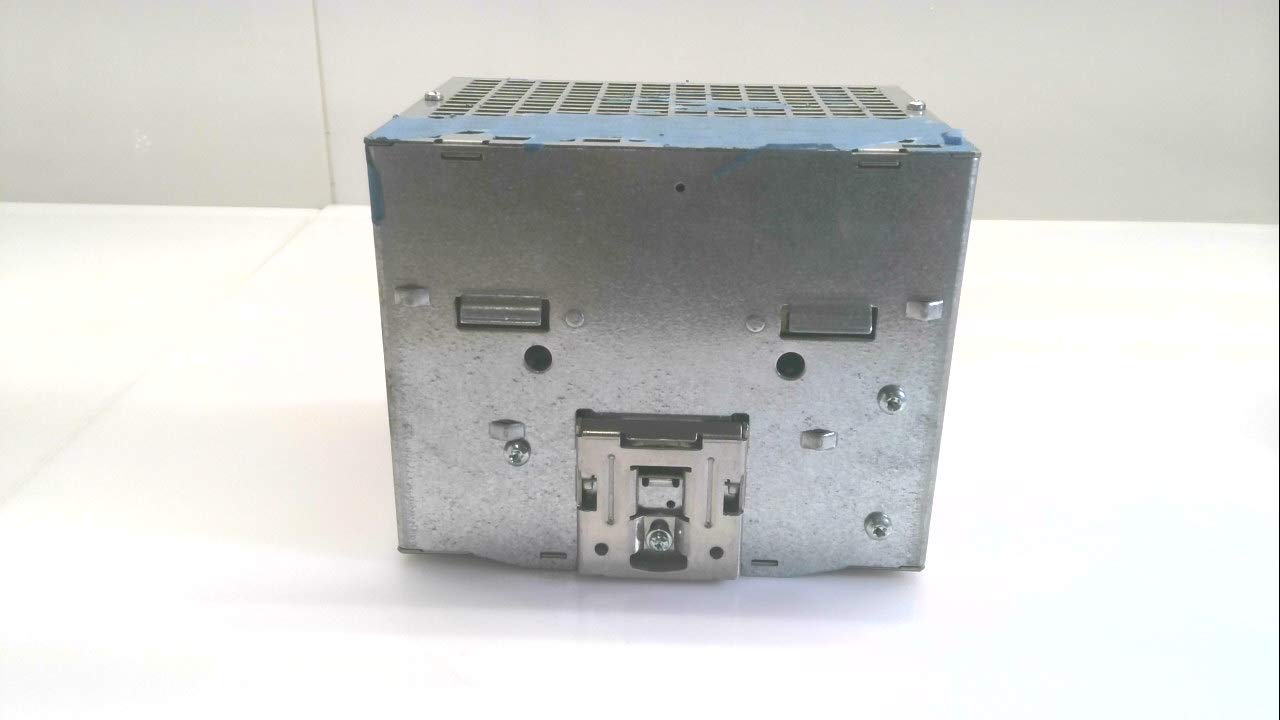
Figure 1: Rear view of the power supply, illustrating the plug-in mounting mechanism.
3.2 Input Power Connection
Connect the three-phase AC input power to the terminals labeled L1, L2, L3, and the protective earth (PE) conductor to the PE terminal. Use appropriate wire gauges for the rated input current (1.1A at 400V / 0.9A at 500V).
- Ensure the main power supply is disconnected.
- Connect the L1 phase wire to the 'L1' terminal.
- Connect the L2 phase wire to the 'L2' terminal.
- Connect the L3 phase wire to the 'L3' terminal.
- Connect the Protective Earth (PE) wire to the 'PE' terminal.
- Verify all connections are secure and correctly polarized.
3.3 Output Power Connection
Connect the DC load to the output terminals labeled 'DC 24V/20A'. Observe correct polarity (+ and -).
- Connect the positive (+) wire of your load to the '+' output terminal.
- Connect the negative (-) wire of your load to the '-' output terminal.
- Ensure all connections are tight and correct.

Figure 2: Front panel of the power supply, highlighting input and output terminals and status LEDs.
4. Operating Instructions
4.1 Powering On
After ensuring all connections are secure and correct, switch on the main AC power supply. The unit will perform a self-test, and the status LEDs will indicate its operational state.
4.2 LED Indicators
The power supply features several LED indicators on its front panel to provide immediate status feedback:
- 24V OK: Illuminates green when the output voltage is within the specified range (24V to 28.8V DC).
- OVERLOAD: Illuminates yellow/orange if the output current exceeds the rated limit (20A) or the current limitation (23A) is active. The unit may enter constant current mode or shut down depending on the overload severity.
- SHUT DOWN: Illuminates red if the unit has shut down due to a fault condition, such as severe overload, short circuit, or over-temperature.
4.3 Output Voltage Adjustment
The output voltage can be adjusted within the range of 24V to 28.8V DC using the potentiometer located on the front panel. Use a small screwdriver to carefully turn the potentiometer to achieve the desired output voltage. Monitor the output voltage with a multimeter during adjustment.
5. Maintenance and Care
The SIEMENS SITOP Modular power supply is designed for minimal maintenance. However, regular checks can ensure optimal performance and longevity.
- Cleaning: Keep the unit clean and free from dust and debris. Use a soft, dry cloth for cleaning. Do not use liquid cleaners or solvents.
- Ventilation: Ensure that ventilation openings are not obstructed to prevent overheating.
- Connections: Periodically check all electrical connections for tightness and signs of corrosion.
- Inspection: Visually inspect the unit for any signs of damage, discoloration, or unusual odors.
- All maintenance requiring internal access must be performed by qualified service personnel.
6. Troubleshooting Guide
This section provides solutions to common issues you might encounter with your power supply.
| Problem | Possible Cause | Solution |
|---|---|---|
| No output voltage, no LEDs illuminated | No input power or faulty input connection. | Check input power supply and connections (L1, L2, L3, PE). Verify input voltage is within range. |
| OVERLOAD LED is illuminated | Output current exceeds rated limit or short circuit in load. | Reduce load or check for short circuits in the connected equipment. Ensure total load current does not exceed 20A. |
| SHUT DOWN LED is illuminated | Severe overload, short circuit, or over-temperature. | Disconnect load, cycle input power. Check for short circuits. Ensure adequate ventilation and ambient temperature. If issue persists, contact support. |
| Output voltage is incorrect | Output voltage adjustment setting is off. | Adjust the output voltage potentiometer on the front panel to the desired value (24V-28.8V). |
7. Technical Specifications
Detailed specifications for the SIEMENS SITOP Modular 6EP1436-3BA00 power supply:
| Parameter | Value |
|---|---|
| Model Number | 6EP1436-3BA00 |
| Input Voltage (Rated) | 400-500V 3AC |
| Input Voltage Range (AC) | 320-550V AC |
| Input Current (Rated) | 1.1A (@400V) / 0.9A (@500V) |
| Frequency Rating | 50/60 Hz |
| Output Voltage (Rated) | 24V DC |
| Output Voltage Adjustment Range | 24-28.8V DC |
| Output Current Range | 0-20 Amperes |
| Output Overvoltage Protection | < 35V |
| Current Limitation | 23 Amperes |
| Mounting Type | Plug-In Mount |
| Product Dimensions | 0.35 x 0.35 x 0.28 inches (approx. 9 x 9 x 7 mm) |
| Weight | 5.67 Pounds (approx. 2.57 kg) |
8. Warranty and Technical Support
For warranty information, technical assistance, or service inquiries regarding your SIEMENS SITOP Modular power supply, please contact SIEMENS customer support directly or refer to the official SIEMENS website. Ensure you have your product model number (6EP1436-3BA00) available when contacting support.
For additional resources and product documentation, visit the official SIEMENS Store on Amazon.


