1. Product Overview
The Omars USB C Power Bank is a high-capacity portable charger designed to provide reliable power on the go. With a 10000mAh battery and 18W Power Delivery (PD) capability, it offers fast and efficient charging for a wide range of USB-C and USB-A compatible devices. Its compact design and intelligent display make it an ideal companion for daily use and travel.

Figure 1: Omars USB C Power Bank with digital display.
2. Safety Information
- Do not expose the power bank to extreme temperatures, direct sunlight, or fire.
- Avoid dropping, disassembling, or attempting to repair the device yourself.
- Keep away from water and high humidity.
- Use only certified charging cables and adapters.
- Store in a cool, dry place when not in use.
- Keep out of reach of children.
- Dispose of the power bank responsibly according to local regulations.
3. What's in the Box
Verify that all items are present in the package:
- Omars USB C Power Bank (Model: OMPB10KBGJYF)
- USB-C to USB-A Charging Cable
- User Manual

Figure 2: Contents of the Omars Power Bank package.
4. Setup
4.1 Initial Charge
Before first use, fully charge the Omars Power Bank. This ensures optimal battery performance and longevity.
- Connect the provided USB-C to USB-A cable to the USB-C input port on the power bank.
- Connect the other end of the cable to a USB wall charger (not included) or a computer's USB port. For fastest charging, use an 18W Power Delivery (PD) compatible wall charger.
- The digital display will show the charging percentage. The power bank is fully charged when the display shows "100%".
5. Operating Instructions
5.1 Charging Your Devices
The Omars Power Bank features both USB-C (input/output) and USB-A (output) ports, allowing you to charge a variety of devices.
- Connect your device's charging cable to the appropriate output port on the power bank (USB-C or USB-A).
- Connect the other end of the cable to your device.
- The power bank will automatically begin charging your device. The digital display will show the remaining battery percentage.

Figure 3: Charging two devices simultaneously.
The 18W Power Delivery (PD) via the USB-C port enables fast charging for compatible devices. The power bank can charge two devices simultaneously using both the USB-C and USB-A output ports.

Figure 4: High-speed charging technology with PD18W USB-C output.

Figure 5: Illustrates the multiple charges possible with 10000mAh capacity.

Figure 6: The Omars Power Bank is designed for portability, allowing you to stay charged on the go.
5.2 Understanding the Digital Display
The integrated digital display provides real-time information about the power bank's status:
- Percentage (%): Indicates the remaining battery charge level of the power bank.
- "FAST" Indicator: Appears when the power bank is actively engaged in fast charging (18W PD) for a connected device or when being fast charged itself.
- "IN" / "OUT" Indicator: Shows whether power is flowing IN (power bank is charging) or OUT (power bank is charging a device).
6. Maintenance
- Cleaning: Use a soft, dry cloth to clean the surface of the power bank. Do not use liquid cleaners or aerosols.
- Storage: If storing for an extended period, charge the power bank to approximately 50-70% and store in a cool, dry place. Recharge every 3-6 months to prevent battery degradation.
- Battery Care: Avoid fully discharging the power bank frequently, as this can reduce battery lifespan.
7. Troubleshooting
| Problem | Possible Cause | Solution |
|---|---|---|
| Power bank not charging. | Cable or adapter issue; power bank fully charged; faulty port. | Try a different charging cable and wall adapter. Ensure the power bank is not already at 100%. Check if the charging port is clean and undamaged. |
| Device not charging from power bank. | Power bank is depleted; cable issue; device not compatible; power bank in standby. | Check power bank's battery level. Try a different charging cable. Ensure your device is compatible with USB charging. Press the power button on the power bank to activate output if it's in standby. |
| Slow charging. | Non-PD charger/cable used; device not supporting fast charge; multiple devices charging. | For fast charging, ensure both the power bank's input charger and your device's cable support 18W PD. Charging multiple devices simultaneously may reduce individual charging speeds. |
| "FAST" indicator not showing. | Device or charger does not support PD; cable not PD compatible. | Ensure both the connected device/charger and the cable are Power Delivery (PD) compatible. Not all devices support PD, even if they use USB-C. |
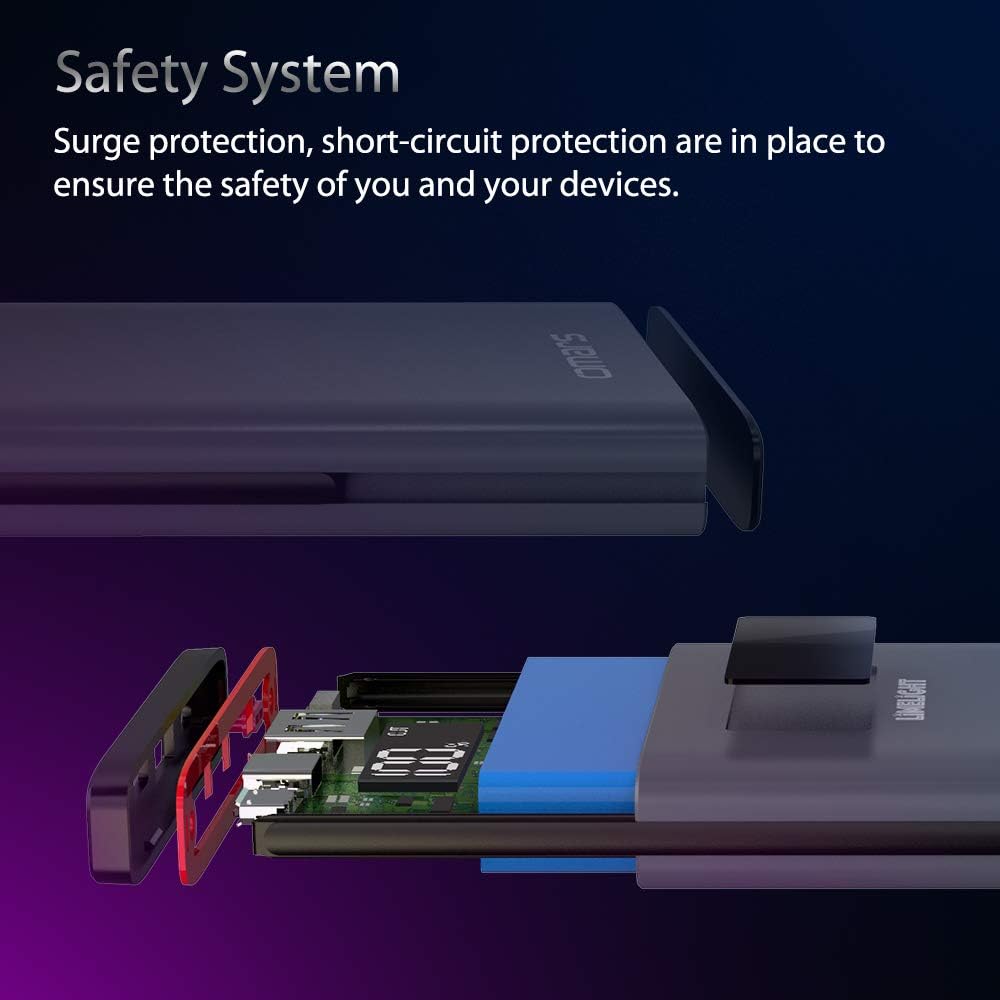
Figure 7: Internal safety system for surge and short-circuit protection.
8. Specifications
| Feature | Detail |
|---|---|
| Model Number | OMPB10KBGJYF |
| Battery Capacity | 10000mAh |
| Battery Type | Lithium Ion (1 required, included) |
| Input Ports | USB Type C, Micro USB |
| Output Ports | USB Type C (PD 18W), USB Type A |
| Special Features | Fast Charging, Portable Charger, Digital Display |
| Product Dimensions | 5.9 x 2.95 x 0.6 inches |
| Item Weight | 8.3 ounces |
| Color | Blue |
| Manufacturer | SHENZHEN DNS INDUSTRIES CO., LTD. |
| Date First Available | November 13, 2018 |
9. Warranty and Support
Omars products are designed and manufactured to the highest quality standards. For information regarding warranty coverage, technical support, or customer service, please refer to the contact information provided on the product packaging or visit the official Omars website.
For the most up-to-date support resources, please visit: Omars Official Store on Amazon
