
Ceenwes B07H94JVXT
Ceenwes Hair Clippers User Manual
Model: B07H94JVXT
1. Important Safety Information
To ensure safe operation and prolong the life of your Ceenwes Hair Clippers, please adhere to the following safety guidelines:
- Do not disassemble the product. Unauthorized disassembly can lead to electric shock or damage to the device, voiding the warranty.
- Keep the device dry and clean. Avoid submerging the clipper in water or using excessive water for cleaning.
- Clean the device with a slightly damp cloth or mild soap solution. Ensure the device is powered off and unplugged before cleaning.
- Charge the device within a temperature range of 0℃ to 40℃ (32°F to 104°F). Charging outside this range may affect battery life and performance.
- Keep out of reach of children. This appliance is not intended for use by persons with reduced physical, sensory or mental capabilities, or lack of experience and knowledge, unless they have been given supervision or instruction concerning use of the appliance by a person responsible for their safety.
- Always unplug the clipper from the power outlet immediately after charging and before cleaning.
- Do not use the clipper if the cord or plug is damaged, or if it is not working properly.
2. Package Contents
Your Ceenwes Hair Clippers package includes the following items:
- Ceenwes Hair Clipper Unit
- Charging Dock
- USB Charging Cable
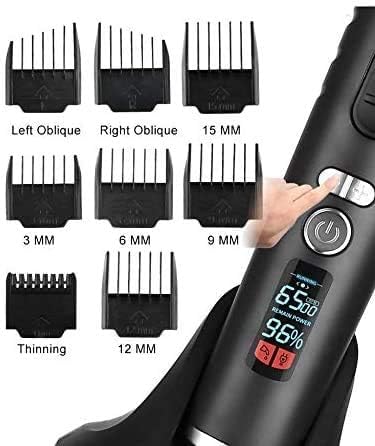
- 8 Guide Combs (various sizes)
- Hairdressing Cape
- Cleaning Brush
- Comb
- Small bottle of mineral oil (for blade lubrication)

3. Setup
Before first use, or if the battery is low, ensure your hair clipper is fully charged.
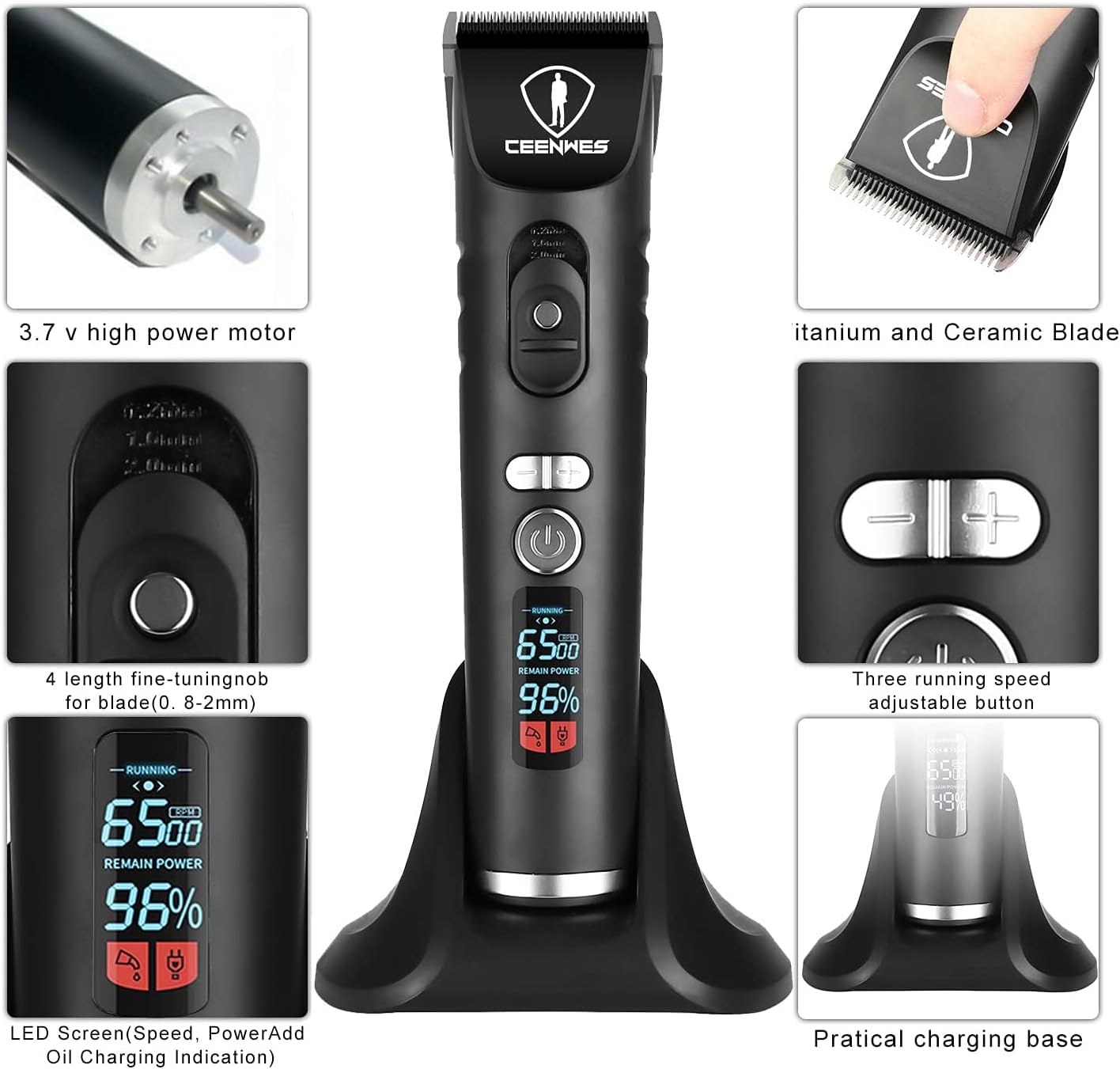
- Initial Charge: Connect the USB charging cable to the charging dock and plug it into a suitable power adapter (not included). Place the clipper onto the charging dock. The intelligent LCD display will show charging progress. A full charge typically takes 3 hours and provides approximately 4 hours of running time.
- Blade Attachment: Ensure the blade is securely attached to the clipper. For reattaching, align the blade with the clipper head and press firmly until it clicks into place.
- Prepare for Use: For personal hair cutting, drape the hairdressing cape around your neck to protect clothing from hair trimmings.

4. Operating Instructions
The Ceenwes Hair Clippers offer precise control for various hair cutting needs.
- Power On/Off: Press the power button to turn the clipper on or off. The intelligent LCD display will illuminate, showing the current RPM speed, battery capacity, and alerts for charging or oiling.
- Adjusting Speed Settings: The clipper supports three different speed settings: 5000 RPM, 5800 RPM, and 6500 RPM. Use the speed adjustment buttons (+/-) to select your desired cutting speed. Higher RPM provides faster cutting, suitable for thicker hair.
- Blade Length Adjustment: The blade itself has a precise length setting adjustment range from 0.8mm to 2.0mm. Use the fine-tuning knob on the clipper body to adjust this length for precise trimming without a guide comb.
- Using Guide Combs: For specific hair lengths, attach one of the 8 included guide combs. Select the appropriate comb size (e.g., 3mm, 6mm, 9mm, 12mm, 15mm, Left Oblique, Right Oblique, Thinning) and slide it onto the clipper blade until it securely locks into place.
- Hair Trimming: Guide the clipper slowly and evenly over the hair, moving against the direction of hair growth. For a closer cut, use a shorter guide comb or remove it entirely and use the blade length adjustment. Always ensure the blade is clean and oiled for optimal performance and to prevent hair pulling.

5. Maintenance
Proper maintenance ensures the longevity and optimal performance of your Ceenwes Hair Clippers.
- Cleaning the Blade: After each use, turn off the clipper and detach the blade. Use the provided cleaning brush to remove any trapped hair from the blade and the clipper head. For thorough cleaning, you may rinse the blade under running water, but ensure the main clipper body remains dry. Allow the blade to air dry completely before reattaching.
- Lubricating the Blade: Regularly apply a few drops of the included mineral oil to the blade teeth. This lubrication is crucial for maintaining sharpness, preventing rust, and ensuring smooth cutting performance without pulling hair. Apply oil after cleaning or if the clipper feels sluggish.
- Storage: Store the clipper in a dry place, away from direct sunlight and extreme temperatures. Ensure it is fully charged before long-term storage to preserve battery health.
- Blade Disassembly Note: When disassembling the blade for cleaning or replacement, ensure the blade length adjustment is set to 2.0mm (the longest setting) to prevent damage.


6. Troubleshooting
If you encounter any issues with your Ceenwes Hair Clippers, refer to the following common problems and solutions:
| Problem | Possible Cause | Solution |
|---|---|---|
| Clipper is not turning on. | Battery is depleted. | Charge the clipper fully using the charging dock and USB cable. Check the LCD display for battery level. |
| Clipper is pulling or snagging hair. | Blade is dull, dirty, or not lubricated. | Clean the blade thoroughly to remove hair debris. Apply a few drops of mineral oil to the blade. Ensure the blade is properly aligned and attached. |
| Clipper is making unusual noise. | Blade is not properly attached or needs lubrication. | Re-attach the blade securely. Lubricate the blade with mineral oil. If the issue persists, contact customer support. |
| Guide combs do not stay in place. | Improper attachment or comb damage. | Ensure the guide comb is slid firmly onto the blade until it clicks. Inspect the comb for any cracks or damage. |
7. Specifications
| Feature | Detail |
|---|---|
| Brand | Ceenwes |
| Model Number | A9S (ASIN: B07H94JVXT) |
| Power Source | Battery Powered |
| Battery Type | Lithium Ion (1 included) |
| Charging Time | Approximately 3 hours |
| Runtime | Approximately 4 hours |
| Blade Material | Ceramic |
| Speed Settings | 5000 RPM, 5800 RPM, 6500 RPM |
| Blade Adjustment Range | 0.8mm to 2.0mm |
| Included Components | Clipper, Charging Dock, USB Cable, 8 Guide Combs, Hairdressing Cape, Cleaning Brush, Comb, Mineral Oil |
| Parcel Dimensions | 25.3 x 23.4 x 8.5 cm |
| Weight | 730 g |
| UPC | 680044040431 |
8. Warranty and Support
Ceenwes is committed to providing high-quality products and excellent customer service. Your hair clipper is covered by a manufacturer's warranty against defects in materials and workmanship.
- Warranty Coverage: Please refer to the warranty card included in your product packaging for specific terms and conditions, including the duration of coverage.
- Customer Support: If you experience any issues with your Ceenwes Hair Clippers, require replacement parts (such as blades), or have questions not covered in this manual, please contact Ceenwes customer support.
- Contact Information: For support, please visit the official Ceenwes website or refer to the contact details provided in your product documentation.
Note: Proof of purchase may be required for warranty claims or support requests.
Ask a question about this manual
Ask about setup, troubleshooting, compatibility, parts, safety, or missing instructions. Manuals+ will review the question and use this page’s manual context to help answer it.