
1. Introduction
Thank you for choosing the Beurer LR 500 Air Purifier. This device is designed to improve the air quality in your home, contributing to a healthier environment. It features a sophisticated 3-layer filter system, a switchable UV light for enhanced purification, and convenient control via a dedicated mobile application. Please read this manual thoroughly before first use to ensure safe operation and optimal performance.
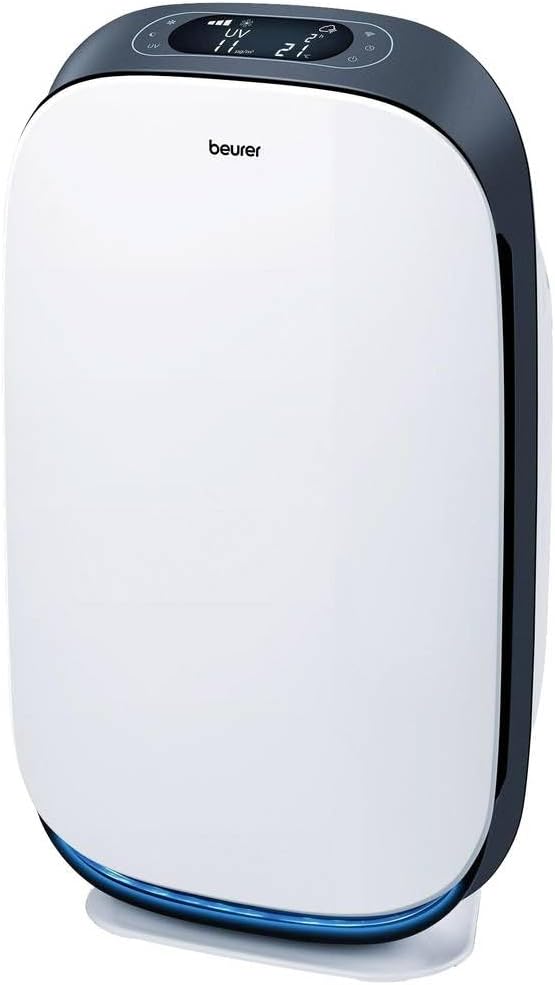
Figure 1: The Beurer LR 500 Air Purifier, a sleek white unit with a dark grey top panel and a blue light at the base.
2. Safety Information
Always observe the following safety instructions to prevent personal injury or damage to the device:
- Read all instructions carefully before use.
- Keep the device away from water and moisture. Do not operate with wet hands.
- Ensure the power cord is not damaged and is placed where it cannot be tripped over.
- Do not block air inlets or outlets. Maintain adequate clearance around the device.
- Only use original Beurer replacement filters.
- Do not attempt to repair the device yourself. Contact authorized service personnel for repairs.
- The UV light is for internal use only. Do not look directly at the UV light when it is active.
- This appliance can be used by children aged from 8 years and above and persons with reduced physical, sensory or mental capabilities or lack of experience and knowledge if they have been given supervision or instruction concerning use of the appliance in a safe way and understand the hazards involved.
3. Product Features
The Beurer LR 500 Air Purifier offers advanced features for comprehensive air purification:
- 3-Layer Filter System: Includes a pre-filter, activated carbon filter, and HEPA 13 filter, ensuring a filtration capacity of 99.95% for particles as small as 0.3 micrometers.
- Effective Against Allergens: Significantly reduces household dust, pet dander, pollen, bacteria, and viruses in the air, making it ideal for allergy sufferers.
- Switchable UV Light: Provides an additional layer of purification for optimal air hygiene.
- PM-2.5 Sensor: Detects fine particulate matter down to 2.5 micrometers, allowing the device to react to current air quality.
- WiFi App Control: Conveniently operate the device from anywhere using the 'beurer FreshHome' application on your smartphone.
- Multiple Operating Modes: Features Auto mode for intelligent operation, Turbo mode for rapid purification, and 4 manual fan speed settings.
- Integrated Timer Function: Allows for scheduled operation.
- Night Mode: Ensures quiet operation with dimmed display for undisturbed sleep.
- Display: Shows real-time temperature, humidity, and air quality readings.
4. Package Contents
Please check that all items are present and undamaged upon unpacking:
- Beurer LR 500 Air Purifier unit
- 3-layer filter set (pre-installed or separate)
- Power adapter
- Instruction manual
5. Setup
- Unpacking: Carefully remove the air purifier and all accessories from the packaging.
- Filter Installation: If the filters are not pre-installed, open the filter compartment (usually at the back or side) and insert the 3-layer filter set according to the markings. Ensure all protective packaging is removed from the filters before installation.
- Placement: Place the air purifier on a flat, stable surface. Ensure there is at least 20 cm (8 inches) of clear space around all sides for optimal air circulation. Avoid placing it directly against walls or furniture.
- Power Connection: Connect the power adapter to the device and then plug it into a suitable electrical outlet. The device will enter standby mode.

Figure 2: The air purifier positioned in a living room, demonstrating appropriate placement away from obstructions.
6. Operating Instructions
6.1 Control Panel
The control panel is located on the top of the device. It features a digital display and touch-sensitive buttons for various functions.

Figure 3: Detailed view of the control panel, showing the digital display with air quality, temperature, and humidity indicators, along with touch buttons for various functions.
- Power Button: Press to turn the device on or off.
- Fan Speed Button: Cycle through 4 manual fan speed settings.
- Auto Mode Button: Activates intelligent mode where the fan speed adjusts automatically based on detected air quality.
- Turbo Mode Button: Engages maximum fan speed for rapid air purification.
- UV Light Button: Toggles the UV-C light function on or off.
- Timer Button: Set an operating duration (e.g., 1, 2, 4, 8 hours).
- Night Mode Button: Activates quiet operation and dims the display.
- WiFi Indicator: Shows the status of the WiFi connection.
- Filter Reset Indicator: Illuminates when it's time to replace the filters.
6.2 App Control (beurer FreshHome)
The Beurer LR 500 can be conveniently controlled via the 'beurer FreshHome' app on your smartphone or tablet.
- Download the App: Search for 'beurer FreshHome' in your device's app store and install it.
- Register/Log In: Follow the in-app instructions to create an account or log in.
- Connect to WiFi: Ensure your air purifier is powered on and in pairing mode (refer to the app for specific pairing instructions, usually involving holding the WiFi button on the device).
- Add Device: Follow the app's prompts to add your Beurer LR 500. You may need to enter your home WiFi network details.
- Remote Control: Once connected, you can control all functions of the air purifier, view air quality data, and set schedules from anywhere.

Figure 4: A user interacting with the 'beurer FreshHome' app on a smartphone to control the air purifier.
7. Maintenance
Regular maintenance ensures the longevity and efficiency of your Beurer LR 500 Air Purifier.
7.1 Filter Replacement
The Beurer LR 500 uses a 3-layer filter system that requires periodic replacement. The filter replacement indicator on the control panel will illuminate when replacement is due (typically every 6-12 months, depending on usage and air quality).
- Power Off: Turn off and unplug the air purifier before attempting any maintenance.
- Access Filters: Open the filter compartment cover.
- Remove Old Filters: Carefully remove the used 3-layer filter set. Dispose of it responsibly.
- Install New Filters: Insert a new, genuine Beurer 3-layer filter set, ensuring correct orientation.
- Close Cover: Securely close the filter compartment cover.
- Reset Filter Indicator: Plug in and power on the device. Press and hold the filter reset button (refer to your device's specific button layout) until the indicator light turns off.
7.2 Cleaning
- Exterior: Wipe the exterior of the device with a soft, damp cloth. Do not use abrasive cleaners or solvents.
- Pre-filter: The pre-filter (the outermost layer of the 3-layer filter) can be gently vacuumed or wiped to remove larger dust particles between replacements. Do not wash the HEPA or activated carbon filters.
- Sensors: Periodically clean the air quality sensor opening with a soft brush or cotton swab to ensure accurate readings.
8. Troubleshooting
If you encounter issues with your Beurer LR 500, refer to the following common problems and solutions:
| Problem | Possible Cause | Solution |
|---|---|---|
| Device does not turn on | No power supply; Power cord damaged | Check power connection; Inspect power cord for damage and replace if necessary. |
| Poor air purification performance | Filters are dirty or clogged; Air inlets/outlets blocked | Replace filters; Ensure clear space around the device. |
| Filter replacement indicator remains on after filter change | Filter reset not performed | Perform filter reset as described in Section 7.1. |
| WiFi connection issues | Incorrect WiFi password; Device too far from router; App not updated | Re-enter WiFi password; Move device closer to router; Update 'beurer FreshHome' app. |
| Unusual noise | Foreign object in fan; Device not on a stable surface | Unplug and check for obstructions; Place on a flat, stable surface. |
If the problem persists after attempting these solutions, please contact Beurer customer support.
9. Specifications
| Feature | Specification |
|---|---|
| Product Name | Oxygen Therapy (General category) |
| Brand | Beurer |
| Item Model Number | 660.13 |
| Product Dimensions (L x W x H) | 42 x 28 x 66 cm (16.5 x 11 x 26 inches) |
| Item Weight | 5.4 Kilograms (11.9 lbs) |
| Net Product Weight | 5900 Grams (13 lbs) |
| Color | Black (schwarz) |
| Power Source | Corded Electric |
| Control Method | Application (App) |
| Filter Type | Pre-filter, Activated Carbon, HEPA 13 |
| Floor Area Coverage | Up to 106 m² (1000 sq ft) |
| Compliance Specifications | HEPA |
| Noise Level | 2 Decibels (minimum, varies by fan speed) |
| Country of Origin | Germany |
10. Warranty and Support
For warranty information, please refer to the warranty card included with your product or visit the official Beurer website. If you require technical support or have questions not covered in this manual, please contact Beurer customer service through their official channels.
Manufacturer: Beurer GmbH
Website: www.beurer.com