
1. Introduction
This manual provides detailed instructions for the assembly, operation, and maintenance of your Sysracks SRF 27U Server Rack. This 27U locking cabinet is designed to securely house 19-inch standard IT and telecommunication equipment, offering protection and accessibility. It features a 32-inch overall depth, accommodating most standard server equipment up to 27-28 inches deep.
Key components include a thermostat, thermosensor, LCD screen, four cooling fans, two dust-tight cable entries, an 8-outlet power bar, casters with stoppers, a heavy-duty shelf, and mounting cage bolt/nut hardware. The cabinet is equipped with fully locking doors and side panels for enhanced security.

Figure 1: Front view of the Sysracks SRF 27U Server Rack.
2. Assembly Instructions
The Sysracks SRF 27U Server Rack features a welded frame design and high-quality hardware for straightforward assembly. While no special tools are strictly required, power tools can expedite the process. Refer to the provided diagrams for component identification and proper assembly sequence.
2.1. Unpacking and Component Identification
Carefully unpack all components and verify against the packing list. Ensure all parts, including the frame, doors, side panels, casters, adjustable feet, rack rails, cooling fans, thermostat, power distribution unit (PDU), shelf, and mounting hardware (cage nuts and bolts), are present.

Figure 2: Exploded view of the server rack components.
2.2. Frame Assembly
Begin by assembling the main frame structure. Ensure all connections are secure but do not fully tighten bolts until the entire frame is aligned. This allows for minor adjustments during the process.
2.3. Caster and Leveling Feet Installation
Attach the heavy-duty casters to the base of the rack for mobility. For stationary placement, install the adjustable leveling feet to ensure stability and proper weight distribution.

Figure 3: Bottom view showing casters and adjustable feet.
2.4. Door and Side Panel Attachment
Install the front glass door, rear solid door, and side panels. Ensure all locking mechanisms operate correctly. The doors and side panels are fully locking for security.

Figure 4: Rear view of the server rack.
2.5. Internal Component Installation
Install the rack rails, heavy-duty shelf, and power distribution unit (PDU) using the provided cage nuts and bolts. Position these components according to your equipment requirements.


Figure 5: Included rack shelf and 8-outlet PDU.

Figure 6: Mounting cage bolts and nuts (50 pieces).
2.6. Cooling System Installation
The four cooling fans, thermostat, thermosensor, and LCD screen are typically pre-installed or require minimal attachment to the top panel. Connect the power bar and fan system as per the wiring instructions.

Figure 7: Close-up of the top panel with LCD display and fan vents.
3. Operation
3.1. Equipment Installation
Mount your 19-inch standard IT equipment onto the rack rails using the provided cage nuts and bolts. Ensure proper weight distribution and secure fastening of all devices.
3.2. Power Management
Connect your equipment to the integrated 8-outlet power distribution unit (PDU). Ensure the PDU is connected to a suitable power source. Utilize the dust-tight cable entries for organized and protected cable routing.
3.3. Cooling System Control
The rack is equipped with an air control system featuring a thermostat, thermosensor, and LCD screen, managing four cooling fans. The LCD display shows temperature readings. The fans automatically activate or adjust speed based on the internal temperature to maintain optimal operating conditions for your equipment.

Figure 8: Airflow diagram and fan units.
3.4. Security
Utilize the locking mechanisms on the front door, rear door, and side panels to secure your equipment. Four keys are provided for access control.
3.5. Mobility and Stability
The rack is mounted on casters for easy relocation. Once positioned, engage the stoppers on the casters to prevent unintended movement. For long-term stationary use, the adjustable leveling feet can be deployed for enhanced stability.
4. Maintenance
Regular maintenance ensures the longevity and optimal performance of your server rack.
- Cleaning: Periodically clean the exterior surfaces with a soft, damp cloth. Ensure the fan vents and dust-tight cable entries are free from obstructions.
- Hardware Inspection: Routinely check all bolts, screws, and locking mechanisms for tightness and proper function. Tighten any loose hardware as needed.
- Cable Management: Maintain organized cable routing to prevent airflow obstruction and ensure easy access to equipment.
- Fan Operation: Monitor the cooling fans for unusual noises or reduced performance. Ensure the thermostat and LCD display are functioning correctly.
5. Troubleshooting
This section addresses common issues you might encounter with your server rack.
- Cooling System Malfunction: If the internal temperature is consistently high, check if the cooling fans are operating. Verify power connections to the fan unit and PDU. Ensure fan vents are not blocked.
- Power Issues: If equipment is not receiving power, check the PDU connection to the main power source and ensure the PDU's circuit breaker (if present) has not tripped.
- Door/Panel Misalignment: If doors or side panels do not close or lock properly, inspect hinges and locking mechanisms for obstructions or damage. Minor adjustments to the frame or hinges may be required.
- Excessive Fan Noise: While the fans provide necessary cooling, some operational noise is normal. If noise levels are unexpectedly high, ensure fans are securely mounted and free from obstructions.
6. Specifications
- Model: SRF 27U
- Rack Units: 27U
- External Dimensions (W x D x H): 24" x 32" x 58" (600mm x 800mm x 1473mm)
- Internal Usable Depth: Up to 27-28 inches
- Material: Alloy Steel
- Color: Black
- Item Weight: 180 pounds (81.6 kg)
- Static Load Capacity: Up to 1200 kg
- Cooling: 4 Cooling Fans with Thermostat, Thermosensor, and LCD Screen
- Power: 8-outlet Power Distribution Unit (PDU)
- Security: Fully Locking Cabinet Doors and Side Panels (4 keys included)
- Mobility: Heavy-duty Casters with Stoppers, Adjustable Leveling Feet
- Cable Management: 2 Dust-tight Cable Entries
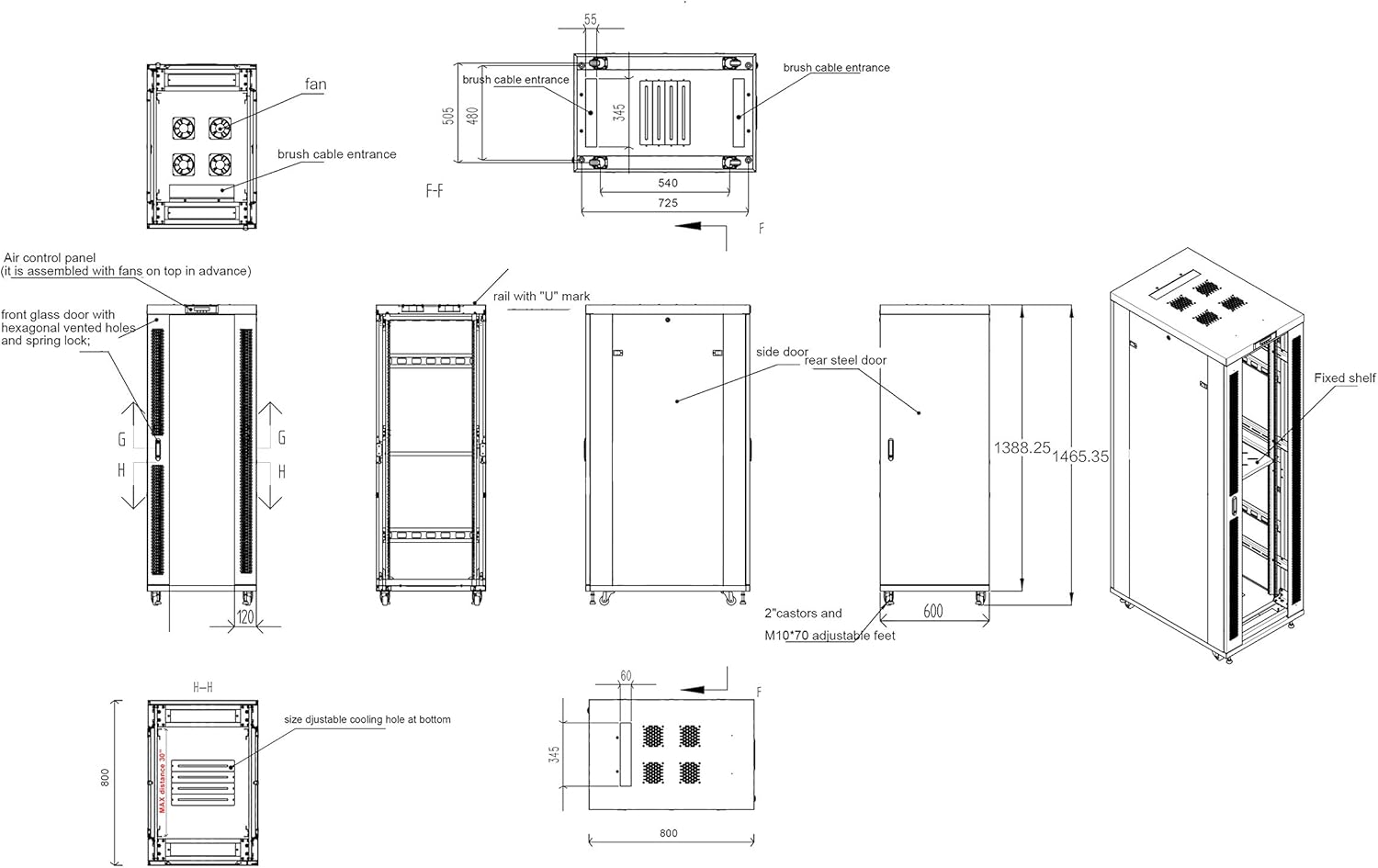
Figure 9: Technical diagram with dimensions.
7. Warranty and Support
Sysracks provides a 2-year guarantee on all rack cabinet enclosures and accessories. For any inquiries, technical assistance, or warranty claims, please contact Sysracks customer service. Quick customer service support is available to assist you.