
Introduction
Thank you for choosing the Peakeep S8 Digital Alarm Clock. This manual provides detailed instructions for setting up, operating, and maintaining your new alarm clock. Please read this manual thoroughly before use to ensure proper function and to maximize your product experience.
Product Features
- Large LCD Screen: Features a clear, boldface number display for easy readability.
- Smart Light Sensor: Built-in sensor automatically activates a soft backlight in dark environments, ensuring visibility without disturbing sleep.
- Gradually Strengthening Alarm: The alarm sound increases in volume gradually to gently wake you up.
- Snooze Function: Provides an additional 5 minutes of sleep after the alarm sounds.
- Adjustable Time and Date Format: Customize time display (12/24 hour) and date format.
- Temperature Monitoring: Displays ambient temperature in Celsius or Fahrenheit.
- Battery Powered: Operates on 3 x AAA batteries (not included).
Package Contents
- 1 x Peakeep S8 Digital Alarm Clock
- 1 x User Manual
Controls and Display
Front Display
The large LCD screen displays time, date, day of the week, alarm status, and temperature. The backlight activates automatically in low light conditions when the sensor is enabled.
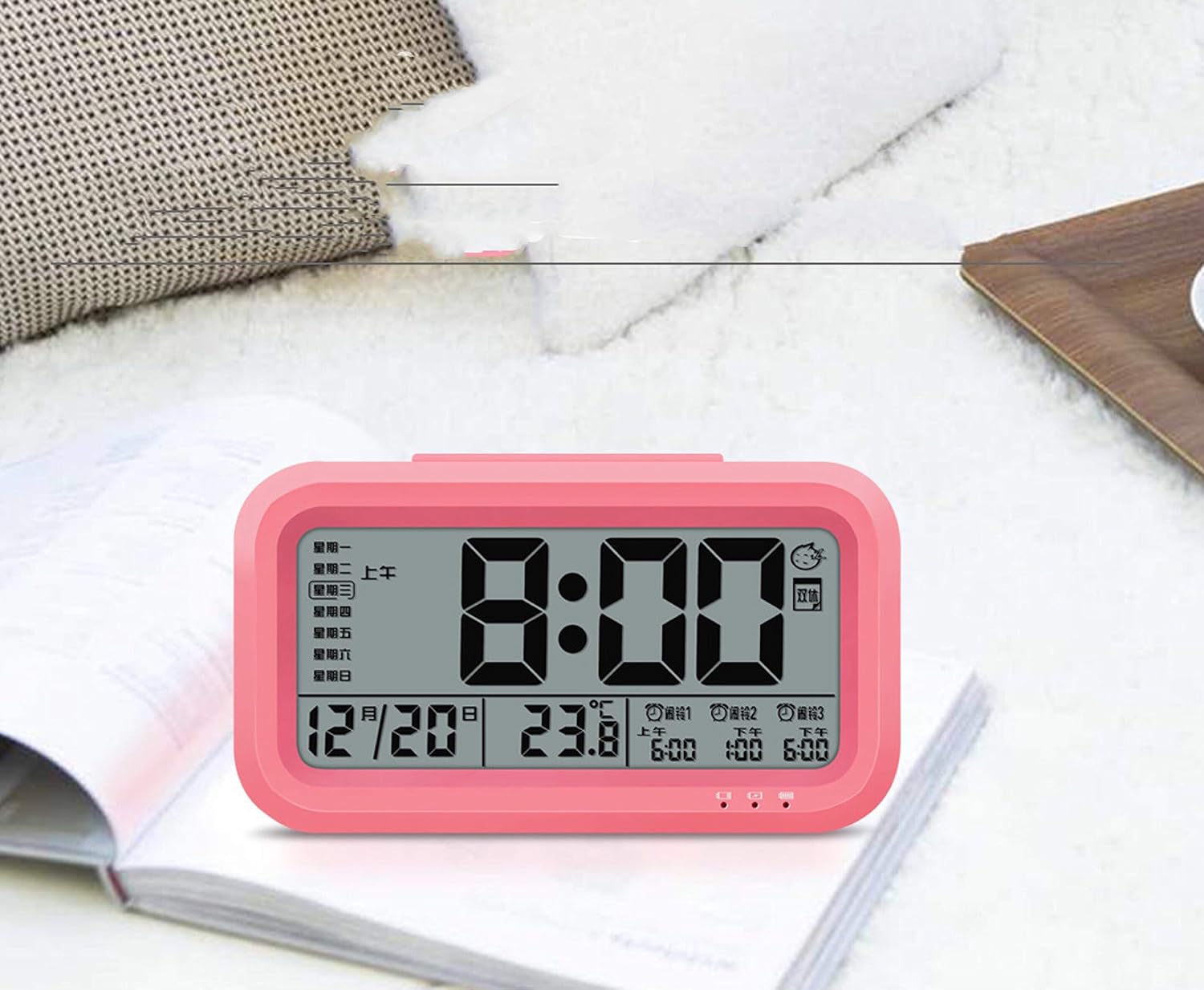
Image: Front view of the Peakeep S8 Digital Alarm Clock. This image shows the large digital display with the time (8:00), date (12/20), and temperature (23.8°C). It also indicates alarm settings and day of the week.
Rear Controls
The back of the clock features several buttons and switches for setting time, date, alarm, and other functions.
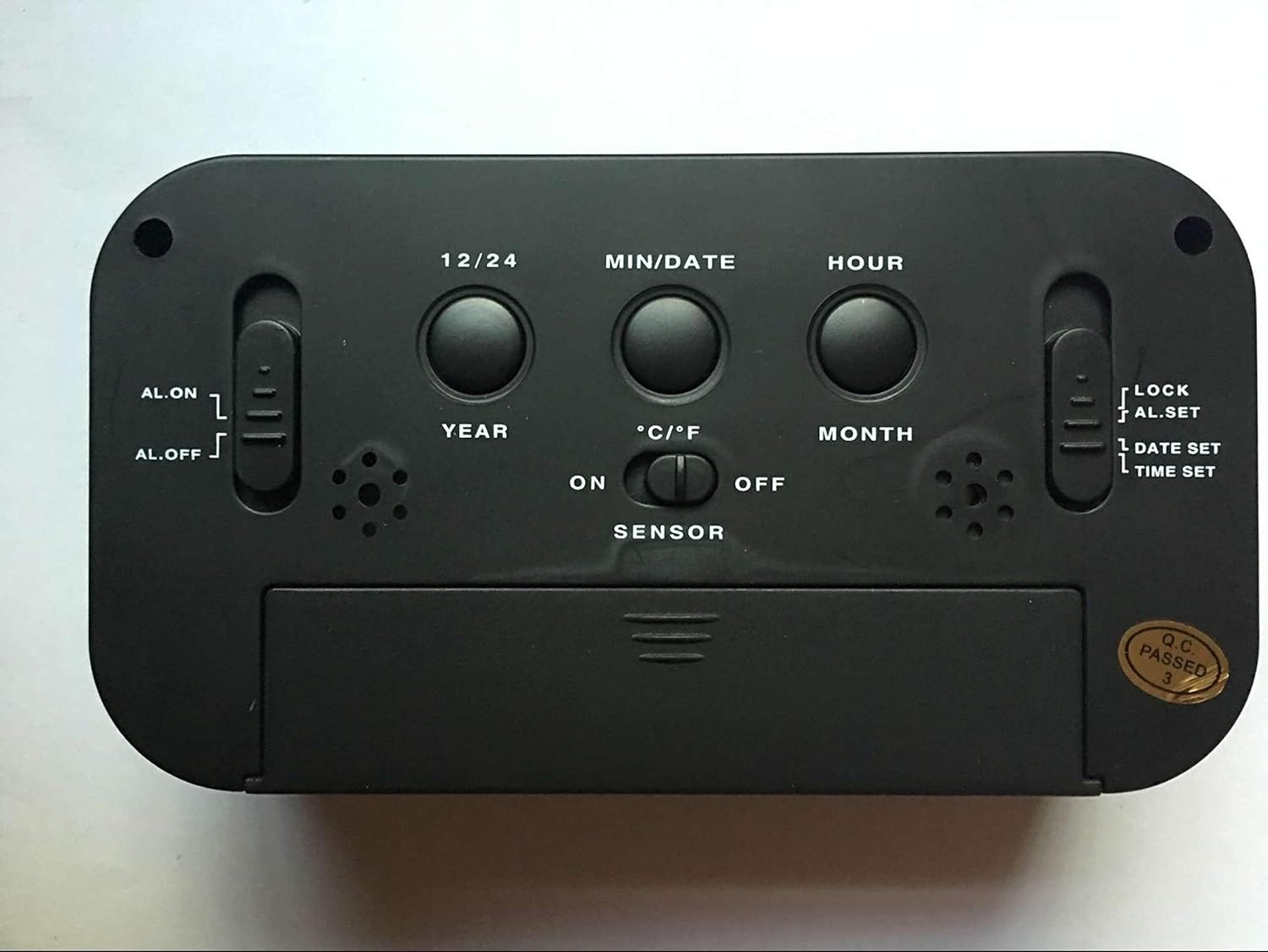
Image: Rear view of the Peakeep S8 Digital Alarm Clock. This image highlights the control panel on the back, including buttons for 12/24 hour format, MIN/DATE, HOUR, YEAR, MONTH, °C/°F, and switches for AL.ON/AL.OFF, LOCK/AL.SET/DATE SET/TIME SET, and SENSOR ON/OFF.
- 12/24 Button: Toggles between 12-hour and 24-hour time display.
- MIN/DATE Button: Used to adjust minutes during time/alarm setting, and to view date.
- HOUR Button: Used to adjust hours during time/alarm setting.
- YEAR Button: Used to set the year.
- MONTH Button: Used to set the month.
- °C/°F Button: Switches temperature display between Celsius and Fahrenheit.
- AL.ON/AL.OFF Switch: Turns the alarm function on or off.
- MODE Switch (LOCK/AL.SET/DATE SET/TIME SET):
- LOCK: Locks current settings to prevent accidental changes.
- AL.SET: Enters alarm setting mode.
- DATE SET: Enters date setting mode.
- TIME SET: Enters time setting mode.
- SENSOR ON/OFF Switch: Activates or deactivates the smart light sensor for automatic backlight.
- SNOOZE/LIGHT Button (Top): Activates snooze when alarm sounds, or temporarily illuminates the display.
Setup
1. Battery Installation
- Open the battery compartment cover on the back of the clock.
- Insert 3 new 1.5V AAA batteries, ensuring correct polarity (+ and -).
- Close the battery compartment cover securely.
- Note: Batteries are not included.
2. Initial Time Setting
- Slide the MODE switch to TIME SET.
- Press the HOUR button to adjust the hour.
- Press the MIN/DATE button to adjust the minutes.
- Once the correct time is set, slide the MODE switch back to LOCK.
3. Initial Date Setting
- Slide the MODE switch to DATE SET.
- Press the YEAR button to adjust the year.
- Press the MONTH button to adjust the month.
- Press the MIN/DATE button to adjust the day.
- Once the correct date is set, slide the MODE switch back to LOCK.
Operating Instructions
Setting the Alarm
- Slide the MODE switch to AL.SET.
- Press the HOUR button to adjust the alarm hour.
- Press the MIN/DATE button to adjust the alarm minutes.
- Once the desired alarm time is set, slide the MODE switch back to LOCK.
- To activate the alarm, slide the AL.ON/AL.OFF switch to AL.ON. An alarm icon will appear on the display.
Using the Snooze Function
When the alarm sounds, press the large SNOOZE/LIGHT button on top of the clock. The alarm will pause for approximately 5 minutes and then sound again. This can be repeated.
Turning Off the Alarm
To turn off the alarm completely, slide the AL.ON/AL.OFF switch to AL.OFF. The alarm icon will disappear from the display.
Activating the Smart Light Sensor
To enable the automatic backlight feature, slide the SENSOR switch to ON. The display will automatically illuminate with a soft glow in dark environments. Slide the switch to OFF to disable this feature.
Changing Temperature Unit
Press the °C/°F button on the back of the clock to switch the temperature display between Celsius and Fahrenheit.
Changing Time Format (12/24 Hour)
Press the 12/24 button on the back of the clock to toggle between 12-hour (with AM/PM indicator) and 24-hour time formats.
Maintenance
Cleaning
Wipe the clock with a soft, dry cloth. Do not use abrasive cleaners or solvents, as they may damage the surface.
Battery Replacement
When the display becomes dim or the clock functions erratically, it is time to replace the batteries. Follow the battery installation steps in the "Setup" section. Always replace all three AAA batteries at the same time with new ones.
Troubleshooting
| Problem | Possible Cause / Solution |
|---|---|
| Display is blank or dim. |
|
| Alarm does not sound. |
|
| Clock is losing or gaining time. |
|
| Buttons are unresponsive. |
|
Specifications
- Brand: Peakeep
- Model Number: S8 (Item Model Number: Crazy Curry-030)
- Display Type: Digital LCD
- Material: Plastic
- Color: Black (Black-a)
- Power Source: 3 x 1.5V AAA Batteries (Not included)
- Special Features: Alarm, Snooze, Smart Light Sensor, Temperature Display (°C/°F), 12/24 Hour Format
- Dimensions: (Approximate, based on typical alarm clock size and weight)
- Item Weight: 178 g
- Shipping Weight: 0.18 Kilograms
- UPC: 734602860235
Warranty and Support
This product is designed for reliability and ease of use. For specific warranty information, please refer to the documentation provided at the time of purchase or contact your retailer.
If you encounter any issues not covered in this manual, please contact the retailer or manufacturer for assistance. Keep your purchase receipt as proof of purchase for any warranty claims.


