
Introduction
This manual provides detailed instructions for the installation, operation, and maintenance of your Eogifee Universal Ceiling Fan Remote Control and Receiver Kit. This kit is designed to add remote control functionality to most 3-speed AC ceiling fans, including those from Hampton Bay, Hunter, Harbor Breeze, Home Decorators Collection, Litex, Westinghouse, and Honeywell.
The receiver features a 250W power capacity, supporting multiple light bulbs. The remote control offers 3-speed fan control and light dimming for compatible bulbs.
Package Contents
Please verify that all items are present in your package:
- Remote Control (1)
- Receiver (1)
- Wall Mount Holder (1)
- User Guide (1)
- Wire Nuts (6)
- Screws (2)

Compatibility
This universal remote control kit is compatible with most 3-speed AC ceiling fans. It is designed to replace specific remote models and receivers from various brands.
Compatible Remote Models (FCC ID / Model):
- 2AAZPFAN53T / FAN-53T / L3HFAN1T / FAN-11T / KUJCE9103 / E08BT / CHQ7030T / UC7030T (53T)
- 2AAZPFAN35TI / L3HFAN35T / L3HFAN35TI / KUJCE9603 / CHQ7202T (35T)
- L3H2010FANHD / FAN-HD / L3H2014FANHD / FAN-HD / FAN-HD5 (HD5)
- UC-9050T / CHQ9051T / UC7087 (9050T)
Light Bulb Compatibility:
- Compatible with all incandescent and halogen bulbs.
- Compatible with some dimmable LED/CFL bulbs.
- For non-dimmable LED/CFL bulbs, only ON/OFF functions are supported.
Fan Type Compatibility:
- Compatible with most down-rod style fans.
- Not recommended for use with hugger fans.
- Not for use with wall-mounted fans or exhaust-type fans.

Setup and Installation
WARNING: Always disconnect power at the circuit breaker before installing or servicing the fan and receiver to prevent electric shock.
Ensure all local and national electrical code requirements are met. The power supply and fan must be 110-120 volts, 60 Hz.
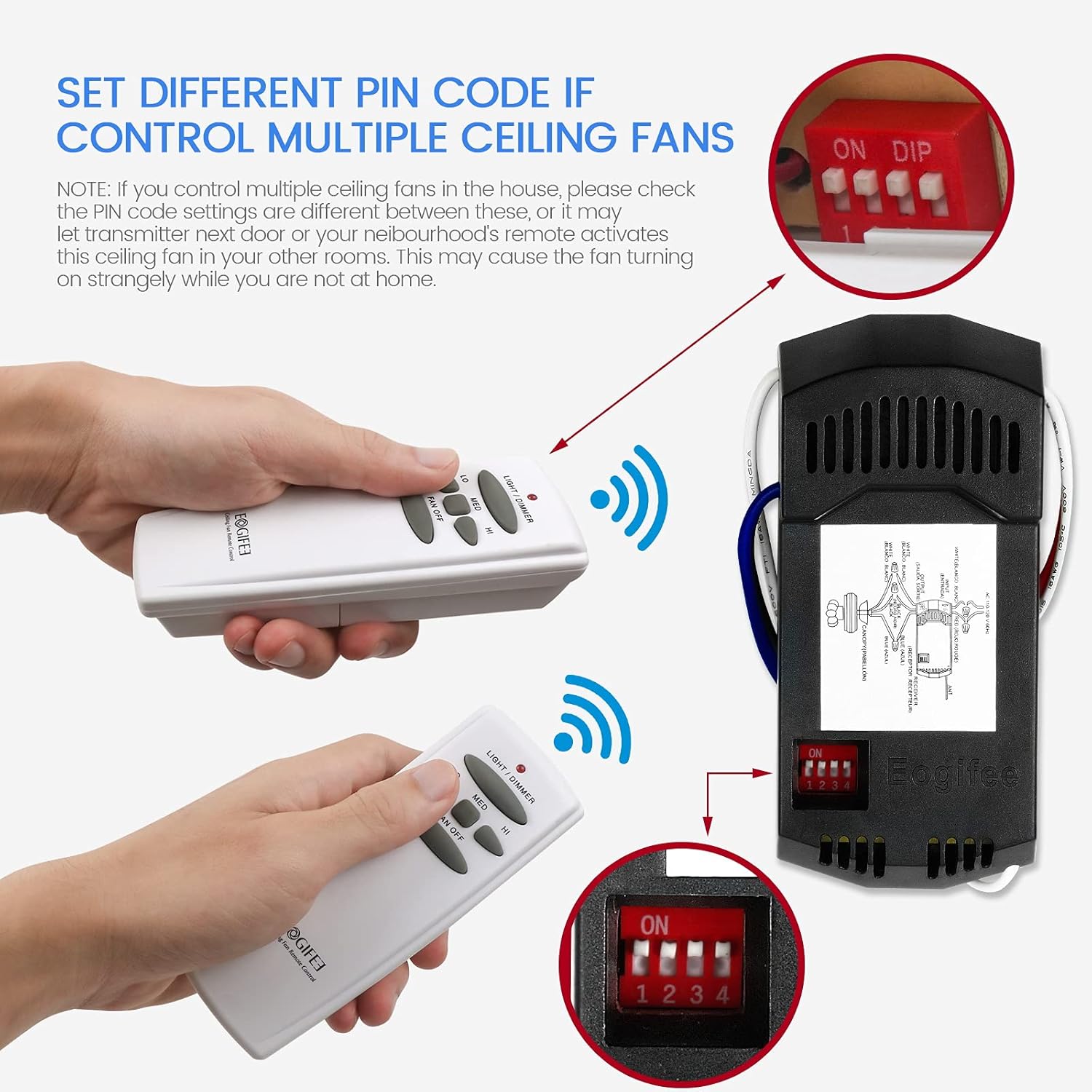
1. Setting the DIP Switches (Frequency Codes)
Both the receiver and the remote control have DIP switches that must be set to the same frequency code for proper communication. There are 16 possible frequency combinations.
- Locate the DIP switches on the receiver. These are typically small red switches labeled 1-4.
- Open the battery compartment of the remote control to find its DIP switches.
- Slide the switches on both the receiver and the remote control to match the same pattern. For example, if the receiver switches are set to 'ON-OFF-ON-OFF', the remote's switches must also be 'ON-OFF-ON-OFF'.
- If you are controlling multiple ceiling fans in the same house, ensure each fan/remote pair has a unique frequency code to prevent interference.

2. Wiring the Receiver
The receiver is installed in the fan's canopy. Follow the wiring diagram carefully:
- Connect the white wire from the receiver to the neutral wire of the power source (AC IN N).
- Connect the black wire from the receiver to the live wire of the power source (AC IN L).
- Connect the white wire from the receiver (TO MOTOR N) to the neutral wire of the fan motor.
- Connect the black wire from the receiver (TO MOTOR L) to the live wire of the fan motor.
- Connect the blue wire from the receiver (FOR LIGHT) to the light wire of the fan.
- Use the provided wire nuts to secure all connections.
Important Note for Fans with Pull Chains: If your ceiling fan has pull chains, set the fan speed to maximum and turn the fan light ON using the pull chains BEFORE using the wireless remote control. This ensures proper functionality between the pull chains and the remote.

Video: This video demonstrates the correct wiring procedure for the Eogifee Universal Ceiling Fan Remote Control and Receiver Kit, followed by a demonstration of its operational features.
Operating Instructions
Once the receiver is correctly installed and the remote's DIP switches are matched, you can operate your ceiling fan and light using the remote control.
Fan Control:
- HI: Sets the fan to high speed.
- MED: Sets the fan to medium speed.
- LOW: Sets the fan to low speed.
- FAN OFF: Turns the fan off.
Light Control:
- LIGHT / DIMMER button:
- Press quickly to turn the light ON or OFF.
- Press and hold to dim or brighten incandescent/halogen lights. Release when the desired brightness is reached.
- For dimmable LED/CFL bulbs, this button will dim. For non-dimmable LED/CFL bulbs, it will only function as ON/OFF.
Reverse Function:
This remote control kit does not include a reverse button. If your ceiling fan has a reverse function, it must be controlled directly on the fan motor housing via its physical reverse switch. To change the fan's direction, turn off the fan, wait until the blades are completely stationary, then flip the reverse switch on the fan motor.


Troubleshooting
If you encounter issues with your Eogifee Universal Ceiling Fan Remote Control and Receiver Kit, please review the following common solutions:
- No Response from Fan/Light:
- Check if the DIP switches on both the receiver and remote are set to the exact same frequency code.
- Ensure the remote control has fresh batteries and they are inserted correctly.
- Verify that the power supply to the fan is ON at the circuit breaker and wall switch.
- If your fan has pull chains, ensure the fan speed is set to HIGH and the light is ON via the pull chains.
- Inspect all wiring connections for tightness and correct placement according to the wiring diagram.
- Light Not Dimming:
- Confirm that the light bulbs installed are dimmable (incandescent, halogen, or dimmable LED/CFL). Non-dimmable LED/CFL bulbs will only turn ON/OFF.
- Interference with Other Fans:
- If another fan in your house is activating unexpectedly, change the DIP switch settings on both the affected receiver and its remote to a new, unique frequency code.
- Fan Operates but Light Does Not:
- Check the light bulb for proper installation and ensure it is not burnt out.
- Verify the light wiring connection to the receiver.
Specifications
| Feature | Specification |
|---|---|
| Product Dimensions | 4.72 x 2.09 x 0.01 inches |
| Item Weight | 7.8 ounces |
| Item Model Number | 7539920754 |
| Brand | Eogifee |
| Special Feature | Universal |
| Color | White |
| Max Number of Supported Devices | 1 (per remote/receiver pair) |
| Compatible Devices | Fan |
| Receiver Power Capacity | 250W (for lights) |
| Input Voltage | 100-140V |
| AC Frequency | 50/60Hz |
| Wireless Transmission Mode | Radio Frequency (RF) |
| Radio Frequency Band | 303.9MHz |
| Remote Control Range | Up to 30m (approx. 98 feet) |


Maintenance
- Clean the remote control with a soft, dry cloth. Do not use abrasive cleaners or solvents.
- Replace batteries in the remote control when its performance diminishes.
- Ensure the receiver is kept dry and free from dust and debris.
Warranty and Support
For warranty information or technical support, please contact Eogifee customer service through the retailer where the product was purchased or visit the official Eogifee store page.
Each item has a unique code that is verified before shipping, ensuring product authenticity.

