
Picun Picun H10
Picun Wireless Headphones User Manual
Model: Picun H10
1. Product Overview
The Picun H10 Wireless Headphones are designed for an active lifestyle, offering high-quality audio with the convenience of Bluetooth connectivity. Featuring a lightweight, ergonomic design, these in-ear headphones provide a secure and comfortable fit, making them ideal for sports and daily use. With IPX7 sweatproof rating and magnetic earbuds, they are built for durability and ease of storage.

Image: Picun H10 Wireless Headphones, showcasing the black earbuds connected by a flat cable with an inline remote control.
2. Package Contents
Please check the package for the following items:
- Picun H10 Wireless Headphones
- USB Charging Cable
- Multiple sizes of Ear Tips (S, M, L)
- Multiple sizes of Ear Hooks (S, M, L)
- User Manual (this document)

Image: Close-up of the Picun H10 earbud design, illustrating the 30-degree ergonomic angle and showing various sizes of ear tips and ear hooks (S, M, L) for custom fit.
3. Setup and First Use
3.1 Charging the Headphones
Before first use, fully charge your Picun H10 headphones. The charging port is located under a rubber flap on the inline control module. Use the provided USB charging cable to connect the headphones to a USB power source (e.g., computer USB port, wall adapter). The LED indicator will show charging status.
- A full charge typically takes less than 1.5 hours.
- A full charge provides approximately 10 hours of playtime.
3.2 Fitting the Earbuds
For optimal sound quality and comfort, select the ear tips and ear hooks that best fit your ears. Experiment with different sizes (S, M, L) to find the most secure and comfortable seal. The ergonomic design ensures a stable fit, especially during physical activity.
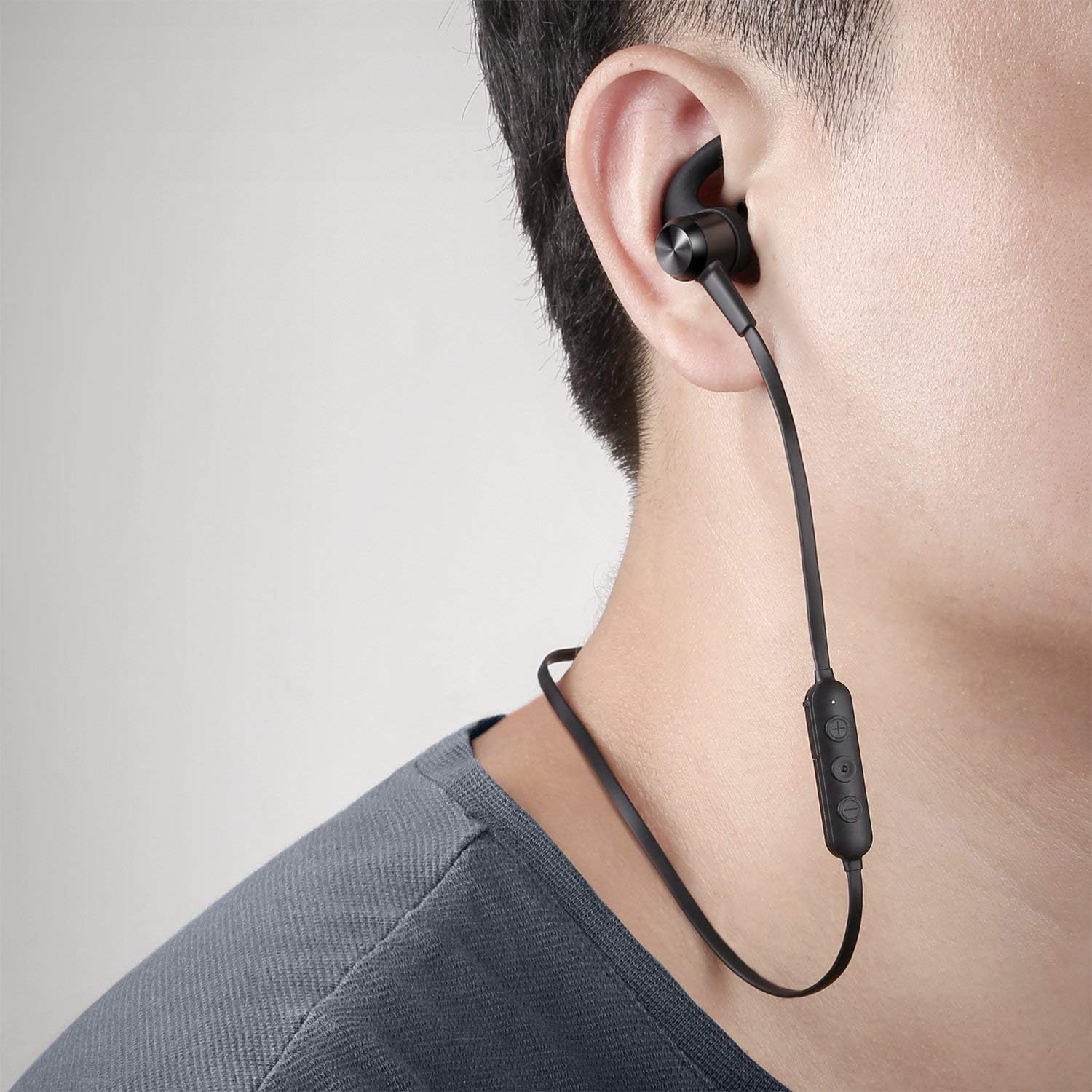
Image: A person wearing the Picun H10 headphones, demonstrating the secure and comfortable fit of the earbuds within the ear.
4. Operating Instructions
4.1 Bluetooth Pairing
To pair your Picun H10 headphones with a Bluetooth-enabled device:
- Ensure the headphones are turned off.
- Press and hold the multi-function button (middle button on the inline remote) until you see the blue light turn on. Continue holding the button until the red and blue lights flash alternately. This indicates pairing mode.
- On your device (smartphone, tablet, laptop), enable Bluetooth and search for available devices.
- Select "H10" from the list of found devices.
- Once connected, the blue light will flash slowly, and a voice prompt will confirm the connection.
The headphones use Bluetooth 4.1 for stable and efficient wireless communication.
4.2 Inline Remote Control Functions
The inline remote allows you to control music playback and calls:

Image: Diagram illustrating the functions of the inline remote control: multi-function button for play/pause/answer/hang up, volume-/previous song button, and volume+/next song button.
- Multi-function Button (Middle):
- Press once: Play/Pause music, Answer/End call.
- Press and hold: Power On/Off, Enter Pairing Mode.
- Volume - / Previous Song Button:
- Press once: Decrease volume.
- Press and hold: Go to previous song.
- Volume + / Next Song Button:
- Press once: Increase volume.
- Press and hold: Go to next song.
4.3 Magnetic Earbuds
The earbuds feature a magnetic design, allowing them to clip together when not in use. This helps prevent tangling and makes them easy to store around your neck or in a bag, reducing the risk of losing them.

Image: Illustration of the magnetic design of the Picun H10 earbuds, showing how they connect together for secure storage and to prevent tangling.
4.4 IPX7 Sweatproof Rating
The Picun H10 headphones are IPX7 rated, meaning they are protected against the effects of temporary immersion in water (up to 1 meter for 30 minutes). This makes them highly resistant to sweat and rain, suitable for intense workouts and outdoor activities. Do not submerge the headphones in water for extended periods or use them for swimming.

Image: Close-up of the Picun H10 earbuds with water droplets, visually representing their IPX7 sweatproof and water-resistant capabilities.
5. Maintenance
To ensure the longevity and optimal performance of your headphones:
- Cleaning: Gently wipe the earbuds and cable with a soft, dry cloth after each use. If necessary, use a slightly damp cloth, but ensure the headphones are completely dry before charging or storing. Do not use harsh chemicals or abrasive cleaners.
- Storage: When not in use, clip the magnetic earbuds together and store the headphones in a clean, dry place away from extreme temperatures and direct sunlight.
- Charging: Always use the provided USB cable for charging. Avoid overcharging by disconnecting the headphones once fully charged.
6. Troubleshooting
| Problem | Possible Cause | Solution |
|---|---|---|
| Headphones do not power on. | Low battery. | Charge the headphones fully. |
| Cannot pair with device. | Headphones not in pairing mode; Bluetooth off on device; device too far. | Ensure headphones are in pairing mode (flashing red/blue). Turn on Bluetooth on your device. Move headphones closer to the device. |
| No sound or poor sound quality. | Volume too low; headphones not connected; ear tips not sealed properly. | Increase volume on headphones and device. Re-pair headphones. Try different size ear tips for a better seal. |
| Intermittent connection. | Interference; device too far; low battery. | Move away from other wireless devices. Stay within Bluetooth range (approx. 10 meters). Charge headphones. |
7. Specifications
- Model Name: Picun H10
- Connectivity: Wireless, Bluetooth 4.1
- Playtime: Up to 10 hours
- Charging Port: USB
- Water Resistance: IPX7 Sweatproof
- Microphone: Built-in HD Microphone
- Form Factor: In-Ear with Earhooks
- Weight: Approximately 60g
- Dimensions (Package): 10.2 x 10.2 x 2.6 cm

Image: Graphic highlighting key features: Bluetooth 4.1, CSR Chip, 10 Hours Playtime, and Steady Signal, indicating superior sound and battery performance.
8. Warranty and Support
The Picun H10 Wireless Headphones come with a 12-month warranty from the date of purchase. This warranty covers manufacturing defects and workmanship. Please retain your proof of purchase for warranty claims.
For technical support, troubleshooting assistance, or warranty inquiries, please contact Picun customer service through the retailer where you purchased the product or visit the official Picun website for contact information.
Related documentsPicun H10


Ask a question about this manual
Ask about setup, troubleshooting, compatibility, parts, safety, or missing instructions. Manuals+ will review the question and use this page’s manual context to help answer it.