
Introduction
The Beurer BF1000 Super Precision Body Composition Analysis Scale provides a professional full-body analysis in a home setting. This digital diagnostic scale utilizes 8 electrodes to perform cross measurements, enabling accurate segmented analysis of various body parameters. It measures body weight, body fat, visceral fat, body water, muscle percentage, bone mass, Body Mass Index (BMI), and Basal Metabolic Rate (BMR)/Active Metabolic Rate (AMR).
The scale features quick-start switch-on technology and displays measurements in kilograms (kg), pounds (lb), or stones (st) on its state-of-the-art dot matrix XXL illuminated display. The standing surface is made from safety glass, measuring 38cm x 39cm, and has a maximum loading capacity of 200kg. The BF1000 supports up to 10 user memory spaces and can store up to 30 readings per user, facilitating trend recognition. For comprehensive health and wellbeing analysis, the scale can be paired with the free Beurer HealthManager Pro app.
Key Features
- Full Body Analysis: Determines body weight, body fat, muscle mass, body water, bone mass, resting/active calorie requirement, and BMI.
- Cross Body Measurement: Provides segmented measurements for individual body sections, including left arm, right leg, and torso.
- Smart Weight Measurement: Connects to the free Beurer HealthManager Pro app for ongoing health management and data tracking.
- 8 Electrodes: Ensures precise body measurements and a detailed understanding of body composition.
- Multi-User Support: Accommodates up to 10 user profiles, allowing families to monitor trends over their last 30 readings.
Setup
1. Battery Installation
The Beurer BF1000 scale requires 4 AAA batteries, which are included with the product. To install:
- Locate the battery compartment on the underside of the scale.
- Open the battery compartment cover.
- Insert the 4 AAA batteries, ensuring correct polarity (+/-).
- Close the battery compartment cover securely.
2. Initial Setup and App Connection
To fully utilize the scale's features, it is recommended to connect it with the Beurer HealthManager Pro app.
- Download the free Beurer HealthManager Pro app from your device's app store.
- Create a user profile within the app, providing necessary personal data for accurate body composition analysis.
- Follow the in-app instructions to pair your Beurer BF1000 scale via Bluetooth.
- Ensure the scale is switched on and within range of your mobile device during the pairing process.
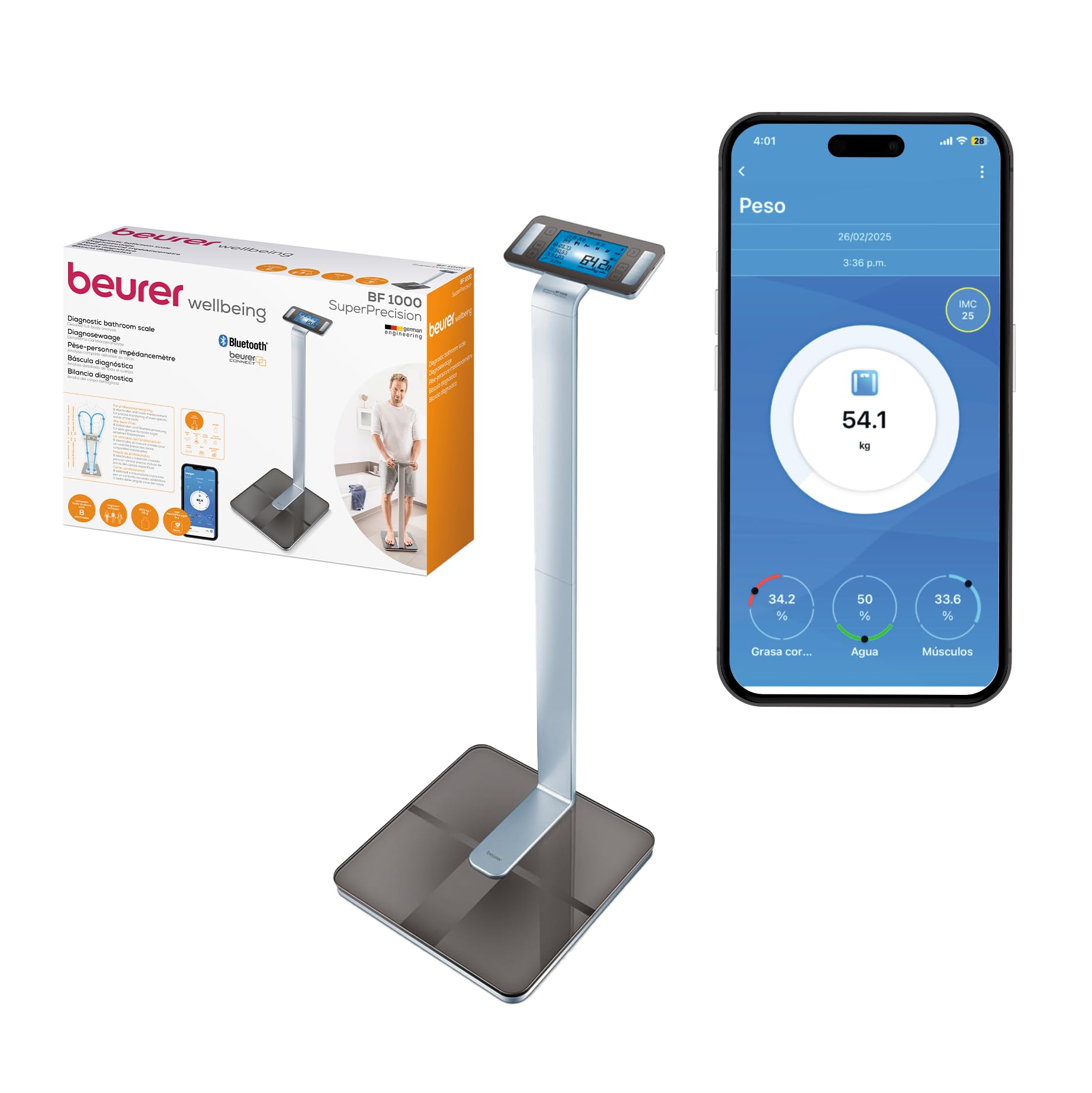
Image: The Beurer BF1000 scale, showcasing its sleek design and illuminated display.
Operating Instructions
1. Taking a Measurement
- Place the scale on a firm, level surface. Avoid carpets or uneven flooring for accurate readings.
- Step onto the scale barefoot, ensuring your feet are positioned correctly on the electrodes. Stand still.
- The scale will automatically switch on and begin the measurement process.
- Remain still until all measurements are displayed on the XXL illuminated display.
- If connected to the app, your readings will automatically synchronize with your profile.
2. Understanding Your Measurements
The BF1000 provides detailed insights into your body composition:
- Body Weight: Your total weight.
- Body Fat Percentage: The proportion of fat in your body.
- Body Water Percentage: The proportion of water in your body.
- Muscle Percentage: The proportion of muscle mass in your body.
- Bone Mass: The weight of your bones.
- BMI (Body Mass Index): A measure of body fat based on height and weight.
- BMR (Basal Metabolic Rate): The calories your body burns at rest.
- AMR (Active Metabolic Rate): The total calories your body burns, including activity.
- Segmented Analysis: Provides specific fat and muscle percentages for individual body parts (e.g., left arm, right leg, torso).
3. User Profiles
The scale can store data for up to 10 users. When multiple users are set up in the app, the scale will attempt to identify the user based on their weight. Ensure your profile is selected in the app before weighing, or confirm the correct user on the scale's display if prompted.
Troubleshooting
- "MEASUREMENT RANGE!" Error: This message indicates that the Bioelectrical Impedance Analysis (BIA) measurement was successful, but the fat content detected is outside the measurable range (less than 3% or greater than 65%). This is not a malfunction of the scale.
- Inaccurate or Inconsistent Readings:
- Ensure the scale is placed on a hard, flat, and level surface. Avoid carpets or soft flooring can affect accuracy.
- Always step onto the scale barefoot and stand still, ensuring proper contact with all 8 electrodes.
- Measurements can vary based on hydration levels, time of day, and recent physical activity. For consistent tracking, weigh yourself at the same time each day, ideally in the morning before eating or exercising.
- Check battery levels. Low batteries can sometimes lead to erratic readings.
- If issues persist, try removing and reinserting the batteries to reset the device.
- App Connectivity Issues:
- Ensure Bluetooth is enabled on your mobile device.
- Make sure the scale is within close proximity to your device.
- Restart both the scale (by removing/reinserting batteries) and your mobile device.
- Re-pair the scale with the Beurer HealthManager Pro app if necessary.
Specifications
| Feature | Detail |
|---|---|
| Brand | Beurer |
| Model Number | 748.60 |
| Display Type | LED (Dot Matrix XXL illuminated display) |
| Weight Limit | 200 Kilograms (440 lbs) |
| Readout Accuracy | +/- 0.5-1% |
| Material | Safety Glass |
| Product Dimensions | 24.61 x 17.91 x 7.28 inches |
| Item Weight | 6.63 Kilograms (14.59 pounds) |
| Batteries | 4 AAA batteries (included) |
| Special Features | Lightweight, Portable, Smart, Cross Measurement, 8 Electrodes, 10 User Memory Spaces |
App Integration: Beurer HealthManager Pro
The Beurer BF1000 scale is designed to seamlessly integrate with the Beurer HealthManager Pro app, available for free download. This app enhances your health monitoring experience by:
- Providing a visual overview of your body composition data over time.
- Tracking trends for all measured parameters (weight, fat, muscle, water, bone mass, BMI, BMR/AMR).
- Allowing you to set goals and monitor your progress.
- Managing multiple user profiles and their individual data.
- Offering comprehensive health and wellbeing analysis based on your readings.
Ensure your mobile device's Bluetooth is active and the app is open when taking measurements to ensure data synchronization.