Introduction
Welcome to the Gigaset CL660 Duo Cordless Phone System. This manual provides essential information for the safe and efficient use of your new telephone. Please read it carefully before initial setup and keep it for future reference. This system includes two handsets for extended coverage and convenience.
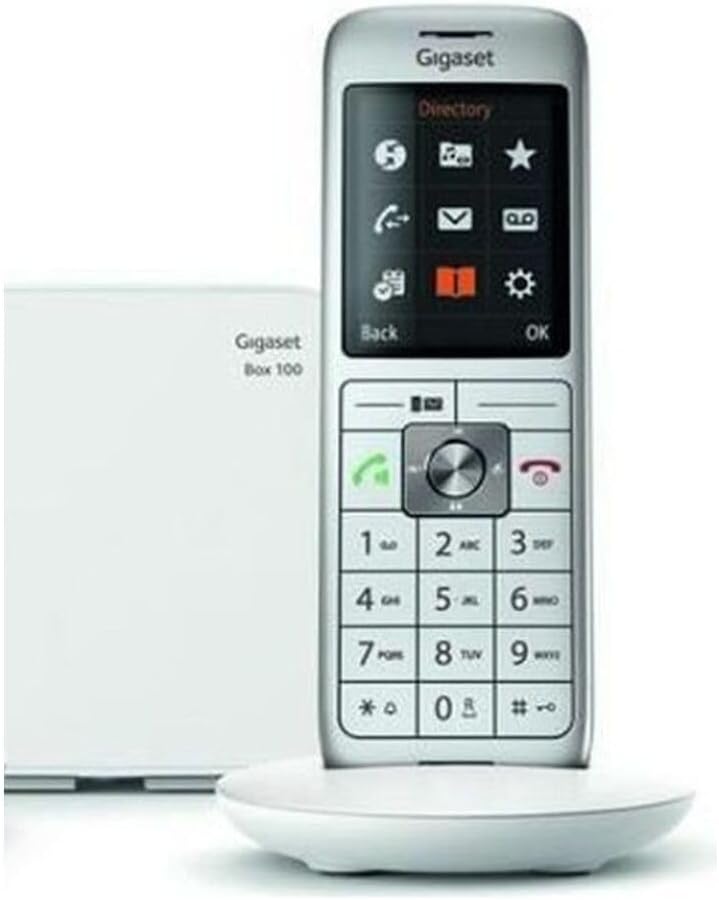
The Gigaset CL660 Duo system includes two white cordless handsets and a compact base station, designed for clear communication.
1. Setup
1.1 Package Contents
Verify that your package contains the following items:
- 1 Gigaset CL660 base station
- 2 Gigaset CL660 handsets
- 2 Handset charging cradles
- 4 AAA NiMH rechargeable batteries
- 1 Power adapter for the base station
- 1 Telephone connection cable
- 1 User manual
1.2 Connecting the Base Station
- Connect the power adapter to the base station and plug it into a wall outlet.
- Connect the telephone cable to the base station and then to your telephone wall socket.
1.3 Installing Batteries in Handsets
- Open the battery compartment cover on the back of each handset.
- Insert the 2 AAA NiMH rechargeable batteries, observing polarity (+/-).
- Close the battery compartment cover.
1.4 Initial Charging and Registration
- Place each handset into its respective charging cradle. The display will indicate charging.
- Allow the handsets to charge for approximately 8-10 hours before first use to ensure optimal battery performance.
- The handsets are typically pre-registered to the base station. If a handset displays "Register Handset" or similar, refer to the "Handset Registration" section below.
1.5 Handset Registration (if needed)
- On the handset, navigate to Settings > Registration > Register Handset.
- Enter the system PIN (default is 0000).
- On the base station, press and hold the registration/paging button for approximately 3 seconds. The base station will enter registration mode.
- The handset will display a confirmation message once registered. Repeat for the second handset.
2. Operating Instructions
2.1 Making Calls
- Press the green call key.
- Dial the desired phone number.
- Press the green call key again to initiate the call.
2.2 Receiving Calls
- When the phone rings, press the green call key to answer.
2.3 Ending Calls
- Press the red end call key.
2.4 Using the Directory
- Press the Directory key (often represented by a book icon).
- Navigate through contacts using the navigation keys.
- To add a new contact, select "New Entry" and follow the on-screen prompts. The directory can store up to 400 contacts.
2.5 Display and Menu Navigation
The 2.4-inch color display provides clear information and an intuitive interface. Use the central navigation key to scroll through menus and options. The soft keys below the display change function based on the current context, offering quick access to relevant features.

A close-up view of the Gigaset CL660 Duo handset, highlighting its 2.4-inch color display, intuitive navigation keys, and alphanumeric keypad.
2.6 PC Connection (Micro USB)
Connect the handset to a PC using a micro USB cable (not included) to manage contacts or update software (if available). Refer to the official Gigaset website for compatible software and drivers.
2.7 Setting Language
To change the display language, navigate to Settings > Language and select your preferred language from the available options.
3. Maintenance
3.1 Cleaning
- Wipe the handsets and base station with a soft, slightly damp cloth.
- Do not use abrasive cleaners, solvents, or strong chemicals, as these can damage the surfaces.
- Ensure no liquid enters the device openings.
3.2 Battery Care
- Use only the specified AAA NiMH rechargeable batteries. Using non-rechargeable batteries or incorrect types can damage the device and void the warranty.
- Avoid exposing batteries to extreme temperatures (very hot or very cold).
- If the phone will not be used for an extended period, remove the batteries from the handsets to prevent leakage.
4. Troubleshooting
If you encounter issues with your Gigaset CL660 Duo, please consult the following common problems and solutions:
4.1 No Dial Tone
- Check connections: Ensure the base station is properly connected to the power outlet and the telephone wall socket.
- Handset registration: Verify that the handset is registered to the base station. If not, follow the registration steps in Section 1.5.
4.2 Cannot Make/Receive Calls
- Telephone line: Confirm your telephone line is active and working. Test with another phone if possible.
- Battery charge: Ensure the handset batteries are sufficiently charged. Place the handset in its charging cradle.
- Range: Make sure the handset is within range of the base station. Move closer to the base if necessary.
4.3 Handset Not Charging
- Placement: Ensure the handset is correctly placed in the charging cradle, making proper contact with the charging pins.
- Power connection: Check the power connection to the charging cradle and the wall outlet.
- Battery type: Verify that the batteries are correctly inserted and are AAA NiMH rechargeable type.
4.4 Display Issues
- Blank display: If the display is blank, check the battery charge level.
- Frozen display: If the display is unresponsive, remove and reinsert the batteries to restart the handset.
4.5 Regional Compatibility Note
This product is designed for use in France. Usage in other regions may lead to compatibility issues with local telephone networks or specific features. Please consult local telecommunication providers for compatibility information if used outside of France.
5. Specifications
| Brand | Gigaset |
| Model Number | GIG-13631 |
| Color | White |
| Telephone Type | Cordless DECT/GAP |
| Number of Handsets | 2 (Duo) |
| Screen Size | 2.4 inches |
| Display Type | Color, backlit |
| Connections | DECT, Micro USB (for PC connection) |
| Special Features | Cordless, 2 handsets |
| Compatible Devices | Gigaset Box |
| Battery Composition | NiMH |
| Batteries Included | 4 x AAA (2 per handset) |
| Power Source | Battery powered |
| Dialer Type | Single keypad |
| Material | Acrylonitrile Butadiene Styrene (ABS) |
| Item Dimensions (L x W x H) | 15.7 x 5.2 x 2.1 cm |
6. Warranty and Support
For detailed warranty information regarding your Gigaset CL660 Duo, please refer to the documentation provided at the time of purchase or consult your retailer. Warranty terms may vary by region and seller.
For further technical assistance, frequently asked questions, or to download updated software/drivers, please visit the official Gigaset website or contact their customer service department directly. Contact information can typically be found on the Gigaset website or in your product packaging.


