
Introduction
This manual provides comprehensive instructions for the installation, operation, and maintenance of your Yakry Y27-N RV Backup Camera Wireless System. Designed for RVs, 5th wheels, trucks, trailers, campers, and motorhomes, this system offers enhanced visibility and safety with its HD 1080P monitor, wireless connectivity, and versatile features.
Package Contents
Please verify that all items listed below are included in your package:
- 7-inch HD 1080P Touch Key Monitor
- Wireless Backup Camera (IP69K Waterproof)
- Dual Antennas for Monitor
- Antenna for Camera
- Furrion Bracket and Pigtail Wire (for pre-wired systems)
- Cigarette Lighter Power Adapter
- Hardwire Power Cable
- Suction Cup Mount for Monitor
- Dash Mount for Monitor (with adhesive pad)
- Mounting Screws and Accessories
- User Manual

Figure 1: Complete contents of the Yakry Y27-N RV Backup Camera Wireless System package.
Video 1: An overview of the Yakry Y27-N RV Backup Camera system, demonstrating its components and features, including the monitor, camera, and various accessories for installation and power.
Key Features
- Dual Antennas Design: Enhanced signal stability and 50% higher refresh rate, reaching up to 825ft in open areas and 320ft on vehicles.
- Easy DIY Installation: Includes Furrion bracket and pigtail wire for quick setup on pre-wired RVs.
- Expandable 4-Channel System: Supports up to 4 cameras for comprehensive front/rear/side views.
- Multi-Functional Recording: Functions as a dash cam with recording capability.
- HD 1080P Display: Provides clear, high-resolution images day and night.
- IP69K Waterproof Camera: Ensures reliable performance in all weather conditions.
- Versatile Usage: Suitable for reversing, rear view, or continuous full-time monitoring.
- 7-inch Touch Key Monitor: User-friendly interface for easy control.
- Clear Night Vision: Equipped with 8 infrared lights for improved visibility in low-light conditions.

Figure 2: Highlights of the Y27-N system's advanced features, including signal stability and multi-camera support.
Setup and Installation
1. Camera Installation
The Yakry Y27-N camera is designed for easy installation, especially for RVs pre-wired for Furrion systems. For general installation, connect the camera to your vehicle's reverse light or running light power source. For Furrion pre-wired RVs, use the provided Furrion bracket and pigtail wire for a seamless connection.

Figure 3: Detailed steps for both general and Furrion-specific camera installation.
2. Monitor Installation
The 7-inch monitor can be mounted on your dashboard using the adhesive pad or on your windshield using the suction cup mount (available upon request). Ensure the monitor is placed in a position that does not obstruct your view of the road.
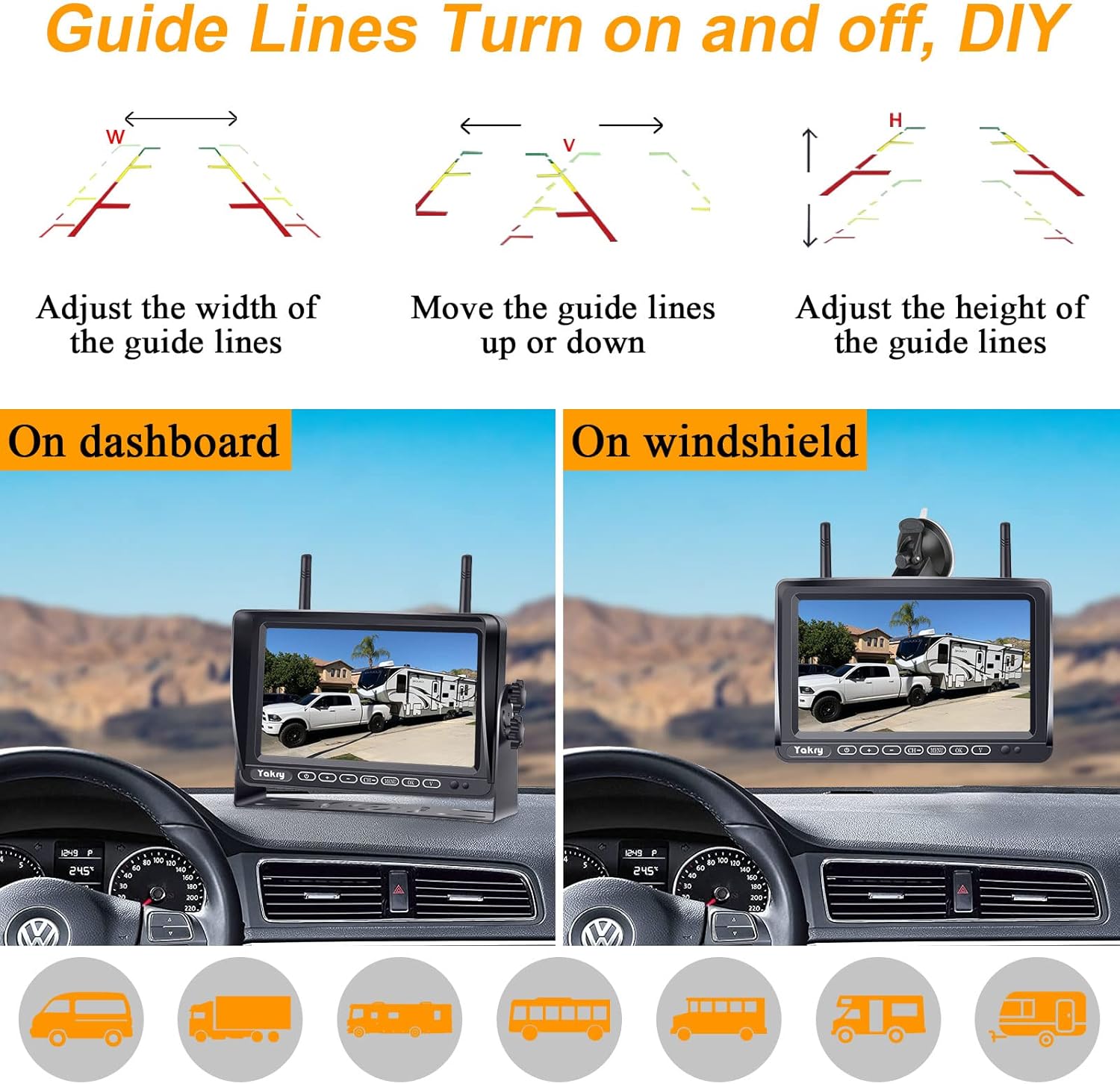
Figure 4: Examples of monitor placement on the dashboard and windshield, highlighting adjustable guide lines.
3. Power Connection
The monitor can be powered via the included cigarette lighter adapter or by hardwiring using the provided cable. Connect the dual antennas to the back of the monitor for optimal signal reception.
Figure 5: Power connection options for the monitor, including cigarette lighter and hardwire methods.
Operating Instructions
1. Powering On/Off
Press the power button on the monitor to turn the system on or off. The monitor will automatically display the camera feed when powered on and receiving a signal.
2. Adjusting Display Modes
The monitor supports various display modes, including full screen, split screen, and quad screen, allowing you to view feeds from multiple cameras simultaneously. Use the "CH" (Channel) button to switch between camera views or display layouts.

Figure 6: Different display modes available on the monitor for multi-camera setups.
3. Recording Function
The system features a recording function, allowing it to act as a dash cam. Ensure an SD card (up to 128GB) is inserted into the monitor's slot to enable recording. The touch key interface provides easy control over recording functions.
4. Guide Lines and Image Adjustment
The monitor allows you to turn guide lines on or off and adjust their width, height, and vertical position for precise maneuvering. You can also adjust image brightness, contrast, and hue to optimize visibility.

Figure 7: Image adjustment options and diverse applications of the system.
5. Mirror and Normal Mode
Switch between mirror mode (for rear view) and normal mode (for front view or specific applications) as needed. The system also supports vertical mirror and vertical normal image options.

Figure 8: Visual representation of mirror and normal display modes.
Maintenance
- Cleaning: Use a soft, dry cloth to clean the monitor screen and camera lens. For stubborn dirt, slightly dampen the cloth with water. Avoid using harsh chemicals or abrasive cleaners.
- Cable Connections: Periodically check all cable connections to ensure they are secure and free from damage.
- Camera Lens: Keep the camera lens clear of dirt, mud, snow, or ice for optimal image quality. The IP69K rating ensures durability in harsh conditions.
- Antennas: Ensure antennas are securely attached and not bent or damaged to maintain strong signal transmission.

Figure 9: The camera's IP69K waterproof rating ensures durability in various weather conditions.
Troubleshooting
| Problem | Possible Cause | Solution |
|---|---|---|
| No image on monitor | No power to monitor/camera; Loose connection; Signal interference; Camera not paired. | Check power connections. Ensure all cables are securely plugged in. Reduce distance between camera and monitor or reposition antennas. Re-pair camera with monitor (refer to manual for pairing steps). |
| Image flickering or unstable | Weak signal; Interference; Loose antenna. | Ensure antennas are securely attached. Reposition antennas for better line of sight. Avoid placing near strong electromagnetic sources. |
| Poor image quality (blurry/dark) | Dirty lens; Low light conditions; Incorrect display settings. | Clean camera lens. Adjust brightness/contrast settings on the monitor. Ensure infrared lights are not obstructed for night vision. |
| Recording not working | No SD card; SD card full/corrupted; Recording function off. | Insert a compatible SD card. Format or replace SD card. Activate recording function via monitor settings. |
Specifications
- Model: Y27
- Screen Size: 7 Inches
- Display Technology: LCD
- Video Capture Resolution: 1080p
- Optical Sensor Technology: CMOS
- Voltage: 12 Volts
- Lux Rating: 0.1 Lux (for low light)
- Product Dimensions (Monitor): 7.1"L x 0.9"W x 4.6"H
- Product Dimensions (Package): 11.42 x 8.27 x 3.15 inches
- Item Weight: 2.95 pounds
- Waterproof Rating (Camera): IP69K
- Wireless Range: Up to 825ft (open area), 320ft (on vehicles)
- Expandability: Supports up to 4 cameras
- Manufacturer: Yakry
- Country of Origin: China
- Date First Available: September 5, 2018
Warranty and Support
Your Yakry Y27-N RV Backup Camera Wireless System comes with a 3-year warranty. For technical support, warranty claims, or any inquiries, please contact Yakry customer service through their official website or the contact information provided in your product packaging.
Visit the Yakry Store on Amazon for more information and additional products.