
1. Safety Information
Please read all safety instructions before operating this product. Failure to follow these instructions may result in electric shock, fire, or serious injury.
- This product is designed for outdoor and indoor use. Ensure all connections are secure and waterproof when used outdoors.
- Do not look directly into the light source.
- Keep the projector away from flammable materials.
- Do not attempt to disassemble or modify the product. Repairs should only be performed by qualified personnel.
- Ensure the power supply voltage matches the product's requirements (110 Volts).
- Unplug the projector from the power source before cleaning or performing any maintenance.
2. Package Contents
Verify that all components are present in the package:
- SOMKTN LED Holiday Projector Unit
- RF Wireless Remote Controller
- Ground Stake
- Round Base Stand
- 16 Interchangeable Slide Patterns
- Power Adapter with 26.2 ft Ultra Long Power Cable

Image 2.1: Overview of the SOMKTN LED Holiday Projector and its included accessories.
3. Product Overview
The SOMKTN LED Holiday Projector is a versatile 2-in-1 lighting solution designed to enhance your indoor and outdoor decorations. It features two distinct projection heads:
- Pattern Projection Head: Displays 16 unique holiday and event-themed slide patterns.
- Ocean Wave Effect Head: Creates dynamic RGBW ocean wave ripples with 10 color options.
These effects can be used independently or combined for a customized display. The projector is controlled via an RF wireless remote, offering convenience and flexibility for adjusting light colors, moving speed, flash speed, and setting an auto-timer.
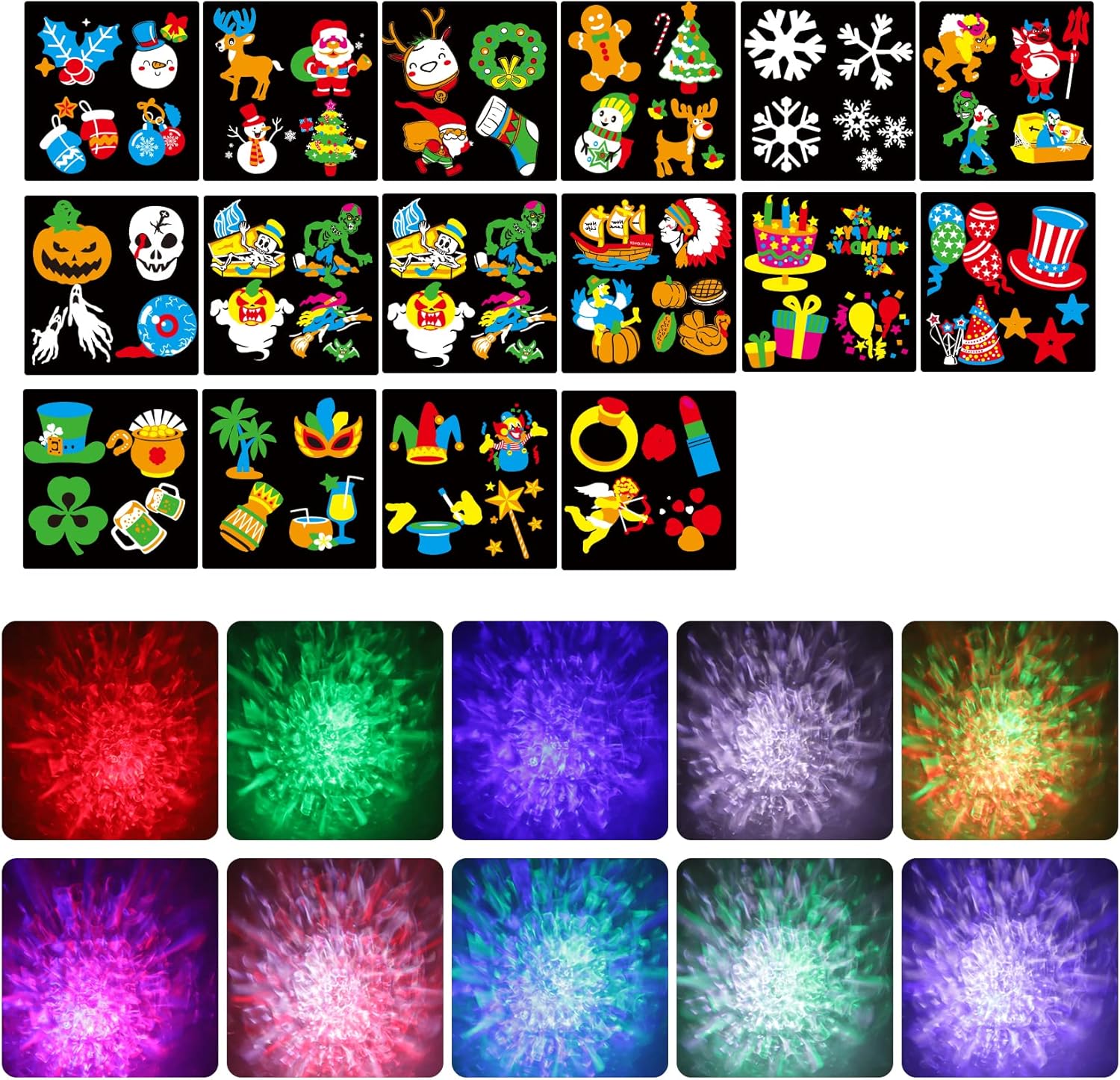
Image 3.1: Detailed view of the 16 interchangeable slide patterns and 10 ocean wave color options.

Image 3.2: Example of the projector displaying Halloween patterns combined with ocean wave effects on a building.

Image 3.3: Example of the projector displaying Christmas patterns combined with ocean wave effects on a building.
4. Setup and Installation
The projector offers flexible installation options for both indoor and outdoor environments.
4.1 Outdoor Installation (Ground Stake)
- Attach the ground stake to the bottom of the projector unit.
- Insert the stake firmly into soft ground in your desired projection area.
- Adjust the projection angle using the adjustable head.
- Connect the power adapter to a suitable outdoor power outlet.
4.2 Indoor Installation (Base Stand)
- Attach the round base stand to the bottom of the projector unit.
- Place the projector on a flat, stable surface.
- Adjust the projection angle as needed.
- Connect the power adapter to an indoor power outlet.
4.3 Optimal Projection Distance and Coverage
For best results, consider the following projection distances:
- Outdoor: 10-16.4 feet (3-5 meters) for clear images.
- Indoor: 16.4-26.25 feet (5-8 meters) for wider coverage.
The projection coverage ranges from 40 to 330 square feet, depending on the distance.

Image 4.1: Illustration of the projector's versatility for both indoor and outdoor use.

Image 4.2: Details on projection distance, coverage area, and the 26.2 ft power cable.

Image 4.3: The projector features a 270-degree adjustable head for precise aiming.
5. Operation
The projector is operated using the included RF wireless remote control. Ensure 2 x AAA batteries are installed in the remote (batteries not included).
5.1 Remote Control Functions

Image 5.1: Remote control layout and button functions.
- Power On/Off: Turns the projector on or off.
- Ocean Wave On/Off: Activates or deactivates the ocean wave effect.
- Pattern On/Off: Activates or deactivates the slide pattern projection.
- Red/Green/Blue/White Light: Selects individual colors for the ocean wave effect.
- FADE1 (Single color cycling): Cycles through ocean wave colors one by one.
- FADE2 (Multi-color cycling): Cycles through ocean wave colors with smooth transitions.
- S+/S- (Speed): Adjusts the moving speed of the ocean wave effect.
- BREATHE (Ocean wave in breathing/keep on mode): Controls the breathing or static mode of the ocean wave.
- STOP (Pattern flashing speed): Stops or adjusts the flashing speed of patterns.
- KEEP ON (Pattern keeps on): Sets patterns to remain static.
- 2H/4H/6H (Auto-timer): Sets the projector to automatically turn off after 2, 4, or 6 hours.
- CANCEL TIMER: Deactivates the timer setting.
5.2 Changing Slide Patterns
To change the slide patterns:
- Ensure the projector is unplugged.
- Locate the slide tray on the pattern projection head.
- Carefully remove the current slide and insert the desired new slide.
- Ensure the slide is correctly seated in the tray.
- Plug in the projector and use the remote to activate pattern projection.
6. Maintenance
Proper maintenance ensures the longevity and optimal performance of your projector.
- Cleaning: Use a soft, dry cloth to clean the projector's exterior. For the lens, use a lens cleaning cloth to avoid scratches. Do not use abrasive cleaners or solvents.
- Storage: When not in use, store the projector in a cool, dry place, away from direct sunlight and extreme temperatures. Keep the slides in their protective casing.
- Waterproof Rating: The projector has an IP65 waterproof rating, making it resistant to dust and low-pressure water jets. However, avoid submerging it in water.
7. Troubleshooting
If you encounter issues with your projector, refer to the following common solutions:
- Projector does not turn on:
- Check if the power adapter is securely connected to both the projector and the power outlet.
- Ensure the power outlet is functional.
- Verify the remote control batteries are correctly installed and not depleted.
- Remote control is not responding:
- Replace the AAA batteries in the remote control.
- Ensure there are no obstructions between the remote and the projector's sensor.
- The remote has a range of up to 40ft and can operate through walls.
- Projection is blurry or unclear:
- Adjust the projection distance to be within the optimal range (10-16.4ft outdoor, 16.4-26.25ft indoor).
- Ensure the lens is clean and free from dust or smudges.
- Verify the slide pattern is correctly inserted and not damaged.
- Patterns or ocean wave effect not moving:
- Use the speed (S+/S-) buttons on the remote to adjust movement.
- Check if the 'KEEP ON' button for patterns or 'BREATHE' mode for ocean wave is activated, which might set them to static or breathing modes.
8. Specifications
| Feature | Specification |
|---|---|
| Model Number | SOMKTN-DB-01 |
| Brand | SOMKTN |
| Color | Black |
| Material | ABS plastic |
| Light Source Type | LED |
| Voltage | 110 Volts |
| Wattage | 10.5 Watts (Max 12 Watts) |
| Brightness | 2200 Lumen |
| Amperage | 1 Amps |
| Product Dimensions | 5.59"L x 4.65"W x 4.29"H |
| Item Weight | 1.57 pounds |
| Power Source | Corded Electric |
| Waterproof Rating | IP65 |
| Operating Temperature | -4°F to 122°F (-20°C to 50°C) |
| Remote Control Range | Up to 40ft |
| UPC | 631145621364 |
9. Warranty and Support
For warranty information and customer support, please refer to the product packaging or contact SOMKTN directly through their official channels. Keep your purchase receipt for warranty claims.