
1. Introduction
Thank you for choosing the DALI Oberon 7 Floorstanding Speaker. This manual provides essential information for the proper setup, operation, and maintenance of your speaker to ensure optimal audio performance and longevity. The Oberon 7 is designed to deliver a dynamic and powerful audio experience, featuring dual 7-inch wood fiber woofers for deep bass and a precision-coated soft dome tweeter for clear highs.
2. Safety Information
- Placement: Position speakers on a stable, level surface to prevent tipping. Ensure adequate ventilation around the speakers.
- Power: Connect speakers only to appropriate audio amplification equipment. Do not exceed the recommended power handling capacity.
- Moisture: Keep speakers away from water, moisture, and high humidity. Do not expose to dripping or splashing.
- Heat: Avoid placing speakers near heat sources such as radiators, heat registers, stoves, or other heat-producing apparatus.
- Cleaning: Disconnect from power before cleaning. Use a soft, dry cloth. Do not use liquid cleaners or aerosol cleaners.
- Service: Do not attempt to service this product yourself. Refer all servicing to qualified service personnel.
3. Package Contents
Carefully unpack your DALI Oberon 7 speaker and verify that all components are present:
- DALI Oberon 7 Floorstanding Speaker (single unit)
- Grille
- Rubber Feet
- Spikes
- User Manual (this document)

Image: The DALI Oberon 7 Floorstanding Speaker with its protective grille attached, showcasing its elegant design.
4. Setup
4.1 Attaching Feet/Spikes
For optimal stability and vibration isolation, attach the included rubber feet or spikes to the bottom of the speaker. Rubber feet are suitable for hard floors, while spikes are recommended for carpeted surfaces to couple the speaker firmly to the subfloor.
4.2 Speaker Placement
Proper speaker placement is crucial for achieving the best sound quality. Consider the following guidelines:
- Stereo Setup: For a stereo pair, place the speakers equidistant from your primary listening position, forming an equilateral triangle.
- Distance from Walls: Experiment with placing the speakers a short distance from the rear and side walls. This can affect bass response and soundstage depth.
- Toe-in: Slightly angle the speakers inward towards the listening position (toe-in) to optimize imaging and soundstage focus.

Image: A DALI Oberon 7 speaker placed in a typical living room setup, demonstrating ideal positioning next to a media console.
4.3 Connecting to an Amplifier/Receiver
The DALI Oberon 7 features gold-plated terminals for secure and reliable connections. Use high-quality speaker cables for the best audio transmission.
- Ensure your amplifier/receiver is turned off and unplugged from the power outlet.
- Connect the positive (+) terminal (red) on the speaker to the positive (+) terminal on your amplifier.
- Connect the negative (-) terminal (black) on the speaker to the negative (-) terminal on your amplifier.
- Ensure all connections are tight and secure to prevent signal loss or short circuits.

Image: The rear panel of the DALI Oberon 7 speaker, highlighting the gold-plated speaker terminals and the bass reflex port.
5. Operating
Once your DALI Oberon 7 speakers are properly set up and connected to your amplifier/receiver, you can begin enjoying your audio. The Oberon 7 incorporates DALI's advanced driver technology, including the patented SMC (Soft Magnetic Compound) in the magnet motor system, which reduces distortion for improved clarity and dynamic range.
- Turn on your amplifier/receiver and select the appropriate audio source.
- Start playback at a low volume level.
- Gradually increase the volume to your desired listening level.
- Allow for a 'break-in' period: Like many high-fidelity speakers, the Oberon 7 may benefit from a period of use (typically 50-100 hours) to allow the drivers to fully settle and achieve their optimal sound characteristics.

Image: The DALI Oberon 7 speaker with its grille removed, revealing the two 7-inch wood fiber woofers and the soft dome tweeter.
6. Maintenance
To maintain the aesthetic and acoustic performance of your DALI Oberon 7 speakers, follow these simple maintenance guidelines:
- Cleaning Cabinets: Use a soft, dry, lint-free cloth to gently wipe the cabinet surfaces. For stubborn marks, a slightly damp cloth can be used, followed immediately by a dry cloth. Avoid abrasive cleaners or solvents.
- Cleaning Grilles: The fabric grilles can be carefully removed and gently vacuumed with a soft brush attachment to remove dust.
- Driver Care: Avoid touching the speaker drivers (woofers and tweeter) as this can cause damage. Keep them free from dust and debris.
- Sunlight Exposure: Prolonged exposure to direct sunlight can cause discoloration of the cabinet finish. Position speakers to minimize direct sun exposure or use curtains/blinds.
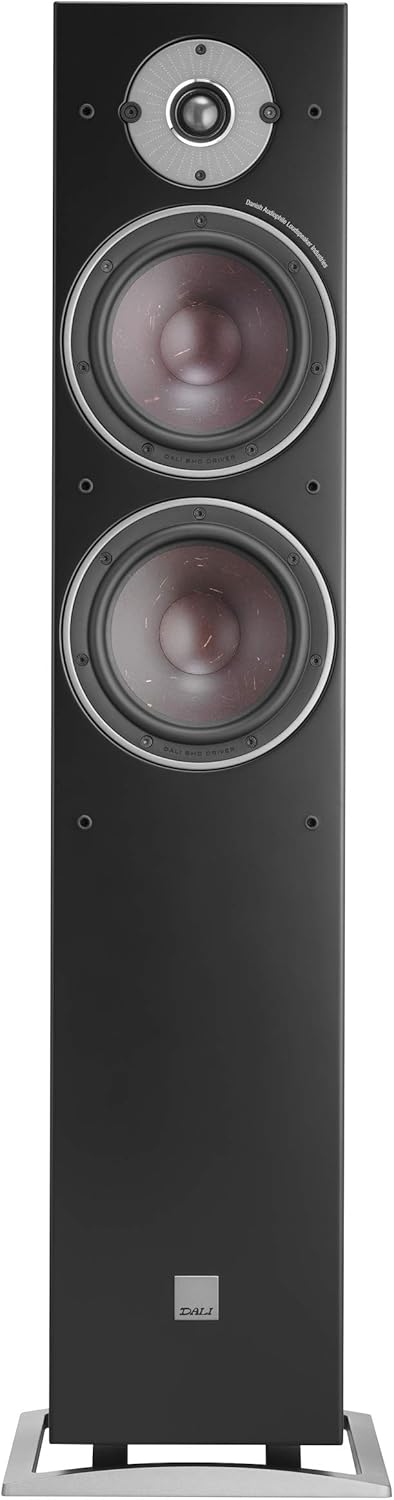
Image: A detailed close-up of the DALI Oberon 7's tweeter and one of its wood fiber woofers, showcasing the driver construction.
7. Troubleshooting
If you encounter issues with your DALI Oberon 7 speakers, refer to the following common troubleshooting steps:
- No Sound:
- Check all speaker cable connections at both the speaker and amplifier ends. Ensure they are secure and correctly connected (positive to positive, negative to negative).
- Verify that the amplifier/receiver is powered on and the correct input source is selected.
- Check the volume level on your amplifier/receiver.
- Distorted Sound:
- Reduce the volume level on your amplifier/receiver. Overdriving the speakers can cause distortion.
- Inspect speaker cables for any damage or frayed wires that might be causing a short circuit.
- Ensure the amplifier's power output matches the speaker's recommended power handling.
- Unbalanced Sound (one speaker louder/softer):
- Check the balance settings on your amplifier/receiver.
- Verify that both speakers are connected correctly and securely.
- Ensure both speakers are receiving a signal from the amplifier.
If these steps do not resolve the issue, please contact your DALI retailer or authorized service center.
8. Specifications
| Feature | Specification |
|---|---|
| Model Name | Oberon 7 |
| Item Model Number | 230073 |
| Brand | DALI |
| Speaker Type | Floorstanding, Surround Sound, Woofer |
| Special Feature | Hi Res Audio |
| Recommended Uses | For Music Players |
| Compatible Devices | Home Theater |
| Woofer Diameter | 7 Inches (x2) |
| Surround Sound Channel Configuration | 2.0 |
| Color | Black |
| Product Dimensions (D x W x H) | 13"D x 40"W x 8"H |
| Item Weight | 32.6 pounds (14.8 Kilograms) |
| Speaker Maximum Output Power | 180 Watts |
| Connectivity Technology | RCA, XLR (via amplifier) |
| Audio Output Mode | Surround |
| Mounting Type | Floor Standing |
| Material | Wood |
| UPC | 680140965492 |
9. Warranty and Support
The DALI Oberon 7 Floorstanding Speaker comes with a Limited Warranty. Please refer to the warranty documentation provided with your purchase for specific terms and conditions.
For technical support, service, or warranty claims, please contact your authorized DALI retailer or visit the official DALI website. You can also find more information on the DALI Brand Store on Amazon.


