
Introduction
The NICRON B74 is a versatile and durable flashlight designed for various applications. Its robust aluminum body and IP65 compatibility ensure reliability in challenging environments. Key features include a powerful magnetic base, a pen holder hook function for hands-free operation, and a unique 90-degree rotating head for flexible illumination. The flashlight offers multiple lighting modes, including three brightness levels (700, 300, and 100 lumens), a fast flashing mode, and an SOS function for emergencies. It is powered by a rechargeable battery and includes a lock function to prevent accidental activation.
Product Features
- Powerful Magnet & Rotating Head: The powerful magnet and oscillating function allow for hands-free use, brightening your workspace or surroundings. The unique 90-degree rotating head provides versatile lighting angles, transforming from a standard flashlight to an angled light for specific tasks.
- Brightness Levels: Equipped with three distinct lighting levels: 700 lumens (Max Brightness), 300 lumens, and 100 lumens. It also includes specialized functions such as a fast flashing mode and an SOS flashing function for signaling.
- Durability: Constructed with an impact-resistant carbide aluminum body, the NICRON B74 is designed for heavy-duty use. It boasts an IP65 rating, making it water-resistant and suitable for use in heavy rain. The flashlight is also drop-resistant up to 1 meter.
- Portability: Compact and tough, this flashlight features a convenient pocket clip for easy carrying.
- Accidental Operation Prevention: Includes a lock function to prevent accidental operation, ensuring battery life is preserved when not in use.
Included Components
The NICRON B74 package typically includes:
- NICRON B74 Aluminum Flashlight
- Rechargeable Lithium Ion Battery (1 included)
- USB Charging Cable (Micro USB)
- Product Manual (this document)
- Extra Gasket (for maintenance)
Setup
Battery Installation
Upon first use, unscrew the tail cap of the flashlight. Remove the insulating film from the battery. Insert the rechargeable Lithium Ion battery with the positive (+) end facing towards the head of the flashlight. Securely screw the tail cap back on.

Image: NICRON B74 flashlight with its 90-degree rotating head and magnetic base.
Initial Charge
Before first use, it is recommended to fully charge the flashlight. Locate the USB-C charging port on the side of the flashlight head, covered by a rubber flap. Connect the provided USB charging cable to the port and a compatible USB power source (e.g., computer, wall adapter). The indicator light on the button will turn red during charging and green when fully charged.
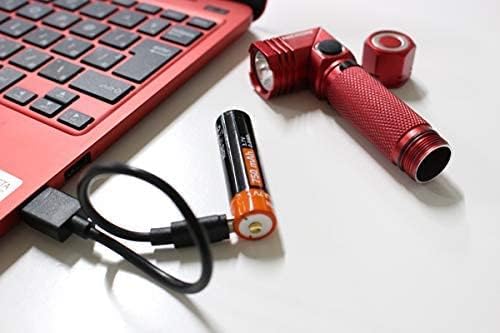
Image: NICRON B74 flashlight battery being charged via USB cable.
Operating Instructions
Power On/Off and Mode Selection
Press the power button once to turn the flashlight on. Press it again to cycle through the brightness modes (Moonlight, Low, Medium, High). Press and hold the button to turn the flashlight off from any mode.
Lock Mode
To prevent accidental activation, double-click the power button quickly. The flashlight will blink twice to indicate it is in lock mode. To unlock, double-click the power button again. The flashlight will blink twice and return to the last used mode.
Special Modes (Flashing/SOS)
From the OFF state, press and hold the power button for 3 seconds to activate the red flashing mode. Press and hold again to switch to SOS mode. Press and hold once more to return to normal white light modes or turn off.

Image: Hand holding the NICRON B74 flashlight, demonstrating its compact size.
Charging
The NICRON B74 flashlight features a convenient Micro USB charging port. To charge, open the rubber cover on the side of the flashlight head. Insert the Micro USB end of the charging cable into the port and connect the USB-A end to a power source (e.g., computer, USB wall adapter). The indicator light on the power button will illuminate red during charging and turn green when the battery is fully charged. Ensure the rubber cover is securely closed after charging to maintain water resistance.
Maintenance
General Care
Keep the flashlight clean and free from dirt and debris. Wipe the body with a soft, damp cloth. Avoid using harsh chemicals or abrasive materials.
Water Resistance
The IP65 rating indicates the flashlight is protected against dust and low-pressure water jets. Ensure all caps and covers (especially the charging port cover) are securely closed to maintain water resistance. Do not submerge the flashlight in water.
Gasket Replacement
An extra gasket is included. If the original gasket becomes worn or damaged, replace it to maintain the flashlight's water resistance.
Troubleshooting
- Flashlight Not Turning On: Ensure the battery insulating film has been removed. Check that the battery is inserted correctly with the positive (+) end facing the head. Verify the battery is charged; connect to a charger and check the indicator light. Ensure the flashlight is not in lock mode (double-click to unlock).
- Dim Light Output: Charge the battery fully. The light output may decrease as the battery level gets low. Ensure the lens is clean.
- Charging Indicator Not Working: Check the USB cable and power source for proper connection. Ensure the charging port is clean and free of debris.
Specifications
| Brand | NICRON |
| Model | B74 |
| Color | Red |
| Material | Aluminum |
| Light Source Type | LED |
| Brightness | 700 Lumens (Max) |
| Light Path Distance | 126 Meters |
| Power Source | Rechargeable (Lithium Ion Battery) |
| Battery Capacity | 2600 mAh |
| Water Resistance | IP65 |
| Drop Resistance | 1 Meter |
| Product Dimensions | 1.46"D x 2.64"W x 7.6"H |
| Item Weight | 0.08 Kilograms (2.82 ounces) |
| Special Features | Flashing function, Strong Magnetic Base, 90-Degree Rotating Head, Lock Function |
Warranty and Support
The NICRON B74 flashlight comes with a 12-month warranty from the manufacturer. For warranty claims, technical support, or any product-related inquiries, please contact NICRON customer service through their official website or the retailer where the product was purchased. Please retain your proof of purchase for warranty validation.