
Kratos 69K-764
Kratos Commercial Undercounter Freezer (Model 69K-764) Instruction Manual
Model: 69K-764 | Brand: Kratos
1. Introduction
Thank you for choosing the Kratos Commercial Undercounter Freezer, Model 69K-764. This appliance is designed for commercial use, offering reliable freezing capabilities for various food service environments. This manual provides essential information for the safe and efficient operation of your freezer. Please read it thoroughly before installation and use, and retain it for future reference.
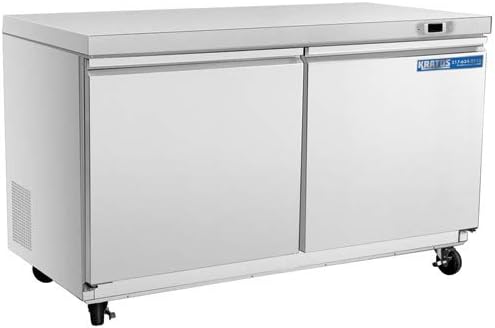
Image 1.1: Front view of the Kratos Commercial Undercounter Freezer.
2. Safety Information
Always follow basic safety precautions when using electrical appliances to reduce the risk of fire, electric shock, and injury.
- Ensure the appliance is properly grounded.
- Do not operate the freezer with a damaged power cord or plug.
- Keep ventilation openings clear of obstructions.
- Do not store explosive substances such as aerosol cans with a flammable propellant in this appliance.
- Only qualified personnel should perform repairs.
- This appliance is intended for commercial use only. Using it in a residential setting may void the warranty.
3. Setup and Installation
3.1 Unpacking
Carefully remove all packaging materials, including tape and protective films. Inspect the freezer for any shipping damage. Report any damage immediately to the carrier and your supplier.
3.2 Placement
Place the freezer on a strong, level surface capable of supporting its weight (approximately 244 pounds). Ensure adequate clearance around the unit for proper ventilation. Avoid direct sunlight or proximity to heat-generating equipment.

Image 3.1: Product dimensions for placement consideration.
3.3 Power Connection
Connect the freezer to a dedicated 120 Volt, properly grounded electrical outlet. Do not use extension cords. After plugging in, allow the unit to stand for at least 24 hours before turning it on to allow refrigerants to settle.
3.4 Shelf Installation
The freezer includes two heavy-duty epoxy-coated adjustable shelves. Install them at desired heights using the provided shelf clips. Ensure shelves are securely seated before placing items on them.
4. Operating Instructions
4.1 Initial Startup
After the 24-hour settling period, turn on the freezer. The digital temperature controls will display the current internal temperature. Allow several hours for the unit to reach the set temperature before loading with products.
4.2 Temperature Control
The freezer features precise digital temperature controls. The recommended operating temperature range is -10°F to 10°F. Refer to the control panel instructions for adjusting the set point.

Image 4.1: Programmable temperature control for precise settings.
4.3 Automatic Defrost
This unit is equipped with an automatic defrost system to maintain peak performance and prevent ice buildup. The defrost cycle operates periodically without user intervention.

Image 4.2: Automatic defrost system prevents ice accumulation.
4.4 Self-Closing Doors
The freezer features self-closing doors with integrated handles to ensure a tight seal and minimize temperature fluctuations. Avoid forcing the doors open or closed.

Image 4.3: Self-closing doors for energy efficiency and convenience.
5. Maintenance
5.1 Cleaning the Interior and Exterior
Regularly clean the interior with a mild soap and water solution. Wipe down the stainless steel exterior with a soft cloth and a non-abrasive cleaner designed for stainless steel. Avoid using harsh chemicals or abrasive pads.

Image 5.1: The corrosion-resistant 304 stainless steel exterior is easy to clean.
5.2 Door Gaskets
Inspect the magnetic door gaskets regularly for cracks or tears. Clean them with warm water and mild soap to ensure a proper seal. A damaged gasket can lead to inefficient operation and increased energy consumption.
5.3 Condenser Coil Cleaning
The condenser coil should be cleaned periodically to ensure efficient operation. Dust and debris can accumulate, reducing cooling efficiency. Consult a qualified technician for condenser coil cleaning.
6. Troubleshooting
Before contacting service, review the following common issues and solutions.
| Problem | Possible Cause | Solution |
|---|---|---|
| Freezer not cooling or not reaching set temperature. |
|
|
| Unit runs continuously. |
|
|
| Excessive ice buildup. |
|
|
If problems persist after attempting these solutions, contact qualified service personnel.
7. Specifications
| Feature | Detail |
|---|---|
| Brand | Kratos |
| Model Number | 69K-764 |
| Installation Type | Undercounter |
| Dimensions (W x D x H) | 48" x 30.31" x 38.31" |
| Item Weight | 244 pounds |
| Voltage | 120 Volts |
| Defrost Type | Automatic |
| Temperature Range | -10°F to 10°F |
| Refrigerant | R290A |
| Number of Doors | 2 |
| Shelves | 2 (Epoxy-coated, adjustable) |
| Exterior Material | Stainless Steel |
8. Warranty and Support
8.1 Warranty Information
The Kratos Commercial Undercounter Freezer (Model 69K-764) comes with the following warranty for commercial applications:
- One (1) Year: Parts and Labor Warranty
- Five (5) Years: Compressor Warranty
Important Note: The warranty is void if the product is used in a residential setting. Please retain your proof of purchase for warranty claims.
8.2 Customer Support
For technical assistance, warranty claims, or to inquire about replacement parts, please contact Kratos customer support. Refer to your purchase documentation for specific contact details or visit the official Kratos website. When contacting support, please have your model number (69K-764) and serial number ready.
Ask a question about this manual
Ask about setup, troubleshooting, compatibility, parts, safety, or missing instructions. Manuals+ will review the question and use this page’s manual context to help answer it.