
1. Introduction
This manual provides essential information for the safe and efficient operation, installation, and maintenance of your Kratos Commercial Freezer Model 67K-004. Please read these instructions thoroughly before installation and use to ensure proper function and longevity of the unit. Retain this manual for future reference.
2. Safety Information
Important Safety Precautions:
- Always disconnect power before cleaning, servicing, or performing maintenance.
- Do not store explosive substances such as aerosol cans with a flammable propellant in this appliance.
- Ensure proper ventilation around the unit to prevent overheating and maintain efficiency.
- This appliance is intended for commercial use only.
- Keep all ventilation openings clear of obstruction.
- Do not use mechanical devices or other means to accelerate the defrosting process, other than those recommended by the manufacturer.
Electrical Safety:
- The freezer requires a dedicated 120 Volt, 60 Hz, single-phase electrical supply.
- Ensure the unit is properly grounded to prevent electrical shock.
- Do not use extension cords or adapter plugs with this appliance.
- If the power cord is damaged, it must be replaced by the manufacturer, its service agent, or similarly qualified persons to avoid a hazard.
3. Unpacking and Installation
3.1 Unpacking
Carefully remove all packaging materials. Inspect the freezer for any shipping damage. Report any damage immediately to the carrier and your supplier. Do not discard packaging until the unit has been inspected and is confirmed to be in working order.
3.2 Placement
Position the freezer on a strong, level surface capable of supporting its weight (approximately 321 pounds). Ensure there is adequate clearance around the unit for proper air circulation, especially at the rear and sides, to allow the condenser to dissipate heat efficiently. Avoid placing the unit near heat sources such as ovens, grills, or direct sunlight.
3.3 Electrical Connection
Connect the freezer to a dedicated electrical outlet that matches the unit's voltage requirements (120 Volts). Ensure the outlet is properly grounded. Do not overload the circuit.
3.4 Initial Startup
After placement and electrical connection, allow the unit to sit for at least 2 hours before plugging it in. This allows the refrigerant to settle. Before loading products, clean the interior of the freezer. Plug in the unit and allow it to run for several hours to reach its operating temperature before storing items.

4. Operating Instructions
4.1 Temperature Control
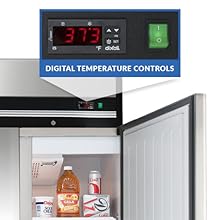
The freezer is equipped with an LED display for monitoring and adjusting temperatures. The digital temperature controls allow for precise temperature settings to ensure optimal food preservation. Refer to the display to verify the internal temperature and adjust as needed using the control buttons.
4.2 Automatic Defrost
This unit features an automatic defrost function, which helps maintain ideal temperatures and prevents ice buildup. The system periodically initiates a defrost cycle to melt any accumulated frost, ensuring efficient operation without manual intervention. This feature eliminates the need for manual defrosting, contributing to consistent performance.

5. Maintenance
5.1 Cleaning
Regular cleaning of the interior and exterior surfaces is recommended. Use a mild detergent and warm water. Avoid abrasive cleaners or harsh chemicals that could damage the stainless steel finish. Periodically clean the condenser coil located at the bottom of the unit to ensure efficient operation. A dirty condenser coil can lead to increased energy consumption and reduced cooling performance.
5.2 Shelf Adjustment
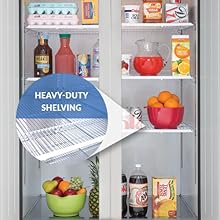
The freezer includes three corrosion-resistant, epoxy-coated shelves. These shelves are adjustable to accommodate various product sizes and can hold up to 89 lbs each. To adjust, simply lift the shelf and reposition the shelf clips to the desired height along the interior pilasters.
6. Troubleshooting
If you experience issues with your Kratos Commercial Freezer, consult the following table for common problems and solutions:
| Problem | Possible Cause | Solution |
|---|---|---|
| Freezer not cooling | No power; thermostat set too high; condenser coil dirty; door not sealing properly. | Check power supply and circuit breaker; adjust thermostat to a lower setting; clean condenser coil; inspect and adjust door gasket. |
| Excessive noise | Unit not level; fan motor obstruction; loose components. | Ensure unit is level; check for and remove any obstructions around fan; contact service for loose components. |
| Icing or frost buildup | Door gasket damaged or not sealing; frequent door openings; high humidity environment; defrost cycle issue. | Inspect and replace door gasket if necessary; minimize door openings; ensure proper ventilation; contact service if defrost cycle is not functioning. |
| LED display not working | Power issue; display malfunction. | Check power supply; contact service for display repair or replacement. |
If the problem persists after attempting these solutions, please contact Kratos customer support or a qualified service technician.
7. Specifications
Detailed technical specifications for the Kratos Commercial Freezer Model 67K-004:
| Specification | Value |
|---|---|
| Brand | Kratos |
| Model Number | 67K-004 |
| Item Weight | 321 pounds |
| Product Dimensions | 32.2 x 29 x 82.5 inches (D x W x H) |
| Capacity | 23 Cubic Feet |
| Installation Type | Freestanding |
| Form Factor | Upright |
| Special Features | Automatic Defrost, Door Lock |
| Color | Silver |
| Voltage | 120 Volts |
| Wattage | 396 watts |
| Number of Racks/Shelves | 3 |
| Defrost Type | Automatic |
| Door Hinges | Right |
| Door Material Type | Stainless Steel |
| Shelf Type | Heavy Duty |
| Certification | ETL |
| Material Type | Stainless Steel |
8. Warranty and Support
The Kratos Commercial Freezer Model 67K-004 is backed by a two-year parts and labor warranty. Additionally, the compressor is covered by a separate five-year warranty. These warranties cover defects in materials and workmanship under normal use and service.
For warranty claims, technical assistance, or service inquiries, please contact Kratos customer support. Ensure you have your model number (67K-004) and purchase date available when contacting support.