
1. Introduction
This instruction manual provides essential information for the safe and efficient operation, installation, and maintenance of your Kratos Commercial Undercounter Freezer, Model 69K-753. This unit is a 61-inch wide, 2-door stainless steel freezer designed for commercial use. Please read this manual thoroughly before operating the appliance and retain it for future reference.
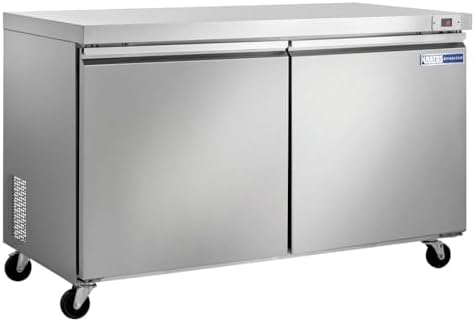
Figure 1: Front view of the Kratos Commercial Undercounter Freezer, Model 69K-753. This image displays the stainless steel exterior and two doors of the undercounter freezer unit.
2. Safety Information
Adherence to safety precautions is crucial to prevent injury and damage to the appliance. Always follow these guidelines:
- Electrical Safety: Ensure the unit is connected to a properly grounded 120 Volt electrical outlet. Do not use extension cords. Disconnect power before any cleaning or maintenance.
- Placement: Position the freezer on a level, stable surface. Maintain adequate clearance around the unit for proper ventilation.
- Handling: Use appropriate lifting techniques and equipment when moving the unit due to its weight (268 pounds).
- Commercial Use Only: This appliance is designed for commercial environments. The manufacturer's warranty is void if the unit is used in a residential setting.
- Limited Warranty for Mobile Applications: A 90-day limited warranty applies to units used in food trucks or other mobile applications.
- Condenser Maintenance: Failure to regularly clean the condenser coil (every 30 days) will affect unit performance and may void the warranty.
3. Setup
3.1 Unpacking
- Carefully remove all packaging materials, including tape and protective film.
- Inspect the unit for any shipping damage. Report any damage immediately to the carrier and supplier.
3.2 Placement and Leveling
- Choose a location with good air circulation, away from direct sunlight or heat-generating equipment.
- Ensure the floor is strong enough to support the unit's weight.
- Install the casters (if not pre-installed) and adjust them to ensure the unit is level. Proper leveling is essential for door sealing and drainage.

Figure 2: Side view of the Kratos Commercial Undercounter Freezer. This image shows the side panel with ventilation grilles and the installed casters, highlighting the unit's mobility.
3.3 Electrical Connection
- Connect the freezer to a dedicated 120 Volt, 60 Hz, single-phase grounded electrical outlet.
- Do not overload the circuit or use adapters.
3.4 Initial Power-On
- After moving the unit, allow it to stand upright for at least 24 hours before plugging it in. This allows compressor oils to settle.
- Plug in the unit. The digital temperature display should illuminate.
- Allow the freezer to reach its set temperature before loading products.
4. Operating Instructions
4.1 Temperature Control
The freezer is equipped with a digital temperature controller located on the front panel. This controller allows you to monitor and adjust the internal temperature.

Figure 3: Illustration highlighting the programmable temperature feature. The digital display allows for precise temperature adjustments.
- Refer to the controller's specific instructions for detailed programming steps.
- Ensure the temperature is set appropriately for frozen food storage, typically around 0°F (-18°C).
- Note: Some units may require an initial reset of the thermostat if factory-programmed incorrectly (e.g., Celsius instead of Fahrenheit). Consult customer support if experiencing temperature issues.
4.2 Loading the Freezer
- Distribute products evenly on the shelves.
- Do not block the internal air vents or circulation paths to ensure consistent cooling.
- Avoid overloading the shelves beyond their weight capacity.
4.3 Door Operation
The freezer features self-closing doors to help maintain internal temperature and energy efficiency.

Figure 4: Illustration highlighting the self-closing door feature. This design helps maintain consistent internal temperatures by minimizing heat ingress.
4.4 Automatic Defrost
This unit is equipped with an automatic defrost system, which periodically melts away frost buildup on the evaporator coil. This eliminates the need for manual defrosting.

Figure 5: Illustration highlighting the automatic defrost feature. This system prevents ice buildup, ensuring efficient operation without manual intervention.
5. Maintenance
5.1 Condenser Coil Cleaning
The condenser coil must be inspected and cleaned every 30 days to maintain peak performance and prevent compressor damage. Failure to do so will affect the unit's operation and may void the warranty.

Figure 6: Rear view of the Kratos Commercial Undercounter Freezer. This image shows the exposed compressor and condenser coil assembly, which requires regular cleaning.
- Safety First: Always unplug the unit before cleaning the condenser coil.
- Locate the condenser coil, typically at the rear or bottom of the unit.
- Use a stiff brush or vacuum cleaner to remove dust, dirt, and debris from the coil fins.
- Ensure airflow is not obstructed.

Figure 7: Interior view of the freezer showing a shelf and a warning label. The label emphasizes the importance of regular condenser coil cleaning to prevent warranty voidance.
5.2 Interior and Exterior Cleaning
- Exterior: Wipe down the stainless steel exterior with a soft cloth and mild detergent. Avoid abrasive cleaners.
- Interior: Clean the interior with a solution of mild soap and warm water. Rinse thoroughly and dry completely to prevent odors and ice buildup.
5.3 Door Gasket Inspection
Regularly inspect door gaskets for cracks, tears, or signs of wear. Damaged gaskets compromise sealing and lead to inefficient operation.

Figure 8: Close-up view of the freezer door gasket. This component is crucial for maintaining an airtight seal and preventing temperature fluctuations.
6. Troubleshooting
Before contacting service, review the following common issues and solutions:
| Problem | Possible Cause | Solution |
|---|---|---|
| Freezer not cooling |
|
|
| Excessive ice buildup |
|
|
| Unit runs constantly |
|
|
| Temperature inconsistent (e.g., Celsius instead of Fahrenheit) |
|
|
If problems persist after attempting these solutions, contact qualified service personnel.
7. Specifications
| Feature | Detail |
|---|---|
| Brand | Kratos |
| Model Number | 69K-753 |
| Type | Undercounter Freezer |
| Width | 61 inches |
| Doors | 2 |
| Material | Stainless Steel |
| Item Weight | 268 pounds |
| Installation Type | Undercounter |
| Voltage | 120 Volts |
| Defrost Type | Automatic |
| Door Hinges | Top |
| Shelves | 2 |
8. Warranty and Support
Kratos provides specific warranty coverage for this commercial undercounter freezer:
- The standard warranty is void if the unit is used in a residential setting.
- A 90-day limited warranty applies to units installed in food trucks or other mobile applications.
- Damage due to a dirty condenser coil will void the warranty. Regular cleaning is required.
For detailed warranty information, technical assistance, or to inquire about service, please contact Kratos customer support. Ensure you have your model number (69K-753) and purchase date available when contacting support.