
SHIDU SHIDU S613
Contents
SHIDU S613 Wireless Voice Amplifier User Manual
Model: SHIDU S613
Introduction
The SHIDU S613 is an 18W portable wireless voice amplifier designed to provide clear and powerful sound for various applications such as teaching, fitness instruction, yoga, and tour guiding. This device features a wireless headset microphone, Bluetooth connectivity, and support for TF card and U disk playback, making it a versatile audio solution.

Image: The SHIDU S613 wireless voice amplifier, a compact black unit with a speaker grille and a wireless headset microphone connected.
Package Contents
Please check the box for the following items:
- 1 x Voice Amplifier
- 1 x UHF Wireless Microphone
- 1 x Waistband
- 1 x Audio Cable
- 1 x USB Cable
- 1 x DC 9V Charger (for voice amplifier)
- 1 x 5V Wall Charger (for microphone)
- 1 x User Manual

Image: All components included in the SHIDU S613 package: the voice amplifier, wireless headset microphone, waistband, various cables, chargers, and the user manual.
Product Overview
Familiarize yourself with the main components and their functions.
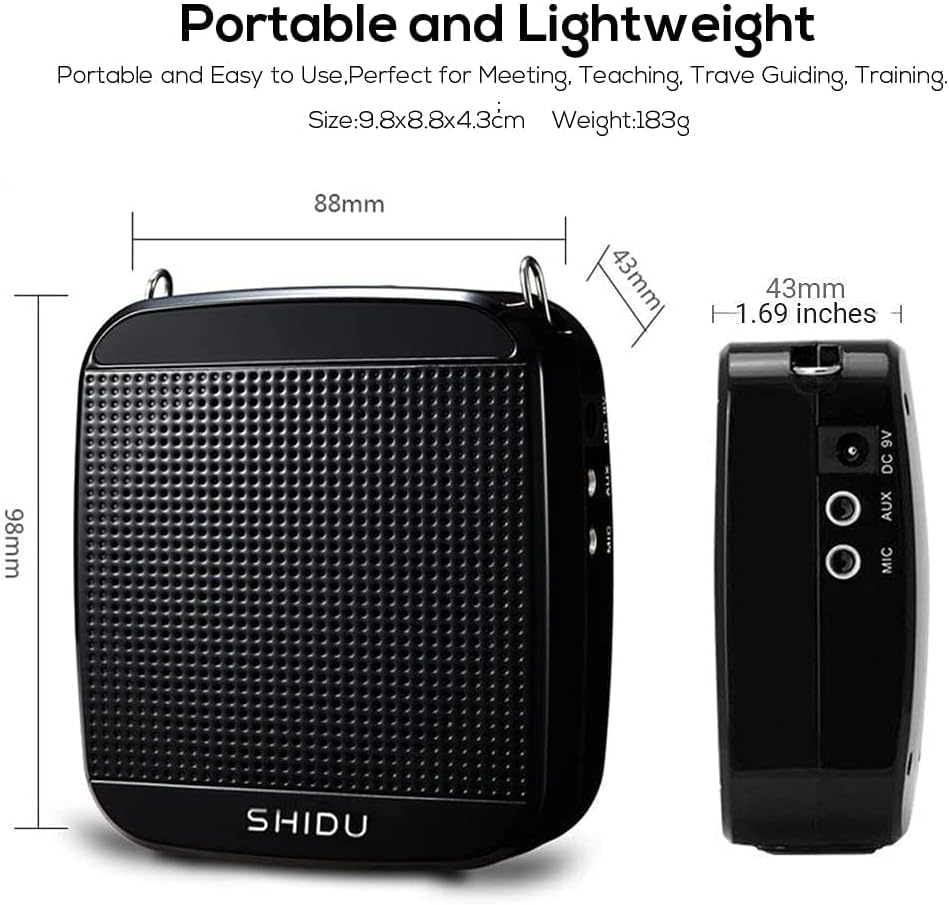
Image: Front and side views of the SHIDU S613 amplifier, illustrating its compact dimensions (98mm x 88mm x 43mm) and showing the DC 9V, AUX, and MIC input ports on the side.

Image: Top view of the SHIDU S613 amplifier, highlighting the USB port, TF card slot, and the ON/OFF switch with integrated roller volume control. This image also shows a USB flash drive and a TF card, indicating compatibility.
Key Features:
- Power Output: 18W for clear and loud sound.
- Connectivity: Bluetooth, TF card, U disk, and Aux audio input.
- Wireless Microphone: UHF wireless headset for hands-free operation.
- Rechargeable Battery: Built-in 2200mAh battery for extended use.
- Compact Design: Portable and lightweight for easy transport.
Setup
Charging the Device:
Before first use, ensure both the voice amplifier and the wireless microphone are fully charged.
- Voice Amplifier: Connect the DC 9V charger to the amplifier's DC 9V port. Charging time is approximately 3-5 hours.
- Wireless Microphone: Connect the 5V wall charger to the microphone's charging port. Charging time is approximately 2-3 hours.

Image: An illustration showing the SHIDU S613 amplifier next to a battery icon with a clock, indicating its 18W power and 2200mAh battery capacity, and highlighting its long working hours after charging.
Initial Connection:
- Turn on the voice amplifier using the ON/OFF switch.
- Turn on the wireless microphone. The microphone should automatically pair with the amplifier.
- Adjust the volume using the roller control on the amplifier.
Operating Instructions
Voice Amplification Mode:
- Ensure the wireless microphone is charged and paired.
- Wear the headset microphone comfortably.
- Speak into the microphone. Adjust the volume on the amplifier to your desired level.
- The amplifier provides clear sound coverage up to 10,000 sq.ft.

Image: The SHIDU S613 amplifier with sound waves emanating from its speaker, illustrating its excellent sound quality, loud and clear output, and low distortion even at high volume.
Music Playback Modes:
The amplifier supports various audio input methods:
- Bluetooth:
- Turn on the amplifier and activate Bluetooth mode (if applicable, usually automatic or via a mode button).
- Enable Bluetooth on your device (smartphone, tablet, etc.) and search for "SHIDU S613" or similar.
- Pair and connect. You can now play audio from your device through the amplifier.
- TF Card / U Disk:
- Insert a TF card or U disk (USB flash drive) with MP3 music files into the corresponding slot on the amplifier.
- The amplifier should automatically detect and begin playing music. Use the controls on the amplifier to skip tracks or adjust volume.
- AUX Audio Input:
- Connect one end of the audio cable to the AUX port on the amplifier.
- Connect the other end to the audio output (headphone jack) of your computer, laptop, iPad, or phone.
- The amplifier will function as an external speaker.

Image: A collage of images demonstrating various scenarios where the SHIDU S613 voice amplifier can be used, including meetings, teaching, retail environments (the mall), tourist guiding, and yoga training, highlighting its versatility.
Maintenance
- Cleaning: Use a soft, dry cloth to clean the surface of the amplifier and microphone. Do not use liquid cleaners or aerosols.
- Storage: Store the device in a cool, dry place away from direct sunlight and extreme temperatures when not in use for extended periods.
- Battery Care: To prolong battery life, avoid fully discharging the battery frequently. Charge the device regularly, even if not in constant use.
Troubleshooting
If you encounter issues, please refer to the following common solutions:
| Problem | Possible Cause / Solution |
|---|---|
| No sound from amplifier. |
|
| Microphone not connecting or cutting out. |
|
| Distorted sound. |
|
| Device not charging. |
|
Important Tips:
- Do not frequently insert or plug the connector to avoid looseness of the socket or poor connection.
- Distinguish between the MIC and AUX plugs to ensure correct connection.
- Before using, turn down the volume and then adjust it according to your needs to prevent sudden loud sounds.
- Original accessories are suggested if replacements are needed.
Specifications
| Feature | Detail |
|---|---|
| Power Output | 18W |
| Battery Capacity (Amplifier) | 2200mAh |
| Frequency Response | 80Hz-18KHz |
| Charging Voltage (Amplifier) | DC9V, 1200mA |
| Charging Voltage (Microphone) | DC5V, 500mA |
| Working Time (Wired MIC mode) | 6-8 hours |
| Working Time (Musical mode) | 6-8 hours |
| Working Time (Wireless Microphone) | 4 hours (dependent on volume) |
| Charging Time (Amplifier) | 3-5 hours |
| Charging Time (Microphone) | 2-3 hours |
| Sound Coverage | 10,000 sq.ft |
| Work Temperature | -10℃ to 45℃ |
| Product Dimensions | 98mm x 88mm x 43mm (3.86 x 3.46 x 1.69 inches) |
| Unit Weight | 183g / 0.4lb |
| Connectivity Technology | Bluetooth, Aux, USB |
| Mounting Type | Tabletop |
Warranty and Support
SHIDU offers an easy return and full refund policy on your purchase within 30 days from the date of purchase. Additionally, a 1-year warranty is provided from the date of purchase.
Should you require any assistance, please do not hesitate to contact SHIDU customer support. Refer to the contact information provided in the included user manual or on the official SHIDU website.
Ask a question about this manual
Ask about setup, troubleshooting, compatibility, parts, safety, or missing instructions. Manuals+ will review the question and use this page’s manual context to help answer it.