
1. Introduction
This manual provides essential information for the safe and efficient operation, installation, and maintenance of your Kratos Refrigeration 69K-809 Commercial Reach-in Refrigerator. Please read this manual thoroughly before operating the unit and retain it for future reference. This commercial refrigerator is designed for professional food service environments, offering reliable cooling and ample storage capacity.
2. Safety Information
Always follow basic safety precautions when using this appliance to reduce the risk of fire, electric shock, or injury.
- Electrical Safety: Ensure the unit is connected to a properly grounded electrical outlet with the correct voltage and amperage as specified on the rating label. Do not use extension cords.
- Ventilation: Maintain adequate clearance around the unit for proper air circulation to prevent overheating of the compressor.
- Placement: Place the unit on a strong, level surface capable of supporting its total weight when fully loaded.
- Cleaning: Disconnect power before cleaning or performing any maintenance. Use non-abrasive cleaners.
- Service: All service and repairs should be performed by a qualified technician. Unauthorized repairs can void the warranty and create hazards.
- Flammable Materials: Do not store explosive substances or flammable materials inside or near the refrigerator.
3. Product Overview
The Kratos 69K-809 is a robust commercial reach-in refrigerator designed for demanding kitchen environments. It features a durable stainless steel construction and a spacious interior.

Front view of the Kratos 69K-809 Commercial Reach-in Refrigerator with three solid doors.
Key Features:
- Heavy-Duty Construction: Stainless steel exterior and interior for enhanced durability and hygiene in commercial settings.
- Adjustable Shelving: Nine corrosion-resistant, epoxy-coated shelves, each capable of holding up to 89 lbs., designed to accommodate full-size sheet pans.
- Mobile Design: Equipped with heavy-duty casters with brakes for easy movement during cleaning and maintenance.
- LED Display: A large, bright digital display for convenient temperature monitoring.
- Auto Defrost Function: Helps maintain ideal temperatures and prevents ice buildup.
- Self-Closing Doors: Each door features a recessed handle and a 90-degree stay-open feature for convenient loading and unloading.
- Top-Mounted Compressor: Maximizes internal storage space and cooling efficiency.
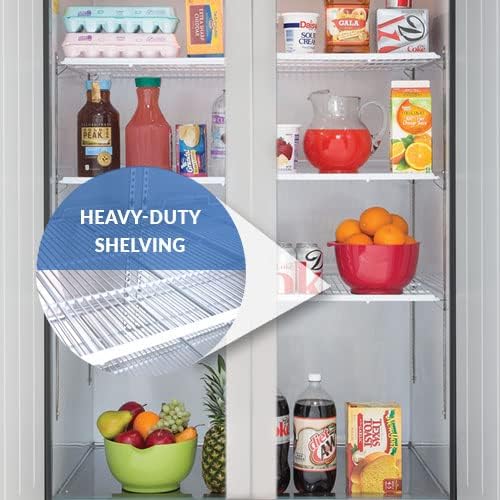
Interior view highlighting the heavy-duty, adjustable shelving.

Diagram showing the overall dimensions of the Kratos 69K-809 refrigerator.
Product Video:
This video provides an overview of the Kratos and Central Exclusive Three-Door Refrigeration units, highlighting key features and benefits.
4. Setup
- Unpacking: Carefully remove all packaging materials. Inspect the unit for any shipping damage. Report any damage immediately to the carrier.
- Placement: Choose a location that is level, well-ventilated, and away from direct sunlight or heat sources. Ensure at least 6 inches of clearance from walls for proper air circulation.
- Caster Installation: If not pre-installed, attach the heavy-duty casters to the bottom of the unit. Ensure all casters are securely tightened, and engage the brakes once the unit is in its final position.
- Initial Cleaning: Before first use, clean the interior and exterior surfaces with a mild soap and water solution. Wipe dry thoroughly.
- Power Connection: Plug the unit into a dedicated, grounded electrical outlet. Do not use extension cords or adapter plugs.
- Initial Startup: Allow the unit to sit for at least 2 hours after moving before plugging it in to allow refrigerants to settle. Once plugged in, allow the unit to run for several hours (e.g., 4-6 hours) to reach its operating temperature before loading products.
5. Operating Instructions
- Temperature Control: The unit features an LED display for easy temperature monitoring. Use the control panel to set the desired temperature. Refer to the specific control panel instructions for detailed programming.
- Loading Product: Arrange products to allow for proper air circulation within the cabinet. Do not block air vents. The adjustable shelves can be repositioned to accommodate various product sizes.
- Door Usage: The self-closing doors ensure minimal temperature loss. For extended loading or unloading, utilize the 90-degree stay-open feature by opening the door fully until it locks into place. Gently push the door to release it from the stay-open position.
- Auto Defrost: The unit is equipped with an automatic defrost system. This cycle will periodically run to prevent ice buildup on the evaporator coil. During defrost, the internal temperature may temporarily rise slightly.
6. Maintenance
Regular maintenance is crucial for the longevity and efficient operation of your refrigerator.
- Daily Cleaning: Wipe down the interior and exterior surfaces daily with a damp cloth and mild detergent. Dry thoroughly to prevent water spots and corrosion.
- Condenser Coil Cleaning (Monthly/Quarterly): The condenser coil can accumulate dust and debris, reducing efficiency. Disconnect power, locate the condenser coil (usually at the top or bottom near the compressor), and use a brush or vacuum cleaner to remove dust. For heavily soiled coils, professional cleaning may be required.
- Door Gasket Inspection (Monthly): Inspect door gaskets for cracks, tears, or signs of wear. Damaged gaskets can lead to air leaks and increased energy consumption. Replace worn gaskets promptly.
- Drain Pan Cleaning (Regularly): Check and clean the drain pan to prevent blockages and odors.
- Interior Shelves: Remove and clean shelves as needed with warm, soapy water.
7. Troubleshooting
Before contacting service, check the following common issues:
| Problem | Possible Cause | Solution |
|---|---|---|
| Unit not cooling | Power supply issue, thermostat set too high, condenser coil dirty, excessive door openings. | Check power connection/breaker. Adjust thermostat. Clean condenser coil. Ensure doors are closed properly. |
| Unit runs constantly | Dirty condenser coil, door gasket leak, ambient temperature too high. | Clean condenser coil. Inspect and replace door gaskets if damaged. Ensure proper ventilation. |
| Excessive noise | Loose components, fan obstruction, unit not level. | Check for loose parts. Clear any obstructions from fans. Ensure unit is level. |
| Water on floor | Clogged drain line, drain pan overflow. | Clear drain line. Empty and clean drain pan. |
If problems persist after attempting these solutions, contact a qualified service technician.
8. Specifications
| Specification | Detail |
|---|---|
| Brand | Kratos |
| Model Number | 69K-809 |
| Capacity | 72 Cubic Feet |
| Installation Type | Freestanding |
| Number of Doors | 3 (Solid Doors) |
| Defrost System | Automatic |
| Door Material Type | Stainless Steel |
| Shelf Type | Wire (Epoxy-coated) |
| Form Factor | Side By Side |
9. Warranty and Support
Your Kratos Refrigeration 69K-809 Commercial Reach-in Refrigerator comes with the following warranty:
- Parts & Labor: 2 Years
- Compressor: 5 Years
Important Warranty Information:
- Warranty is void if the unit is used in a residential setting.
- A 90-day limited warranty applies to units used in food trucks or mobile applications.
For technical support, warranty claims, or to order replacement parts, please contact Kratos customer service. Have your model number and purchase date ready when you call.
Contact Information: Please refer to the contact details provided with your purchase documentation or visit the official Kratos website for the most current support information.


