
EASYGUARD EC009-K-L
EASYGUARD EC009-K-L PKE Car Alarm System User Manual
Model: EC009-K-L
Introduction
This manual provides comprehensive instructions for the installation, operation, maintenance, and troubleshooting of the EASYGUARD EC009-K-L PKE Car Alarm System. This system is designed to enhance vehicle security and convenience with features such as Passive Keyless Entry (PKE), remote engine start, push start button, and shock alarm warning. It is compatible with most DC12V petrol vehicles.
Important Note: Professional car alarm installer installation is highly recommended for this product. This system is not compatible with cars that have a double pulse for unlock, pneumatic or vacuum locking systems, or factory-installed push start buttons. An extra bypass module may be required for vehicles with a chip immobilizer in the factory OEM key fob.
Safety Information
- Always disconnect the vehicle's battery before beginning any installation work to prevent electrical shorts or damage.
- Ensure all wiring connections are secure and properly insulated to prevent short circuits and fire hazards.
- Do not attempt to install this system if you are not familiar with automotive electrical systems. Seek professional assistance.
- Verify that the vehicle is in neutral (manual transmission) or park (automatic transmission) before using the remote engine start feature.
- Do not leave children or pets unattended in a vehicle with the remote start feature active.
- Ensure the steering lock is unlocked, released, or removed during installation as per the product requirements.
Package Contents
Please verify that all items listed below are included in your package:
- Main Control Unit
- Remote Key Fobs (2x)
- Push Start Button
- Siren
- Shock Sensor
- PKE Antennas (2x)
- Wiring Harnesses
- Installation Guide & User Manual

Figure 1: All components included in the EASYGUARD EC009-K-L PKE Car Alarm System package.
Product Overview
Main Control Unit
The central processing unit of the alarm system, responsible for managing all functions.

Figure 2: Top view of the main control unit with dimensions (113.5mm length, 67.5mm width).
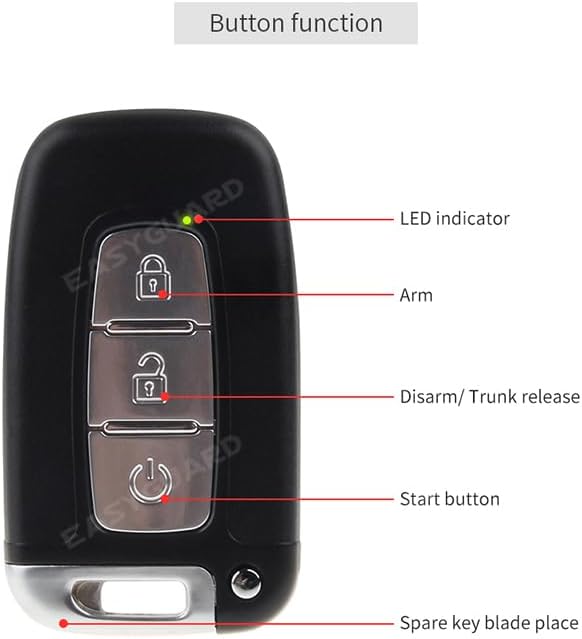
Figure 3: Side view of the main control unit with dimensions (27.8mm height).
Remote Key Fob
Used for arming/disarming, remote start, and trunk release. Features an LED indicator and a spare key blade place.

Figure 4: Detailed view of the remote key fob buttons and their functions: LED indicator, Arm, Disarm/Trunk release, Start button, and Spare key blade place.

Figure 5: Front and back view of the remote key fob, showing the low battery tip on the back.
Siren
Emits audible warnings when the alarm is triggered.

Figure 6: The siren unit with its mounting bracket and wiring.
Shock Sensor
Detects impacts or vibrations to the vehicle and triggers the alarm.

Figure 7: The shock sensor module with its wiring harness.
Wiring Harnesses and Antennas
Various cables and antennas for connecting components and enabling PKE functionality.

Figure 8: A collection of wiring harnesses and PKE antennas included with the system.
Setup and Installation
Installation of the EASYGUARD EC009-K-L system requires knowledge of automotive electrical systems. It is strongly recommended to have this system installed by a qualified professional car alarm installer.
Pre-Installation Checks:
- Confirm your vehicle is a DC12V petrol car.
- Ensure your vehicle does not have a double pulse for unlock or a pneumatic/vacuum locking system.
- If your vehicle has a factory chip immobilizer, acquire an appropriate bypass module (e.g., ASIN: B00MEHBVIC).
- Unlock/release/remove the steering lock as required for installation.
General Installation Steps (Consult Wiring Diagram for Details):
- Disconnect Battery: Always disconnect the negative terminal of the vehicle's battery before starting.
- Mount Main Control Unit: Choose a secure, hidden location inside the vehicle, away from moisture and extreme temperatures.
- Connect Wiring Harnesses: Follow the provided wiring diagram carefully. Connect power, ground, ignition, accessory, and starter wires.
- Install Push Start Button: Replace the existing ignition switch with the new push start button. Ensure proper wiring for ignition, accessory, and start signals.
- Install PKE Antennas: Strategically place the PKE antennas (typically one inside and one outside the vehicle) to ensure optimal passive keyless entry range.
- Mount Siren: Install the siren in the engine bay, facing downwards to prevent water accumulation.
- Install Shock Sensor: Mount the shock sensor securely to a rigid part of the vehicle's chassis. Adjust sensitivity as needed after installation.
- Connect Central Door Locking: Wire the system to the vehicle's central door locking system. Default is electrical locking; pneumatic option available if applicable.
- Optional Connections: Connect optional modules such as trunk release solenoid (e.g., ASIN: B00N4RP8VM) or window closer modules (e.g., 4-door ASIN: B00N3RKA8E, 2-door ASIN: B00N4S92SQ, 5-door ASIN: B00NTOL03K).
- Reconnect Battery: Once all connections are made and verified, reconnect the vehicle's battery.
- Test System: Perform thorough testing of all functions (arming, disarming, PKE, remote start, push start, shock sensor, etc.).
Operating Instructions
Passive Keyless Entry (PKE)
The PKE feature automatically locks and unlocks your vehicle as you approach or walk away, provided the key fob is with you.
- Automatic Unlock: When you approach the vehicle with the key fob within 1-2 meters (3-6 feet), the car doors will automatically unlock.
- Automatic Lock: When you walk away from the car with the key fob beyond 6-9 feet, the car doors will automatically lock and the system will arm.
- PKE On/Off Setting: The PKE function can be enabled or disabled via a specific programming sequence (refer to the detailed installation guide for programming steps).

Figure 9: Illustration of the PKE system automatically unlocking when approaching (3-6ft) and locking when walking away (6-9ft) from the vehicle.
Remote Engine Start/Stop
Allows you to start your vehicle remotely to pre-cool in summer or pre-warm in winter.
- To Start: Press and hold the remote start button on the key fob for approximately 3 seconds. The vehicle will start and run for a preset duration (usually 10-15 minutes).
- To Stop: Press and hold the remote start button again for approximately 3 seconds, or disarm the system.
- Diesel Cars: For diesel cars with engine starting time over 3 seconds, you may need to turn on the ON dashboard first to pre-warm the spark plug, or add an extra timer delay switch.

Figure 10: Depiction of using the remote engine start feature to adjust cabin temperature before entering the vehicle.
Push Start Button
Replaces the traditional ignition key for starting and stopping the engine.
- To Start: With the key fob inside the vehicle, press the brake pedal and then press the push start button.
- To Stop: With the vehicle stationary, press the push start button once.
- ACC/ON Modes: Press the button without pressing the brake pedal to cycle through ACC (Accessory) and ON (Ignition) modes.
Arm/Disarm/Mute Arm
- Arm: Press the lock button on the key fob once to arm the system. The vehicle lights will flash, and the siren will chirp once.
- Disarm: Press the unlock button on the key fob once to disarm the system. The vehicle lights will flash twice, and the siren will chirp twice.
- Mute Arm: Press the lock button and then the unlock button quickly to arm the system without siren chirps.
Other Features
- Shock Sensor Alarm Trigger: If the vehicle experiences a significant impact while armed, the alarm will sound.
- Manual Lock/Unlock: Use the remote key fob buttons for manual locking and unlocking, overriding PKE if desired.
- Emergency Disarm: A specific procedure (refer to the detailed installation guide) to disarm the system without the key fob in emergencies.
- Siren Pause: Press any button on the key fob to temporarily silence the siren during an alarm trigger.
- Remote Trunk Release: Press and hold the unlock/trunk release button on the key fob to open the trunk (requires compatible vehicle wiring and/or extra solenoid kit).
- Anti-Hijacking: A safety feature that can be activated to prevent vehicle theft during a hijacking attempt.
- Auto-Rearm (Anti-False Disarm): If the system is disarmed but no door is opened within a certain time, it will automatically re-arm.
- Door Unclosed Well Reminding: The system will alert you if a door is not properly closed when attempting to arm.
- Central Door Locking Automation: Doors can be set to automatically lock when the ignition is turned on and unlock when the ignition is turned off.
- Power Off Memory: The system retains its armed/disarmed state even after power interruption.
- Window Rolls Up Automatically (Optional): With an additional window closer module, windows can automatically roll up when the system is armed.
- Code Learning/Programming Method: Procedures for pairing new key fobs or reprogramming existing ones (refer to the detailed installation guide).
Maintenance
- Key Fob Battery Replacement: The remote key fobs require 2 CR2 batteries. Replace them when the low battery tip appears on the back of the fob or when the range decreases significantly.
- System Checks: Periodically test all alarm functions (arming, disarming, remote start, shock sensor) to ensure proper operation.
- Wiring Inspection: If you experience issues, visually inspect all wiring connections for looseness, corrosion, or damage.
- Keep Clean: Keep the main control unit and other components free from dust and moisture.
Troubleshooting
| Problem | Possible Cause | Solution |
|---|---|---|
| System does not respond to remote. | Dead key fob battery; remote out of range; system not receiving signal. | Replace key fob battery. Move closer to the vehicle. Check PKE antenna connections. |
| Engine cranks but does not start with remote start. | Immobilizer not bypassed; incorrect wiring; vehicle not in park/neutral. | Ensure bypass module is correctly installed and functioning. Verify all wiring connections. Confirm vehicle is in park/neutral. |
| Doors lock then immediately unlock (double pulse issue). | Vehicle's factory locking system requires a single pulse, but the alarm system is sending a double pulse. | This system is not compatible with vehicles requiring a single pulse for unlock if it sends a double pulse. Consult a professional installer for potential workarounds or alternative wiring if available, though direct compatibility is stated as an issue. |
| PKE not working or inconsistent. | PKE function disabled; antenna placement issues; interference. | Check PKE on/off setting. Adjust antenna placement. Avoid strong electromagnetic interference. |
| Alarm triggers without apparent reason. | Shock sensor sensitivity too high; faulty sensor; loose wiring. | Adjust shock sensor sensitivity. Check sensor wiring. Replace sensor if faulty. |
Specifications
| Feature | Detail |
|---|---|
| Model Number | EC009-K-L |
| Brand | EASYGUARD |
| Compatible Devices | DC12V petrol cars |
| Maximum PKE Range | 2 Meters (approx. 6-7 feet) for unlock, 6-9 feet for lock |
| Remote Control Included | Yes (2 key fobs) |
| Key Fob Batteries | 2 CR2 batteries required |
| Item Weight | 3.17 pounds |
| Package Dimensions | 10 x 7.05 x 3.9 inches |
| Manufacturer | Zhongshan easyguard electronics co.,ltd |
Warranty and Support
For warranty information and technical support, please contact EASYGUARD directly. It is recommended to retain your purchase receipt for warranty claims.
Manufacturer: Zhongshan easyguard electronics co.,ltd
Official Website: ieasyguard.com
Contact Information (from packaging):
- Tel: +86-760-2211-3387
- Email: sales@easyguard.com
- Web: www.ieasyguard.com
- Address: 2F, floor, building 3, NO. 77 Caihong Road, Zhongshan city, Guangdong, China
- WeChat: Scan QR Code
Related documentsEC009-K-L


Ask a question about this manual
Ask about setup, troubleshooting, compatibility, parts, safety, or missing instructions. Manuals+ will review the question and use this page’s manual context to help answer it.