
1. Introduction
This manual provides instructions for the safe and efficient use of your SLLEA 5-Pin Mini DIN 12V 5V 2A AC/DC Adapter, model ADS-1234TAAA. This power supply is designed to convert AC power to DC power for compatible electronic devices requiring 12VDC and 5VDC output via a 5-pin Mini DIN connector.
Please read this manual thoroughly before using the product and retain it for future reference.
2. Safety Information
- Ensure the adapter's input voltage (100-240V) matches your local power supply.
- Only use the adapter with devices that require 12VDC and 5VDC output with a 5-pin Mini DIN connector. Using it with incompatible devices may cause damage.
- Do not expose the adapter to water, moisture, or extreme temperatures.
- Avoid dropping or subjecting the adapter to strong impacts.
- Do not attempt to open or modify the adapter. This will void the warranty and may pose a safety risk.
- Unplug the adapter from the power outlet when not in use for extended periods.
- This product is designed with over-heat and over-voltage protection features to ensure safe operation.
- Proposition 65 Warning: This product may contain chemicals known to the State of California to cause cancer and birth defects or other reproductive harm.
3. Product Features
- Universal Input: Supports AC input from 100V to 240V, 50/60Hz.
- Dual DC Output: Provides 12VDC and 5VDC at 2A.
- Connector Type: Equipped with a 5-Pin Mini DIN connector.
- Safety Certified: CE certified, ensuring compliance with European safety standards.
- Durable Construction: Features a sturdy casing designed for longevity and resistance to bending.
- Protection Mechanisms: Includes built-in over-heat and over-voltage protection.
4. Setup Instructions
- Inspect the Adapter: Before use, visually inspect the adapter and cables for any signs of damage. Do not use if damaged.
- Connect to Device: Carefully insert the 5-Pin Mini DIN connector into the corresponding port on your compatible device (e.g., LT Honor ADS-1234TAAA). Ensure a secure fit.
- Connect to Power Outlet: Plug the AC power cord into the adapter's input port, then plug the other end of the AC power cord into a standard wall outlet (100-240V, 50/60Hz).
- Verify Connection: Once connected, your device should receive power. Some adapters may have an indicator light to show power is active.

Figure 1: The SLLEA 5-Pin Mini DIN AC/DC Adapter with its detachable AC power cord and the 5-pin Mini DIN output connector.
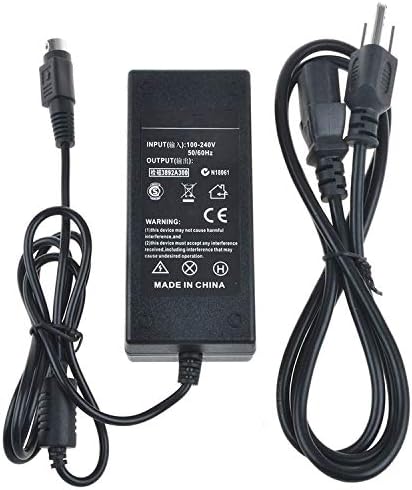
Figure 2: Rear view of the adapter showing the input/output specifications and safety certifications printed on the label.
5. Operating Instructions
Once properly connected, the adapter will supply power to your device. No further user interaction is typically required for operation. Ensure the adapter is placed in a well-ventilated area to prevent overheating.
To disconnect power, first unplug the AC power cord from the wall outlet, then disconnect the 5-Pin Mini DIN connector from your device.
6. Maintenance
- Cleaning: Disconnect the adapter from all power sources before cleaning. Use a soft, dry cloth to wipe the exterior. Do not use liquid cleaners or solvents.
- Storage: Store the adapter in a cool, dry place away from direct sunlight and moisture when not in use. Avoid tightly coiling the cables to prevent damage.
- Inspection: Periodically check the cables and connectors for any signs of wear, cuts, or damage. Replace the adapter if any damage is observed.
7. Troubleshooting
- Device Not Powering On:
- Ensure the AC power cord is securely plugged into both the wall outlet and the adapter.
- Verify the 5-Pin Mini DIN connector is fully inserted into your device.
- Check if the wall outlet is functional by plugging in another device.
- Confirm that your device is compatible with the adapter's voltage and connector type.
- Adapter Feels Hot:
- It is normal for power adapters to become warm during operation. However, if it feels excessively hot to the touch, disconnect it immediately.
- Ensure the adapter is in a well-ventilated area and not covered.
- Verify that the connected device is not drawing more current than the adapter's rated output (2A).
- Unusual Noises: If the adapter produces any physical noise (e.g., buzzing, humming), disconnect it immediately and discontinue use.
8. Specifications
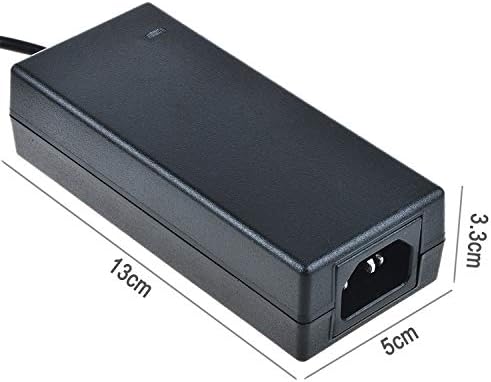
Figure 3: Dimensions of the adapter body, approximately 13cm (length) x 5cm (width) x 3.3cm (height).
| Feature | Detail |
|---|---|
| Brand | SLLEA |
| Model | ADS-1234TAAA |
| Input Voltage | 100-240V AC, 50/60Hz |
| Output Voltage | 12V DC & 5V DC |
| Output Current | 2A |
| Connector Type | 5-Pin Mini DIN |
| Power Source | Corded Electric |
| Item Weight | 1.88 pounds (approximately 0.85 kg) |
| UPC | 607182643294 |
9. Warranty and Support
This product comes with a manufacturer's warranty. For specific warranty details and support, please refer to the information provided at the time of purchase or contact SLLEA customer service.
If you have any questions or concerns regarding the use or performance of this adapter, please contact the seller or manufacturer for assistance.