
Introduction
This manual provides instructions for the setup, operation, maintenance, and troubleshooting of your Rhythm Clocks Crystal Dulcet II Musical Motion Table Clock. This clock features a pearl finish with gold-toned accents, a selection of 36 melodies, and a continuously spinning Swarovski crystal-encrusted pendulum. It operates on battery power and includes a light sensor to manage hourly melodies.
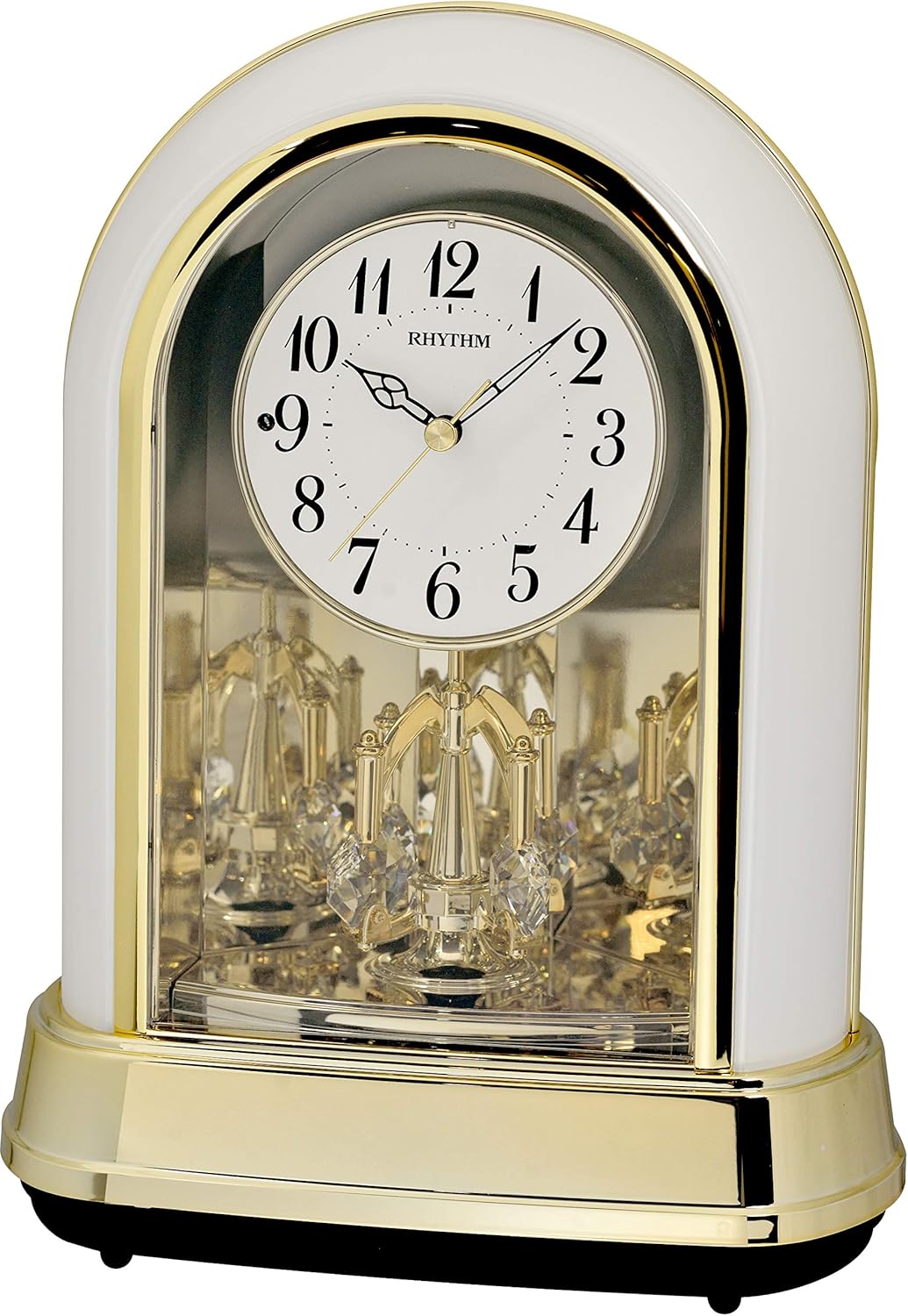
Front view of the Rhythm Clocks Crystal Dulcet II Musical Motion Table Clock in Pearl finish, showcasing its elegant design, gold accents, and visible pendulum.
Package Contents
Verify that all items are present in the package:
- One Rhythm Clocks Crystal Dulcet II Musical Motion Table Clock
- Four AA batteries
Setup
1. Battery Installation
- Locate the battery compartment cover on the back of the clock.
- Remove the cover by sliding or unlatching it.
- Insert four (4) AA batteries, ensuring the correct polarity (+/-) as indicated inside the compartment.
- Replace the battery compartment cover securely.
2. Placement
- Place the clock on a stable, level surface such as a table, shelf, or mantel.
- Ensure the clock is positioned indoors, away from direct sunlight, extreme temperatures, or high humidity, which can affect its performance and lifespan.
- If wall mounting is desired, use appropriate hardware (not included) and ensure the clock is securely fastened and level.
Operating Instructions
1. Setting the Time
- Locate the time setting knob or button on the back or side of the clock.
- Rotate the knob or press the button to adjust the hands to the correct time.
2. Melody Selection
- The clock offers a selection of 36 melodies, including folk, classical, and Christmas tunes.
- Refer to the controls on the back of the clock to cycle through the available melody groups or individual melodies.
- The clock will play one of the selected melodies on the hour.
3. Volume Control
- An adjustable volume control is located on the back of the clock.
- Rotate the dial or slide the switch to increase or decrease the melody volume to your preference.
4. On/Off Switch
- The clock features an On/Off switch for the melodies.
- Set the switch to 'Off' to silence the hourly melodies while the clock continues to keep time.
5. Light Sensor
- The integrated light sensor automatically silences the hourly melodies when the room becomes dark. This feature prevents melodies from playing during nighttime hours.
- Ensure the light sensor is not obstructed for proper function.
6. Pendulum Operation
- The Swarovski crystal-encrusted carousel pendulum is designed to spin continuously when the clock is operating.
- No manual intervention is required for the pendulum's motion.
Maintenance
1. Cleaning
- Wipe the clock's surface with a soft, dry cloth.
- Avoid using abrasive cleaners, solvents, or chemical sprays, as these can damage the finish.
2. Battery Replacement
- Replace all four AA batteries when the clock's performance diminishes, such as inaccurate timekeeping or weak melodies.
- Always replace all batteries at the same time with new, high-quality alkaline batteries.
- Dispose of used batteries according to local regulations.
Troubleshooting
- Clock Not Working: Ensure batteries are inserted correctly with the proper polarity. Replace old batteries with new ones.
- Music Not Playing: Check the volume control and ensure it is not set to minimum. Verify the On/Off switch is in the 'On' position. Confirm the room is adequately lit for the light sensor to allow melodies to play.
- Pendulum Not Moving: Check for any obstructions preventing the pendulum from spinning. Ensure the clock is placed on a level surface. Replace batteries if they are low.
- Inaccurate Time: Replace batteries. Reset the time. If issues persist, contact customer support.
Specifications
| Feature | Detail |
|---|---|
| Brand | RHYTHM |
| Model Number | 4RH794WU03 |
| Color | Pearl |
| Display Type | Analog |
| Special Feature | Musical, Light Sensor, Spinning Pendulum |
| Product Dimensions | 8.4"W x 10.7"H x 6.2"D |
| Power Source | Battery Powered |
| Number of Batteries | 4 AA batteries (included) |
| Material | Glass, Metal |
| Item Weight | 2.4 Pounds |
| Mounting Type | Table Mount, Wall Mount |
| GTIN (UPC) | 009136794036 |
Warranty and Support
This Rhythm Clocks product comes with a limited manufacturer's warranty. The warranty period is typically one (1) year from the date of purchase, covering defects in materials and workmanship.
For warranty claims, technical support, or further assistance, please contact Rhythm Clocks customer service. Keep your proof of purchase for warranty validation.
Manufacturer: Rhythm Clocks
