
1. Introduction
This manual provides essential instructions for the setup, operation, and maintenance of your Easytry123 replacement remote control. This remote is designed to function with specific Sony KDL series LCD HDTV models, including KDL-50R450A, KDL-40R475B, KDL-40R477B, and KDL-40R471A. Please read this manual thoroughly to ensure proper use and to understand the capabilities and limitations of this replacement device.
Important Note: As a replacement unit, this remote control may not support all advanced or unique functions present on your original television remote. Its primary purpose is to provide core television control functionalities.
2. Product Overview
The Easytry123 replacement remote control is an ergonomic, button-controlled device utilizing infrared (IR) technology for communication with your television. It is designed for ease of use and provides access to common television functions.
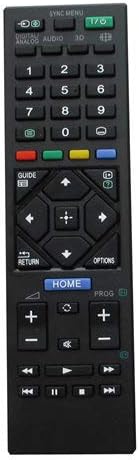
Figure 1: Front view of the remote control, displaying its button layout for various functions.

Figure 2: Rear view of the remote control, highlighting its ergonomic design.
3. Setup
3.1 Battery Installation
The remote control requires two AAA batteries (not included). Follow these steps to install them:
- Locate the battery compartment cover on the back of the remote control.
- Slide the cover downwards or press the latch (if present) to open the compartment.
- Insert two AAA batteries, ensuring the positive (+) and negative (-) terminals align correctly with the markings inside the compartment.
- Slide the battery compartment cover back into place until it clicks securely.
Note: Always use new batteries and replace both batteries at the same time. Do not mix old and new batteries or different types of batteries.
4. Operating Instructions
Once batteries are installed, the remote control is ready for use. Point the remote directly at your Sony LCD HDTV and press the desired function button.
4.1 Basic Functions
- Power (I/O): Turns the TV on or off.
- Number Buttons (0-9): Directly select TV channels.
- Channel Up/Down (PROG +/-): Changes channels sequentially.
- Volume Up/Down (+/-): Adjusts the sound volume.
- Mute: Silences the TV audio.
- Input/Source: Cycles through available input sources (HDMI, AV, etc.).
- Navigation Buttons (Arrows, Enter): Used to navigate menus and confirm selections.
- Home: Accesses the TV's main menu or smart features.
- Return/Back: Returns to the previous screen or menu.
For specific button functions, refer to your television's original user manual, as button labels and their corresponding actions can vary slightly between TV models.
5. Maintenance
5.1 Cleaning
To clean the remote control, gently wipe its surface with a soft, dry cloth. For stubborn dirt, slightly dampen the cloth with water. Avoid using harsh chemicals, abrasive cleaners, or excessive moisture, as these can damage the remote's electronics or finish.
5.2 Storage
When not in use for extended periods, remove the batteries from the remote control to prevent leakage and potential damage. Store the remote in a cool, dry place away from direct sunlight and extreme temperatures.
6. Troubleshooting
If you encounter issues with your remote control, please refer to the following troubleshooting steps:
- Remote Not Responding:
- Ensure batteries are correctly installed with the correct polarity.
- Replace old batteries with new ones.
- Check for any obstructions between the remote control and the TV's IR receiver.
- Ensure you are within a reasonable range and pointing the remote directly at the TV.
- Certain Functions Not Working:
- Verify that your TV model is listed as compatible with this replacement remote.
- Remember that replacement remotes may not support all original TV functions. If a specific advanced function is not working, it may not be supported by this replacement unit.
- Consult your TV's original manual to confirm if the function requires a specific button sequence or is unique to the original remote.
7. Specifications
| Feature | Detail |
|---|---|
| Brand | Easytry123 |
| Compatible Devices | Sony KDL-50R450A, KDL-40R475B, KDL-40R477B, KDL-40R471A LCD HDTVs |
| Connectivity Technology | Infrared (IR) |
| Controller Type | Button Control |
| Special Feature | Ergonomic Design |
| Power Source | 2 x AAA Batteries (not included) |
8. Warranty and Support
Specific warranty information for this Easytry123 replacement remote control is not provided within the product details. For any support inquiries or issues not covered in this manual, please refer to the retailer or point of purchase for assistance.