1. Introduction
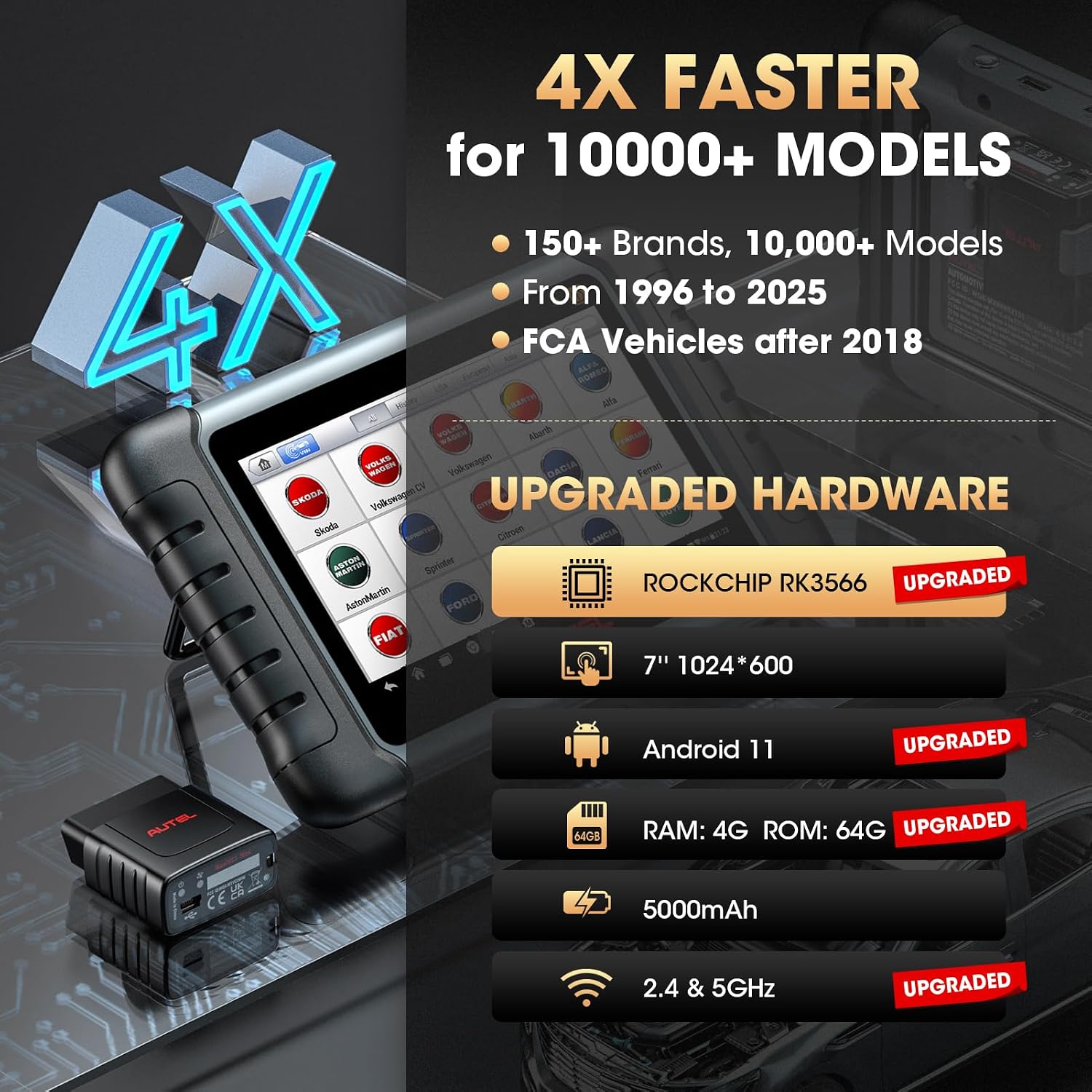
The Autel MaxiPRO MP808S-TS is an advanced diagnostic scan tool designed for comprehensive vehicle system analysis and maintenance. This device integrates full TPMS functions, ECU coding capabilities, bidirectional control, and over 31 service functions, making it a versatile tool for automotive professionals and enthusiasts. It features upgraded hardware for enhanced performance and wider vehicle coverage.

2. Setup and Initial Use
2.1 Unpacking and Power On
Carefully unpack the MaxiPRO MP808S-TS unit and its accessories. Ensure all components are present. Power on the device using the power button. The device runs on Android 11.0 and will guide you through the initial setup process.
2.2 Registration and Updates
Upon first use, register your device to activate the 2-year free update period. Connect the device to a stable Wi-Fi network (2.4 & 5GHz supported) and perform all available software updates to ensure optimal performance and access to the latest vehicle coverage and functions.
2.3 Vehicle Connection
Connect the VCI (Vehicle Communication Interface) dongle to the vehicle's OBDII port, typically located under the dashboard. The MaxiPRO MP808S-TS connects wirelessly to the VCI via Bluetooth, allowing for flexible operation around the vehicle.
3. Operating Instructions
3.1 All-System Diagnostics
The tool provides OE-level diagnostics for all available vehicle systems, including Engine, Transmission, ABS, SRS, TPMS, SAS, EPB, and BMS. This allows for reading and clearing diagnostic trouble codes (DTCs), viewing live data streams, and retrieving ECU information.

3.2 Bidirectional Control (Active Tests)
This function allows the diagnostic tool to send commands to vehicle ECUs to perform specific tests and monitor the operation of actuators. Examples include turning on/off the A/C fan, adjusting adaptive headlamps, or cycling window wipers. This helps in quickly pinpointing vehicle issues.

3.3 ECU Coding & Adaptation
The MaxiPRO MP808S-TS supports advanced ECU coding functions, including online coding for certain brands (e.g., BMW, Porsche, VW, Nissan) and offline coding/adaptation (e.g., Ford, Mazda, Jaguar). It can also refresh hidden features, recode replaced modules, and perform component matching. Note: ECU Coding is not universally compatible with all vehicles and varies by make, model, and year.

3.4 TPMS Functions
This tool offers comprehensive TPMS solutions:
- Diagnose TPMS System: Read/clear codes and view live data from the TPMS module.
- Activate TPMS Sensors: Wirelessly activate 99% of TPMS sensors (315/433MHz), including OE and Autel MX-Sensors.
- Program MX-Sensors: Program Autel MX-Sensors (315/433 Hz) using methods like Copy by Activation, Copy by OBD, Copy by Input, or Auto Create. Up to 16 sensors can be programmed simultaneously.
- TPMS Relearn: Perform stationary, automatic, or OBD relearn procedures for newly replaced or rotated TPMS sensors.
- TPMS Retrofit: Install TPMS modules on vehicles not originally equipped with TPMS (for compatible low-configuration models).

3.5 Service Functions (31+)
The MaxiPRO MP808S-TS provides access to over 31 maintenance and service functions. These functions assist in routine vehicle maintenance and repairs. Available services vary depending on the vehicle's make, model, and year.
- Oil Reset: Reset the oil life system after oil or filter changes.
- EPB Reset: Reset the electronic parking brake after brake pad replacement.
- BMS Reset: Reset the battery management system after battery replacement.
- ABS Bleed: Perform ABS bleeding to remove air from the brake system.
- Injector Coding: Write new injector codes into the ECU for correct fuel delivery.
- SAS Calibration: Perform zero calibration for the steering angle sensor.
- Anti-theft Matching (IMMO Basic): Disable, delete, or match keys for vehicles with low-grade anti-theft systems.
- Additional functions include Throttle Adaptation, Trans Adaptation, Airbag Reset, Suspension Calibration, Headlight Matching, and more.

4. Maintenance
4.1 Software Updates
Regularly check for and install software updates to ensure your device has the latest vehicle coverage, bug fixes, and new features. The MaxiPRO MP808S-TS includes 2 years of free updates from the date of registration. Updates are performed over Wi-Fi.
4.2 General Care
Keep the device clean and free from dust and moisture. Store it in a safe place when not in use. Avoid extreme temperatures and direct sunlight. Use a soft, damp cloth for cleaning the screen and casing.
5. Troubleshooting
If you encounter issues with your MaxiPRO MP808S-TS, consider the following:
- Device Not Powering On: Ensure the battery is charged. Connect the device to the power adapter.
- Connection Issues: Verify the VCI dongle is securely connected to the vehicle's OBDII port. Ensure Bluetooth is enabled on the scanner and the VCI. Check Wi-Fi connection for updates.
- Function Not Working on Vehicle: Remember that specific functions (e.g., ECU Coding, certain service functions) are not universally compatible and vary by vehicle make, model, and year. Consult the vehicle coverage list or contact support for specific compatibility questions.
- Slow Performance: Ensure all software is up to date. Close unnecessary applications running in the background.
For persistent issues, refer to the support section below.
6. Specifications
| Feature | Specification |
|---|---|
| Brand | Autel |
| Operating System | Android 11.0 |
| CPU | ROCKCHIP RK3566 |
| RAM | 4GB |
| ROM | 64GB |
| Display | 7-inch LCD (1024x600 resolution) |
| Wi-Fi | 2.4 & 5GHz Dual-band |
| Battery | 5000mAh Lithium Polymer (included) |
| Dimensions | 10 x 6.9 x 1.4 inches |
| Item Weight | 0.01 ounces (device only, without accessories) |
| Model Number | Autel MP808TS |
| OEM Part Number | Autel MaxiPRO MP808S-TS |
| Vehicle Coverage | 150+ brands, 10000+ models (1996-2025), including FCA AutoAuth |
7. Warranty and Support
The Autel MaxiPRO MP808S-TS comes with a 1-year warranty and 2 years of free software updates from the date of registration. Autel provides lifetime professional technical support and remote assistance.
Contact Information:
For technical assistance or warranty inquiries, please contact Autel support via email: support-amazon@autelonline.com