
1. Introduction
This manual provides instructions for the YING RAY HA-DAN-03 replacement remote control, designed for use with specific DANBY portable air conditioner models. This remote control is a direct replacement and does not require any programming for operation.
Please read this manual thoroughly to ensure proper setup and use of your new remote control.
2. Compatibility
The HA-DAN-03 remote control is specifically designed to be compatible with the following DANBY portable air conditioner models:
- DPA100E1BDB
- DPA100E1WDB
- DPA120E1BDB
- DPA120E1WDB
- DPA100EAUWDB
- DPA100EAUBDB
- DPA120EAUWDB
- DPA120EAUBDB
- DPA120HEAUBDB
- DPA140HEAUBDB
- DPA140HEBUBDB
- DPA140HEAUWDB
- 810900129A
- 810900128F
Important: This is not a universal remote control. It is only compatible with the specific models listed above and those that use a remote control visually identical to the one shown in the main product image.

3. Setup
3.1 Battery Installation
The remote control requires two (2) "AAA" 1.5V ordinary batteries (not included).
- Locate the battery compartment on the back of the remote control.
- Slide the battery cover downwards to open the compartment.
- Insert two "AAA" batteries, ensuring the positive (+) and negative (-) terminals align correctly with the markings inside the compartment.
- Slide the battery cover back into place until it clicks securely.

3.2 Initial Use
Once batteries are installed, the remote control is ready for immediate use. No programming or pairing is required.
4. Operating Instructions
Point the remote control directly at the air conditioner's receiver window. Ensure there are no obstructions between the remote and the unit.
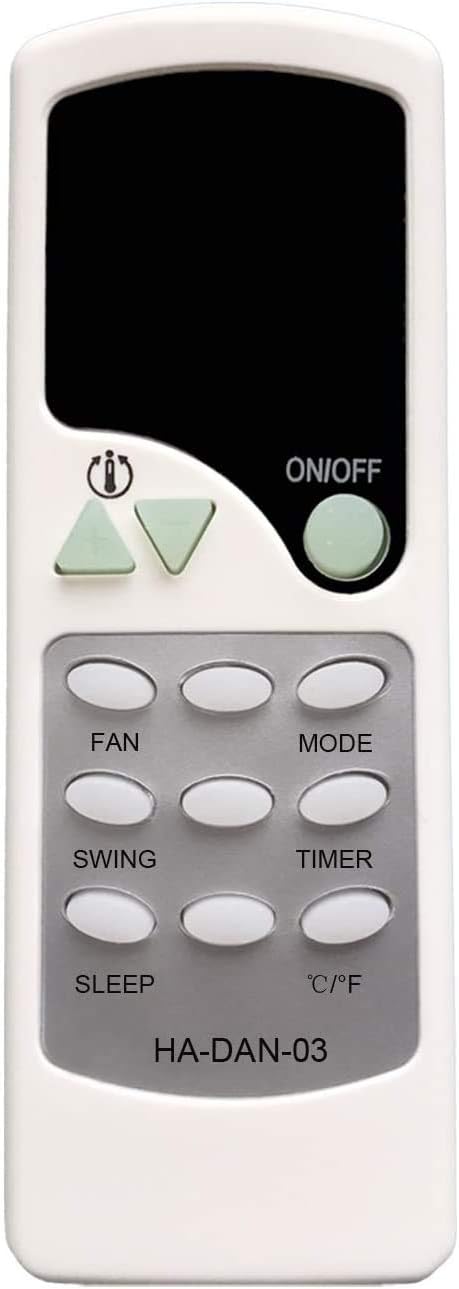
4.1 Button Functions
| Button | Function |
|---|---|
| ON/OFF | Powers the air conditioner on or off. |
| FAN | Adjusts the fan speed (e.g., Low, Medium, High, Auto). |
| MODE | Cycles through operating modes (e.g., Cool, Dry, Fan, Heat, Auto). |
| SWING | Activates or deactivates the automatic louver swing function. |
| TIMER | Sets the timer for automatic power on/off. Refer to your air conditioner's manual for specific timer settings. |
| SLEEP | Activates the sleep mode, which adjusts temperature and fan speed for comfortable sleep. |
| °C/°F | Switches the temperature display between Celsius and Fahrenheit. |
| Temperature Up/Down Arrows | Adjusts the desired temperature setting. |
4.2 Special Features
- Noctilucent Buttons: The ON/OFF and temperature adjustment buttons glow in the dark, providing visibility in low-light conditions.

- Signal Indicator Light: A small light on the remote illuminates when a button is pressed, indicating that a signal is being transmitted.

5. Troubleshooting
5.1 Remote Not Responding
- Check Batteries: Ensure batteries are inserted correctly with the correct polarity (+/-). Replace old batteries with new "AAA" 1.5V batteries if necessary.
- Battery Contact: If the remote does not work after installing batteries, the battery springs might not be making proper contact with the battery's positive pole. Gently pull the battery spring out a little to ensure a firm connection.
- Line of Sight: Ensure there are no obstructions between the remote control and the air conditioner's infrared receiver.
- Compatibility: Double-check that your DANBY air conditioner model is listed in the compatibility section of this manual. This remote is not universal.
6. Specifications
- Model Number: 2018082802 (HA-DAN-03)
- Battery Type: 2 x "AAA" 1.5V Ordinary Battery
- Number of Buttons: 12
- Special Feature: Ergonomic design, Noctilucent buttons (ON/OFF, Temp Up/Down)
7. Support
For further assistance or inquiries regarding the compatibility or operation of your YING RAY replacement remote control, please contact the seller directly through your purchase platform.