
1. Product Overview
The Antminer S9i 14TH/s is a high-performance ASIC (Application-Specific Integrated Circuit) miner specifically designed for Bitcoin mining. This device offers a robust hash rate and efficient power consumption, making it suitable for cryptocurrency mining operations.

Figure 1: Front view of the Antminer S9i 14TH/s Bitcoin Miner, showcasing its compact design and cooling fan.
Key features include:
- High Hash Rate: Achieves a total hash rate of 14.00 TH/s, distributed across three hash boards, each containing 63 hash chips.
- Efficient Power Consumption: Designed for optimal power efficiency with a rating of 94 J/TH + 10%.
- Robust Cooling: Features an air cooling method to maintain optimal operating temperatures.
2. Setup and Installation
Follow these steps to properly set up your Antminer S9i:
- Unpacking: Carefully remove the Antminer from its packaging. Inspect for any visible damage.
- Power Connection: The device requires power to all three PCI-E ports on the hash boards. It is recommended to power the control board before connecting power to the hash boards. You can use one Power Supply Unit (PSU) to power several boards, but avoid powering a single board with two PSUs.

Figure 2: Internal view of the Antminer S9i, showing the hash boards and PCI-E power connectors. Ensure all three PCI-E ports are connected to a power supply.
- Network Connection: Connect an Ethernet cable from your network router or switch to the Ethernet port on the Antminer's control board.

Figure 3: Close-up of the Antminer S9i control board, highlighting the Ethernet port for network connectivity and indicator lights (Reset, Fault, Normal).
- Placement: Place the Antminer in a well-ventilated area to ensure proper airflow for cooling. The operating temperature range is 0 to 40°C.
3. Operating Instructions
Once the Antminer S9i is powered on and connected to the network, it will begin its initialization process. You can typically access the miner's web interface via its IP address to configure mining pools and monitor performance.
- Hash Rate: The device is designed to achieve a hash rate of 14.00 TH/s.
- Power Specifications:
- DC Voltage Input: 11.60 to 13.00V
- DC Input Current (at 12V): 102.3 A +10%
- DC Input Power (at 12V): 1228 W +10%
- 220VAC Power @25°C, 93% conversion efficiency of APW3: 1320 W +10%
- Noise Level: The typical noise level during operation is 76 dB. Consider this when choosing a location for the miner.
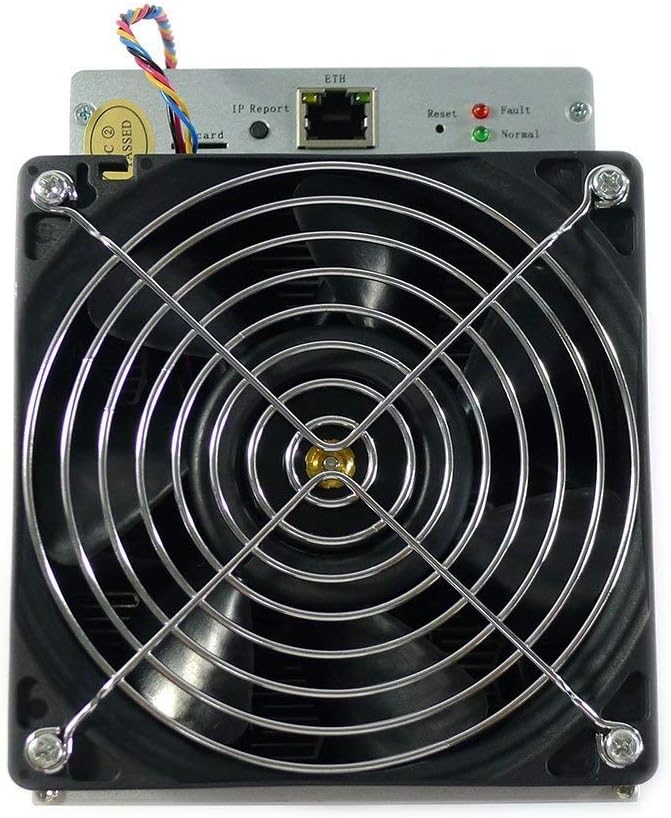
Figure 4: Front view of the Antminer S9i's cooling fan, essential for maintaining operational temperature.

Figure 5: Rear view of the Antminer S9i's cooling fan, showing the Nidec UltraFlo branding, indicating a high-performance fan.
4. Maintenance
Regular maintenance helps ensure the longevity and optimal performance of your Antminer S9i:
- Environmental Conditions:
- Storage Temperature: -40 to 85°C
- Operation Humidity: 5%RH-95%RH (non-condensing)
- Dust Removal: Periodically clean the fans and heatsinks to prevent dust buildup, which can impede airflow and lead to overheating. Use compressed air for best results.
- Cable Management: Ensure all power and network cables are securely connected and not obstructing airflow.
5. Troubleshooting
If you encounter issues with your Antminer S9i, consider the following:
- No Power:
- Verify that all three PCI-E power connectors are securely plugged into the hash boards and the control board is powered.
- Ensure the Power Supply Unit (PSU) is functioning correctly and providing adequate power.
- No Network Connection:
- Check the Ethernet cable connection to both the miner and your network device.
- Confirm your network router/switch is operational.
- Observe the network indicator lights on the control board (refer to Figure 3).
- Low Hash Rate:
- Ensure the miner is operating within the recommended temperature range (0 to 40°C). Overheating can lead to performance degradation.
- Check for dust buildup on fans and heatsinks.
- Verify mining pool configuration and internet connectivity.
- Physical Condition: Minor scratches and rust on the surface do not typically affect the functionality of the device. All hash boards are tested to ensure they are in good working condition before shipment.
6. Specifications
Detailed technical specifications for the Antminer S9i 14.0TH/s:

Figure 6: Detailed specifications table for the Antminer S9i 14.0TH/s.
| Parameter | Value |
|---|---|
| Product Model | S9i-14.0 |
| Total Quantity of Hash Chips | 189 PCS |
| Total Quantity of Hash Boards | 3 PCS |
| Total Hash Rate | 14.00 TH/s |
| DC Voltage Input | 11.60~13.00 V |
| DC Current Input @12V DC Input | 102.3 A +10% |
| DC Power @12V DC Input | 1228 W +10% |
| 220VAC Power @25°C, 93% conversion efficiency of APW3 | 1320 W +10% |
| Power Efficiency | 94 J/TH +10% |
| Weight (without package) | 4.2 kg (9.24 pounds) |
| Operation Temperature | 0-40 °C |
| Storage Temperature | -40 to 85 °C |
| Operation Humidity | 5%RH-95%RH, prevent condensation |
| Noise | 76 dB |
| Networking Connection Mode | Ethernet Cable |
| Power Connection Mode | All three PCI-E ports are required to power the board. One PSU can power multiple boards, but do not attempt to power one board with two PSUs. Control board should be powered up before hash boards. |
| Size (Length*Width*Height) | 350mm*135mm*158mm (13.78 x 5.31 x 6.22 inches) |
7. Warranty and Support
For specific warranty terms and conditions, please refer to the documentation provided by your seller or the official Antminer website. Warranty coverage typically addresses manufacturing defects.
For technical support, troubleshooting assistance beyond this manual, or inquiries regarding repairs, please contact the manufacturer or your authorized reseller. Ensure you have your product model number (S9i 14.0TH/s) and serial number ready when seeking support.


