
Introduction
This manual provides comprehensive instructions for the installation, operation, and maintenance of your PINEWORLD Q303Plus Smart Door Lock. This intelligent lock offers advanced security features and multiple unlocking methods for enhanced home security.
The PINEWORLD Q303Plus is designed with a durable 304 Stainless Steel body and an anti-collision acrylic panel, ensuring longevity and resistance. It integrates a biometric fingerprint module, touchscreen keypad, RFID card reader, and traditional mechanical key access.
Key Features
- Four Unlocking Methods: Fingerprint, User Password, RFID Card, and Mechanical Key.
- High Capacity: Supports up to 100 fingerprints and 100 ID cards.
- Advanced Biometric Recognition: Bio-Electrostatic Fingerprint Identification Technology for fast (<0.4s) and accurate recognition, including elderly and children's fingerprints.
- Anti-Peeping Password: Allows adding random numbers before and after the correct password to protect privacy.
- Emergency Power: Micro-USB emergency charging port for power bank access if batteries are depleted.
- Security Features: Doorbell function, Burglar alarm, Low battery reminder, Idle handle design to prevent forcible entry, C-class stainless steel lock body for enhanced resistance.
- Automatic Locking: Automatically locks when the door is closed; deadbolt engages by pulling up the door handle.
- Reversible Handle: Supports both right and left handle directions.
- Voice Guide: Provides voice prompts for easier operation.

Figure 1: Overview of the four primary unlocking methods for the PINEWORLD Q303Plus Smart Door Lock.
Specifications
| Parameter | Value |
|---|---|
| Model | Q303 |
| Color | Black front with Red Copper side (Black Silver) |
| Connection Type | Wireless Fingerprint Smart Lock |
| Battery Type | R6 AAA Size Battery (not included) |
| Material | 304 Stainless Steel (lock body), Anti-collision acrylic panel (surface) |
| Handle Length | 14mm |
| Mortise Standard | 24*240mm |
| Recommended Working Temperature | -20°C to 50°C (>= -13°F) |
| Applicable Door Thickness | 40mm to 120mm |
| Applicable Door Types | Composite Door, Wooden Door, Copper Door, Security Door, Stainless Steel Door |
| Product Dimensions | 27.43 x 16 x 8.89 cm |
| Item Weight | 454 g |
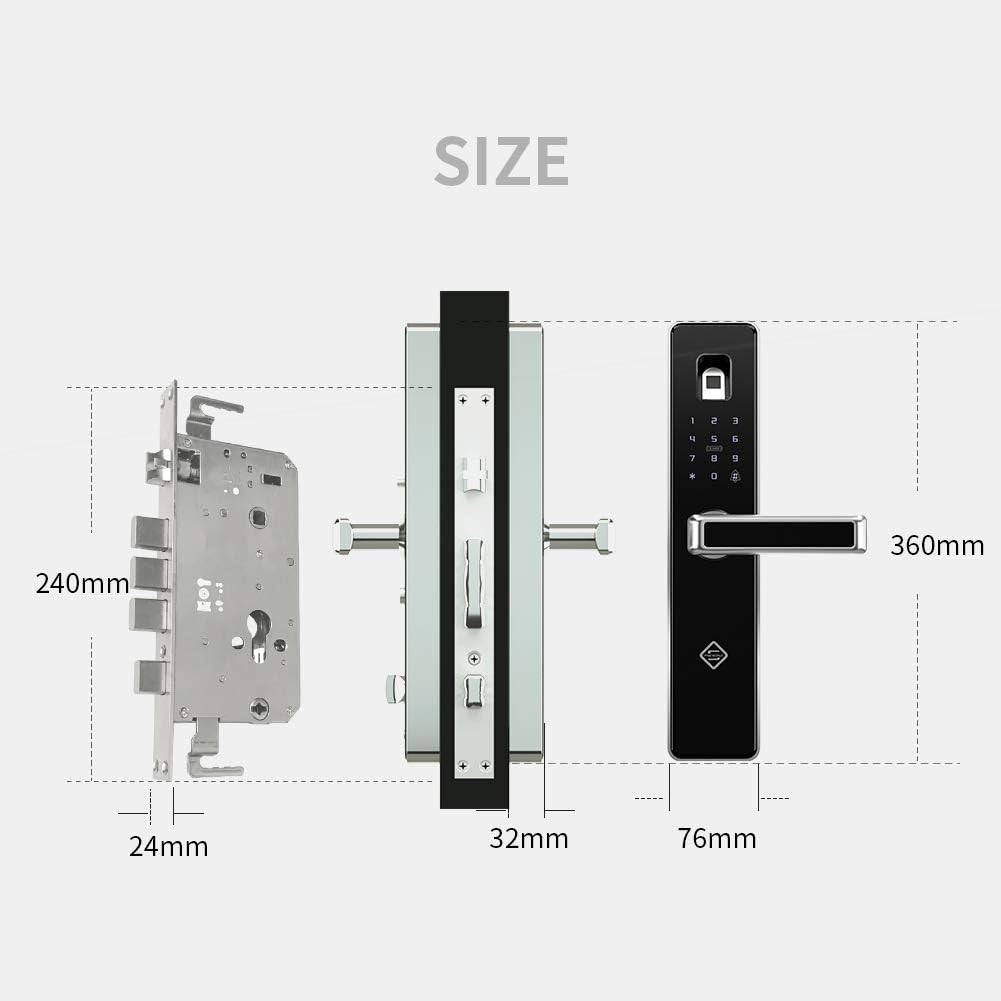
Figure 2: Dimensional specifications of the PINEWORLD Q303Plus Smart Door Lock components.
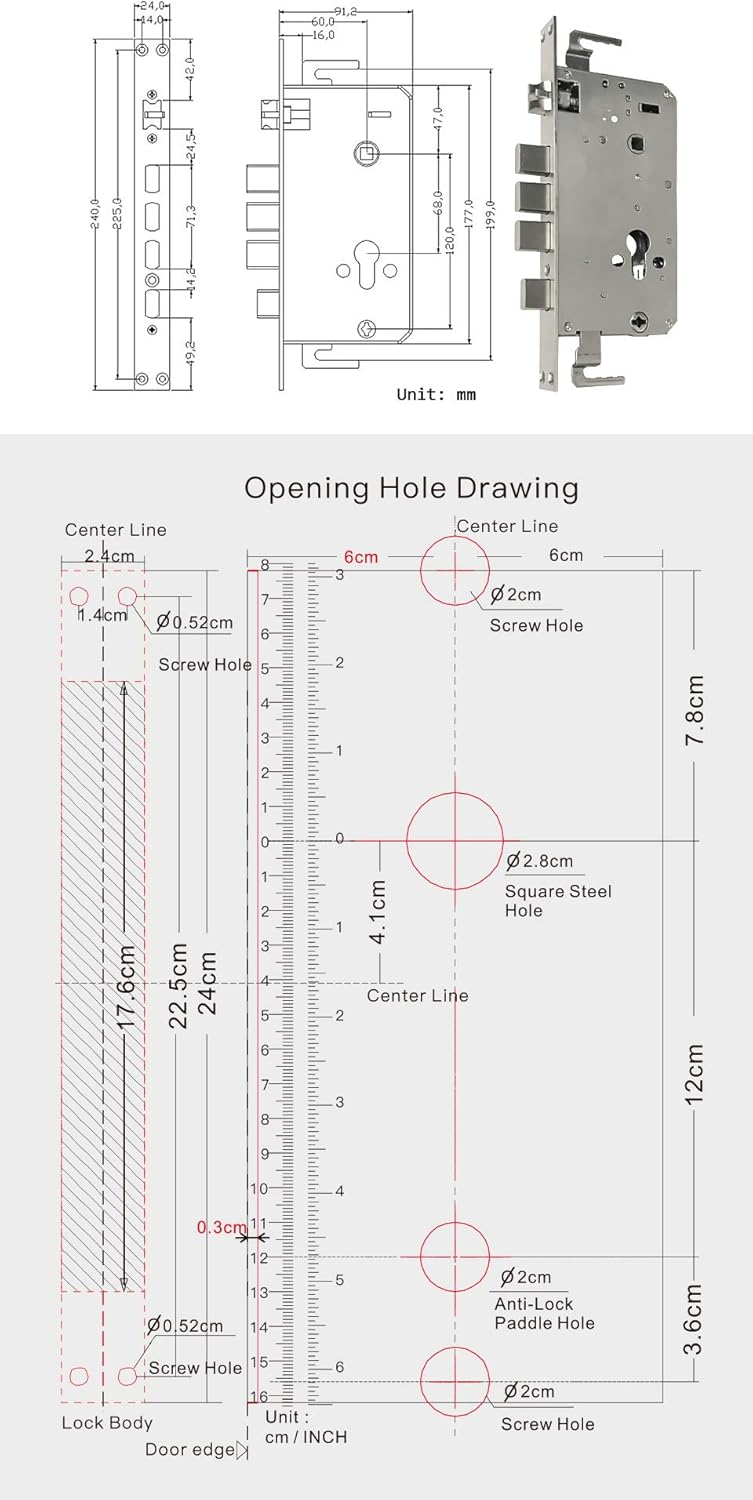
Figure 3: Detailed opening hole drawing for door preparation during installation.
Setup and Installation
Before beginning installation, ensure your door thickness is between 40mm and 120mm. It is recommended to review the installation video for a visual guide.
For a detailed visual guide on installation, please refer to the official installation video by searching "PINEWORLD Q303" on YouTube or by visiting: https://youtu.be/oEx_O_a3sTAY.
General Installation Steps (Refer to video for details):
- Prepare the Door: Ensure the door meets the thickness requirements. Use the provided template (refer to Figure 3) to drill necessary holes for the mortise and lock components.
- Install the Mortise: Insert the mortise into the prepared cavity on the door edge. Ensure the lock tongue direction is correct for your door's opening. The lock features an interchangeable two-direction lock tongue.
- Install the Front Panel: Connect the front panel (with keypad and fingerprint sensor) to the mortise, feeding necessary cables through the door.
- Install the Rear Panel: Connect the rear panel to the front panel, securing it with screws. Ensure all cables are properly connected and not pinched.
- Insert Batteries: Install R6 AAA size batteries (not included) into the battery compartment.
- Test Operation: After installation, test all unlocking methods (fingerprint, password, RFID card, mechanical key) and ensure the handle operates smoothly and the deadbolt engages correctly.

Figure 4: The PINEWORLD Q303Plus Smart Door Lock assembled, ready for installation.
Operating Instructions
Unlocking Methods:
- Fingerprint Unlock: Place a registered finger on the fingerprint sensor. The lock will unlock if the fingerprint is recognized. The system identifies fingerprints in less than 0.4 seconds.
- Password Unlock: Enter your registered password on the touchscreen keypad. For enhanced security, you can use the anti-peeping feature by entering random numbers before and after your actual password. The lock will unlock as long as the correct password sequence is embedded within the entered numbers.
- RFID Card Unlock: Present a registered RFID card to the IC card sensing button area on the lock. The lock will unlock upon successful recognition.
- Mechanical Key Unlock: In case of emergency or battery depletion, insert the mechanical key into the hidden keyhole and turn to unlock the door.
Locking the Door:
- Automatic Locking: The door will automatically lock when closed.
- Deadbolt Engagement: To engage the deadbolt for additional security, pull the door handle upward.
Other Functions:
- Doorbell Function: The lock includes a doorbell feature.
- Voice Guide: Follow the voice prompts for easier setup and operation.
- Emergency Charging: If batteries are completely drained, connect a power bank to the Micro-USB emergency charging port to temporarily power the lock and gain access.

Figure 5: Key components and features of the PINEWORLD Q303Plus Smart Door Lock.

Figure 6: The biometric fingerprint sensor in action, demonstrating rapid identification.
Maintenance
- Battery Replacement: The lock will provide a low battery reminder. Replace all R6 AAA batteries promptly when indicated to ensure continuous operation.
- Cleaning: Wipe the lock's surface with a soft, dry cloth. Avoid using abrasive cleaners or solvents that could damage the finish or electronic components.
- Fingerprint Sensor Care: Keep the fingerprint sensor clean and free of dirt or moisture for optimal performance.
- Mechanical Key: Store the mechanical key in a safe, accessible location outside the secured area for emergency use.
Troubleshooting
| Problem | Possible Cause | Solution |
|---|---|---|
| Lock does not respond. | Dead batteries. | Replace batteries. Use Micro-USB emergency charging if needed. |
| Fingerprint not recognized. | Fingerprint sensor dirty; unregistered fingerprint; dry/wet finger. | Clean sensor. Ensure finger is registered. Try again with a clean, appropriately moist finger. |
| Password not accepted. | Incorrect password entered; anti-peeping feature misunderstood. | Verify password. Ensure correct sequence is entered, even with random numbers. |
| RFID card not working. | Card not registered; card damaged. | Register the card. Try another registered card. |
| Handle is loose or not engaging. | Installation issue; internal mechanism problem. | Recheck installation steps. Contact customer support if issue persists. |
| Doorbell function not working. | Internal connection issue. | Ensure proper installation. Contact customer support. |

Figure 7: The PINEWORLD Q303Plus features an idle handle design to prevent common 'cat eye' unlocking methods.
Warranty and Support
PINEWORLD offers a money-back guarantee within 10 days if you are not satisfied with the product. A 30-day return policy is available for quality-related issues.
The product includes 3 years of technical guidance and service. For any product-related questions or technical assistance, please feel free to contact PINEWORLD customer support via Amazon Message. We aim to respond within 24 hours.
