
1. Introduction and Overview
The Nikon AF-S NIKKOR 500mm f/5.6E PF ED VR is a super-telephoto prime lens designed for exceptional performance in wildlife, sports, and action photography. This lens incorporates Nikon's proprietary Phase Fresnel (PF) technology, which allows for a significantly more compact and lightweight design compared to traditional 500mm lenses, enhancing mobility and handling.
Weighing approximately 3.2 pounds and measuring 9.2 inches in length, this lens offers remarkable portability without compromising on image quality or optical performance. It features Vibration Reduction (VR) for sharper images in challenging conditions and a durable, weather-sealed construction to withstand various outdoor environments.

Image 1.1: The Nikon AF-S NIKKOR 500mm f/5.6E PF ED VR lens, highlighting its compact form factor and accessible controls.
2. Package Contents
Ensure all the following items are present in your package:
- AF-S NIKKOR 500mm f/5.6E PF ED VR Lens
- LC-95 95mm Snap-On Front Lens Cap
- LF-4 Rear Lens Cap
- HB-84 Bayonet Hood
- CL-M5 Lens Case
3. Key Features
- Phase Fresnel (PF) Lens Element: This innovative technology significantly reduces the number of optical elements required, resulting in a remarkably compact and lightweight lens design without compromising sharpness or image quality.
- Vibration Reduction (VR): Nikon's VR system provides up to 4.0 stops of image stabilization, allowing for sharper handheld shots at slower shutter speeds and improved stability for video recording. The lens offers 'Normal' and 'Sport' VR modes.
- Electromagnetic Diaphragm Mechanism: Ensures stable auto-exposure control during high-speed continuous shooting, especially when using a teleconverter.
- Nano Crystal Coat: Reduces ghosting and flare for superior clarity and contrast, even in backlit conditions.
- Fluorine Coating: Applied to the front lens element, this coating effectively repels dust, water droplets, grease, and dirt, making it easier to clean.
- Durable Construction: Built with robust materials and advanced weather sealing to protect against dust and moisture, making it suitable for use in challenging outdoor environments.
4. Setup and Installation
4.1 Attaching the Lens to Your Camera
- Ensure both the camera and lens are powered off.
- Remove the rear lens cap from the lens and the body cap from your camera.
- Align the mounting mark on the lens with the mounting mark on your camera body.
- Rotate the lens counter-clockwise until it clicks into place. Do not force the lens.
4.2 Attaching the Lens Hood (HB-84)
The lens hood helps to reduce flare and protect the front element. Align the mounting mark on the lens hood with the mark on the front of the lens, then rotate the hood until it clicks into place. To store, reverse the hood and attach it to the lens.
4.3 Using the Tripod Collar
The integrated tripod collar allows for stable mounting on a tripod or monopod, especially given the lens's length. Loosen the collar's locking knob to rotate the camera and lens assembly for horizontal or vertical shooting without removing it from the tripod. Tighten the knob securely after adjusting.
5. Operating Instructions
5.1 Focus Mode Switch
- A/M (Autofocus with Manual override): Allows for instant manual focus adjustment by rotating the focus ring while autofocus is active.
- M/A (Manual-priority Autofocus): Similar to A/M, but requires more rotation of the focus ring before manual override takes effect, reducing accidental manual adjustments.
- M (Manual Focus): Disables autofocus, allowing for precise manual focusing.
5.2 Focus Limit Switch
This switch restricts the autofocus range to improve focusing speed when subjects are known to be within a certain distance.
- FULL: Autofocus operates over the entire focus range (from minimum focus distance to infinity).
- ∞-8m: Autofocus operates from 8 meters (26.2 feet) to infinity. Use this setting when shooting distant subjects to prevent the lens from hunting for focus on closer objects.
5.3 Vibration Reduction (VR) Switch
The VR system helps reduce blur caused by camera shake.
- OFF: Disables Vibration Reduction. Recommended when using a sturdy tripod.
- NORMAL: Suitable for general photography, compensating for a wide range of camera movements.
- SPORT: Ideal for tracking fast-moving subjects, such as in sports photography. It provides a more stable viewfinder image and allows for continuous shooting with minimal interruption.
5.4 Memory Recall Buttons
The lens features four memory recall buttons around the barrel. These can be programmed via your camera's custom settings to instantly recall a pre-set focus distance, or other functions depending on your camera model.
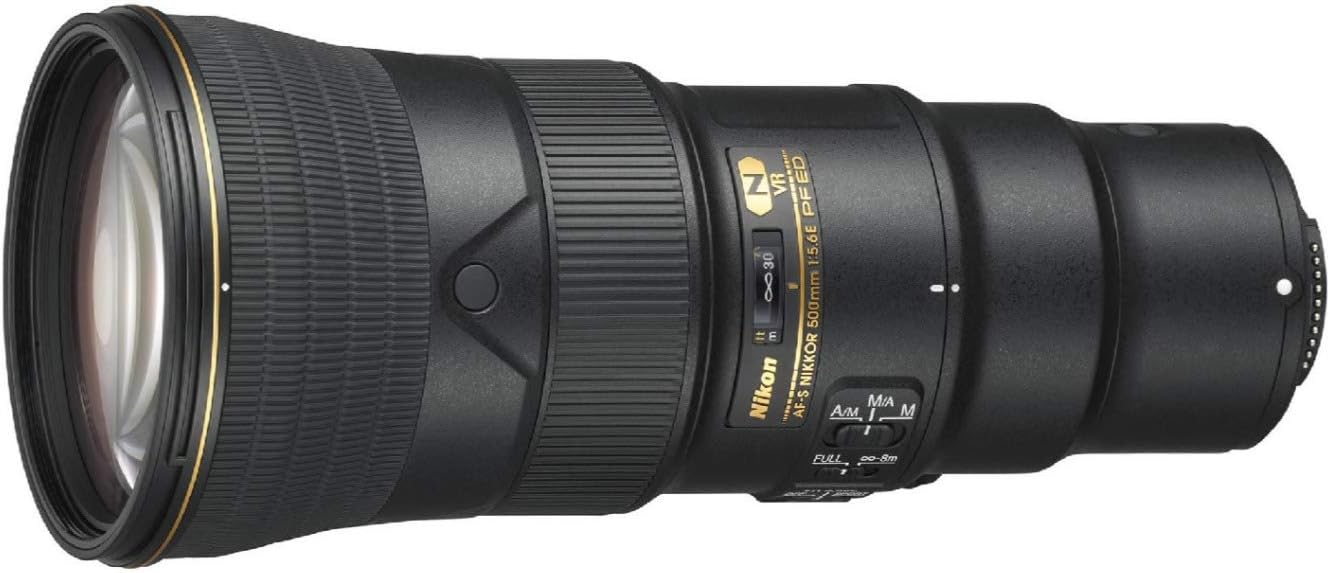
Image 1.2: Side view of the lens, illustrating the focus mode, focus limit, and VR switches.
Video 1.1: Official Product Overview Video. This video demonstrates the physical features and handling of the Nikon AF-S NIKKOR 500mm f/5.6E PF ED VR lens.
6. Maintenance
6.1 Cleaning the Lens
- Lens Elements: Use a blower brush to remove dust, then gently wipe with a clean microfiber cloth and lens cleaning solution if necessary. Avoid touching the glass with bare hands.
- Lens Body: Wipe with a soft, dry cloth. For stubborn dirt, a slightly damp cloth can be used, followed by a dry cloth.
6.2 Storage
When not in use, attach both front and rear lens caps. Store the lens in its provided case in a cool, dry place away from direct sunlight and extreme temperatures. Avoid storing with mothballs or other chemicals that can damage lens coatings.
6.3 Handling Precautions
- Avoid exposing the lens to sudden temperature changes, which can cause condensation.
- Do not leave the lens pointed at the sun for extended periods, as this can damage the camera's sensor or internal lens elements.
- Handle the lens with care to prevent drops or impacts.
7. Troubleshooting
- Images are blurry: Check if Vibration Reduction (VR) is enabled and set to the appropriate mode (Normal/Sport). Ensure the focus mode is correctly set (A/M or M/A for autofocus). Verify that the focus limit switch is not restricting the focus range incorrectly.
- Autofocus is slow or not working: Check the focus mode switch. Ensure there is sufficient light for the autofocus system to operate. If using the focus limit switch, try setting it to 'FULL' to allow the lens to search the entire range.
- Lens not recognized by camera: Ensure the lens is securely mounted to the camera body. Power cycle both the camera and lens. Check camera settings for any lens-related options.
8. Specifications
| Feature | Detail |
|---|---|
| Focal Length | 500 mm |
| Maximum Aperture | f/5.6 |
| Minimum Aperture | f/32 |
| Lens Mount | Nikon F-Mount |
| Format Compatibility | Full-Frame (FX) / DX |
| Angle of View | 5° (FX format), 3° 10' (DX format) |
| Minimum Focus Distance | 9.84' / 3 m |
| Optical Design | 19 Elements in 11 Groups (including 3 ED, 1 PF, and elements with Nano Crystal Coat and Fluorine Coat) |
| Diaphragm Blades | 9, Rounded |
| Autofocus | Yes |
| Image Stabilization | Yes (Vibration Reduction) |
| Filter Size | 95 mm (Front) |
| Dimensions (ø x L) | 4.2 x 9.3" / 106 x 237 mm |
| Weight | 3.2 lb / 1460 g |
| Item Model Number | 20082 |
| ASIN | B07GSJQXRM |
9. Warranty and Support
This Nikon product is covered by a limited warranty. For detailed warranty information, service, and support, please refer to the warranty card included with your product or visit the official Nikon website.
You can find additional resources and contact customer support through the official Nikon Store: Nikon Store on Amazon.


