
Jensen JWM40
Jensen JWM40 DVD/USB/AUX/BT Stereo
User Manual
Introduction
The Jensen JWM40 is a versatile entertainment system designed to bring home entertainment luxuries to various settings, including recreational vehicles. This stereo unit offers a wide range of audio and video playback options, ensuring a comprehensive media experience.
Key features of the JWM40 include:
- Bluetooth streaming audio (A2DP) and control (AVRCP) for wireless connectivity.
- Front USB port supporting MP3/WMA playback for digital media files.
- Slot-type DVD/CD-R/RW player compatible with MP3 discs.
- Integrated AM/FM tuner with 30 station presets (18 FM, 12 AM).
- Front AUX A/V input (3.5mm) for connecting external audio/video devices.
- Two independent speaker zones for flexible audio distribution.
- Two speaker outputs and one rear RCA audio input/output.
- One RCA composite video output for connecting to an external display.
- White LED backlit LCD panel with blue LED buttons for clear visibility.
- Clock with alarm and sleep timer functions.
- Remote control included for convenient operation.
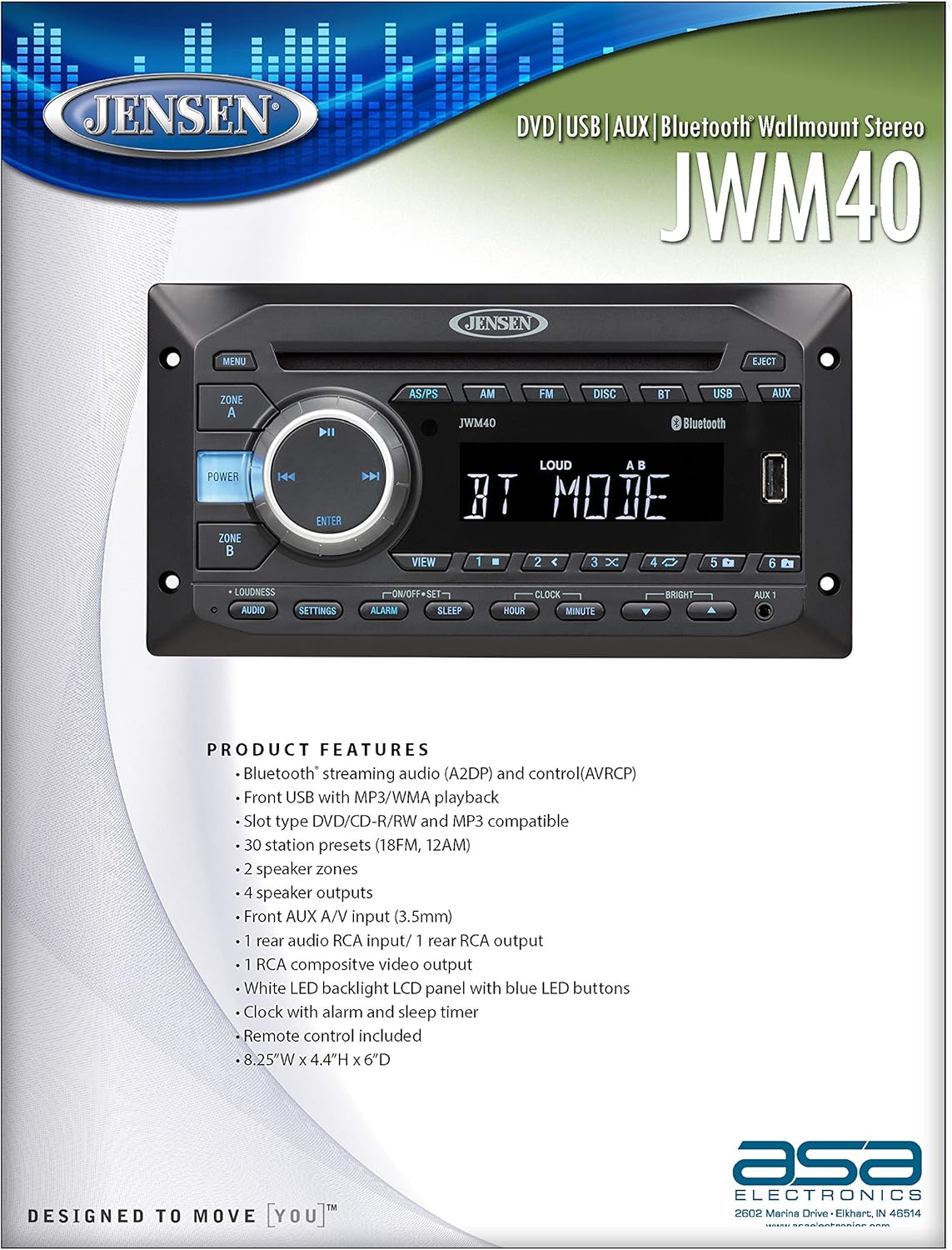
Image: Front view of the Jensen JWM40 stereo unit, highlighting its key product features and specifications on an accompanying document.
Setup and Installation
What's in the Box
The Jensen JWM40 package typically includes the following components:
- Jensen JWM40 DVD/USB/AUX/BT Stereo Unit
- Remote Control
- Wiring Harness
- Mounting Hardware (screws, brackets)
- User Manual (this document or a more comprehensive version)
Note: Contents may vary slightly. Please check your product packaging for the exact list of included items.
Mounting and Dimensions
The JWM40 is designed for wall-mount installation. Ensure adequate space and proper ventilation around the unit. Refer to the diagram below for precise dimensions to facilitate installation planning.

Image: Technical drawing showing the front, top, and side dimensions of the Jensen JWM40 stereo unit, along with detailed specifications.
The product dimensions are approximately 4.33 x 8.19 x 3.39 inches (H x W x D).
Wiring Connections
Connect the power, speaker, and auxiliary cables according to the wiring diagram provided in the full installation guide (not included in this manual). Ensure all connections are secure and correctly polarized to prevent damage to the unit or speakers. The unit operates on a 12V DC (2-Wire) power system.
Operating Instructions
This section provides an overview of the JWM40's controls and basic operation. For detailed instructions on specific functions, refer to the comprehensive user manual.

Image: Close-up view of the Jensen JWM40 stereo's front panel, showing the display, control buttons, and input ports.
Front Panel Controls
- POWER Button: Press to turn the unit on or off.
- MENU Button: Access system settings and options.
- ZONE A/B Buttons: Select and control independent speaker zones.
- Rotary Encoder (with ENTER): Navigate menus and adjust volume. Press ENTER to confirm selections.
- Playback Controls (Play/Pause, Skip/Fast Forward/Rewind): Control media playback.
- Source Buttons (AS/PS, AM, FM, DISC, BT, USB, AUX): Select the desired audio source.
- EJECT Button: Eject a disc from the DVD/CD slot.
- USB Port: Connect USB devices for media playback.
- AUX 1 Input (3.5mm): Connect external audio/video devices.
- LOUDNESS Button: Toggle loudness compensation for enhanced bass and treble at low volumes.
- SETTINGS Button: Access audio and system settings.
- ALARM/SLEEP/HOUR/MINUTE Buttons: Control clock, alarm, and sleep timer functions.
- BRIGHT Buttons: Adjust display brightness.
- Numeric Presets (1-6): Store and recall radio stations or direct track selection.
Basic Operation
- Power On/Off: Press the POWER button.
- Source Selection: Press the corresponding source button (e.g., FM, DISC, BT, USB, AUX).
- Volume Adjustment: Rotate the large central knob.
- Bluetooth Pairing: Select BT mode, then search for "JWM40" on your Bluetooth device and pair.
- Disc Playback: Insert a DVD or CD into the slot. Playback will begin automatically.
- USB Playback: Insert a USB drive into the USB port. The unit will automatically detect and play compatible media files.
Maintenance
Proper maintenance ensures the longevity and optimal performance of your Jensen JWM40 stereo.
- Cleaning: Use a soft, dry cloth to clean the unit's exterior. For stubborn marks, dampen the cloth slightly with water. Avoid using harsh chemicals, abrasives, or solvents.
- Disc Care: Handle discs by their edges. Keep them clean and free of scratches. Store discs in their cases when not in use.
- Ventilation: Ensure that the ventilation openings on the unit are not blocked to prevent overheating.
- Power Disconnection: If the unit will not be used for an extended period, disconnect it from the power source.
Troubleshooting
This section addresses common issues you might encounter with your JWM40 stereo. If the problem persists after attempting these solutions, contact customer support.
| Problem | Possible Cause | Solution |
|---|---|---|
| No power | Loose power connection; Blown fuse; Vehicle battery low. | Check power wiring; Replace fuse if necessary; Charge vehicle battery. |
| No sound | Volume too low; Mute function active; Loose speaker connections; Incorrect source selected. | Increase volume; Deactivate mute; Check speaker wiring; Select correct audio source. |
| Disc will not play/eject | Disc inserted incorrectly; Damaged disc; Unit malfunction. | Ensure disc is inserted correctly; Try a different disc; Consult support if issue persists. |
| Bluetooth not connecting | Device not in pairing mode; JWM40 not in BT mode; Interference. | Ensure both devices are in pairing mode; Select BT source on JWM40; Move closer to unit. |
| Poor radio reception | Antenna not connected; Weak signal area; Interference. | Check antenna connection; Try tuning to a stronger station; Move vehicle to a better reception area. |
Specifications
Detailed technical specifications for the Jensen JWM40 DVD/USB/AUX/BT Stereo.
| Feature | Specification |
|---|---|
| Manufacturer | Jensen |
| Model | JWM40 |
| Item Weight | 3.2 pounds |
| Product Dimensions (H x W x D) | 4.33 x 8.19 x 3.39 inches |
| Power System | 12V DC (2-Wire) |
| Operating Voltage Range | 10V to 16V |
| Operating Temperature Range | -4°F to 149°F (-20°C to 65°C) |
| Storage Temperature Range | -22°F to 158°F (-30°C to 70°C) |
| Maximum Relative Humidity | 95% |
| Connectivity Technology | Auxiliary, Bluetooth, USB |
| Controller Type | Remote Control |
| Compatible Devices | Smartphone, Speaker |
| Connector Type | 3.5mm Jack, USB |
| Audio Output Mode | Stereo |
| Surround Sound Channel Configuration | 2.0 |
| Video Encoding | MPEG-2 |
| Color | Black |
| Special Feature | Compact |
| CD Skip Threshold (Random Freq. Profile) | 1.6 g |
| Compatible CD Formats | CD, CD-R, R/W, MP3, DVD, DVD+/- RW |
| Output Power (RMS) | 24 Watts Total |
| Total Harmonic Distortion | 1% |
| Regulatory Certifications | FCC Part 15B |
Warranty and Support
For information regarding the product warranty, please refer to the warranty card included with your purchase or visit the official Jensen website. Warranty terms and conditions may vary.
If you require technical assistance, troubleshooting beyond what is covered in this manual, or service, please contact Jensen customer support. Contact details can typically be found on the manufacturer's website or in the product packaging.
Note: Keep your purchase receipt as proof of purchase for warranty claims.
Related documentsJWM40


Ask a question about this manual
Ask about setup, troubleshooting, compatibility, parts, safety, or missing instructions. Manuals+ will review the question and use this page’s manual context to help answer it.