1. Introduction
This manual provides essential instructions for the safe and efficient use of your GreatPowerDirect AC/DC Power Adapter. This charger is specifically designed to provide reliable power to your Samsung Galaxy Tab models GT-P3113, GT-P5113, and GT-N8013. Please read this manual thoroughly before using the product and retain it for future reference.
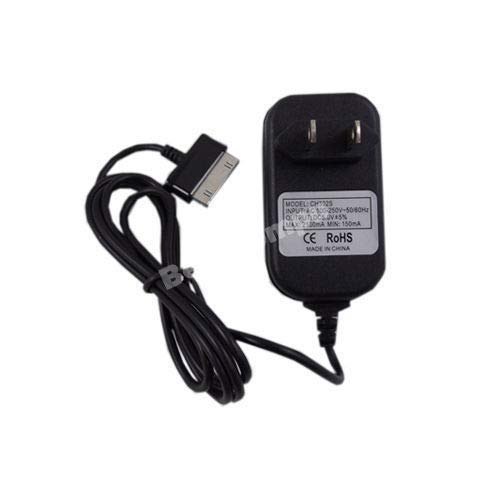
Image 1: The GreatPowerDirect Tablet Charger, showing its compact design with the integrated cable coiled.
2. Package Contents
Please check the package for the following items:
- 1 x GreatPowerDirect AC/DC Power Adapter with integrated proprietary connector cable.
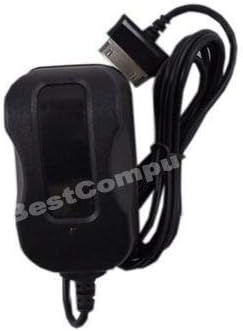
Image 2: The GreatPowerDirect Tablet Charger, illustrating the proprietary connector designed for compatible Samsung Galaxy Tab models.
3. Safety Information
To ensure safe operation and prevent damage, please observe the following safety precautions:
- Do not expose the charger to water, moisture, or extreme temperatures.
- Avoid dropping or subjecting the charger to strong impacts.
- Do not attempt to disassemble or modify the charger. This will void the warranty and may cause electric shock or fire.
- Ensure the power outlet voltage matches the charger's input voltage (240 Volts max).
- Unplug the charger from the power outlet when not in use or during electrical storms.
- Keep out of reach of children.
- Use only with compatible Samsung Galaxy Tab models as specified.
4. Setup
- Identify the Charging Port: Locate the proprietary charging port on your Samsung Galaxy Tab (GT-P3113, GT-P5113, or GT-N8013).
- Connect to Tablet: Carefully insert the charger's proprietary connector into the charging port of your tablet. Ensure it is fully seated and secure. Do not force the connector.
- Connect to Power Outlet: Plug the AC adapter's two-prong plug into a standard wall power outlet.

Image 3: The GreatPowerDirect Tablet Charger, highlighting the standard US-style wall plug for connecting to a power source.
5. Operating Instructions
Once connected, your tablet should indicate that it is charging. The charging indicator (usually an icon on the screen or an LED light on the tablet) will confirm that power is being supplied.
- Charging Time: Charging time may vary depending on your tablet's battery level, usage during charging, and battery health.
- Optimal Charging: For optimal battery life, avoid fully discharging your tablet frequently. It is generally recommended to keep the battery level between 20% and 80%.
- Disconnecting: To disconnect, first unplug the charger from the wall outlet, then gently remove the connector from your tablet.
6. Maintenance
- Cleaning: Disconnect the charger from all power sources and devices before cleaning. Use a soft, dry cloth to wipe the surface of the charger. Do not use liquid cleaners or aerosols.
- Storage: Store the charger in a cool, dry place away from direct sunlight and extreme temperatures. Avoid tightly coiling the cable to prevent damage.
- Cable Care: Do not bend, twist, or pull the cable excessively. Inspect the cable and connector regularly for any signs of wear or damage. If damaged, discontinue use immediately.
7. Troubleshooting
- Tablet Not Charging:
- Ensure the charger is securely plugged into both the tablet and the wall outlet.
- Try a different wall outlet to rule out a faulty power source.
- Check the charger cable and connector for any visible damage.
- Verify that your tablet model is compatible with this charger (GT-P3113, GT-P5113, GT-N8013).
- Slow Charging:
- Ensure no power-intensive applications are running in the background on your tablet during charging.
- Charging speed can be affected by the tablet's battery health and ambient temperature.
- Charger Feels Warm:
- It is normal for the charger to become slightly warm during operation. If it becomes excessively hot, disconnect it immediately and contact support.
8. Specifications
| Brand | GreatPowerDirect |
| Model Number | GPD0808215605 |
| Compatible Devices | Samsung Galaxy Tab 3, Samsung Galaxy Tab 4, Samsung Galaxy Tab 5 (models GT-P3113, GT-P5113, GT-N8013) |
| Connector Type | Proprietary |
| Input Voltage | Up to 240 Volts |
| Output Voltage | 5 Volts (DC) |
| Power Source | AC, DC |
| Item Weight | 8 ounces |
9. Warranty and Support
GreatPowerDirect products are designed for reliability and performance. For warranty information or technical support, please refer to the contact details provided with your purchase or visit the GreatPowerDirect official website. Please have your model number (GPD0808215605) available when contacting support.