
1. Introduction
The Pyle P3001BT is a versatile multi-channel stereo amplifier designed for home entertainment systems. It features Bluetooth 5.0 for wireless audio streaming, an FM radio tuner, USB and SD card playback, and dual microphone inputs with echo control for karaoke. Its rack-mount design allows for flexible installation in various setups. This manual provides detailed instructions to help you set up and operate your amplifier effectively.
2. Safety Instructions
Please read and follow these safety instructions carefully before operating the Pyle P3001BT amplifier to prevent damage and ensure safe use.
- Power Source: Connect the unit only to the specified power supply (120/240V, switchable).
- Ventilation: Ensure adequate ventilation. Do not block ventilation openings. The built-in cooling fan requires clear airflow.
- Water and Moisture: Do not expose the unit to rain, moisture, or excessive humidity.
- Heat Sources: Keep the unit away from heat sources such as radiators, heat registers, stoves, or other heat-producing appliances.
- Cleaning: Unplug the unit from the power outlet before cleaning. Use a dry cloth for cleaning.
- Servicing: Do not attempt to service the unit yourself. Refer all servicing to qualified service personnel.
- Placement: Place the unit on a stable, level surface. Avoid placing heavy objects on top of the unit.
3. Package Contents
Verify that all items are present in the package:
- Pyle P3001BT Hybrid Pre-Amplifier
- Remote Controller
- Rack-Mount Brackets
- AM/FM Antennas
- Power Cable

Image 3.1: Contents of the Pyle P3001BT package, including the amplifier, remote control, power cable, RCA cable, and antenna.
4. Product Overview
4.1 Front Panel Controls and Inputs

Image 4.1: Front view of the Pyle P3001BT amplifier, showing the power switch, USB/SD slots, Bluetooth display, input selectors, microphone inputs, and various control knobs.
- Power Switch: Turns the unit on or off.
- USB/SD Card Slots: For playing MP3 audio files from USB flash drives or SD memory cards.
- Bluetooth Display: Shows Bluetooth connection status.
- Input Selectors: Buttons to choose audio input source (Bluetooth, USB/SD, FM/AM, Optical/Coaxial, AUX1, AUX2, MP3/FM/AM).
- Microphone Inputs (MIC1, MIC2): 1/4-inch jacks for connecting microphones.
- Headphone Jack: 1/4-inch output for headphones.
- Microphone Volume/Echo/Tone Controls: Adjusts microphone audio levels and effects.
- Subwoofer Volume: Adjusts the output level of the subwoofer.
- LED Dimmer: Adjusts the brightness of the LED backlight.
- Bass/Treble Controls: Adjusts low and high frequency audio output.
- Master Volume: Main volume control for all audio outputs.
4.2 Rear Panel Connections
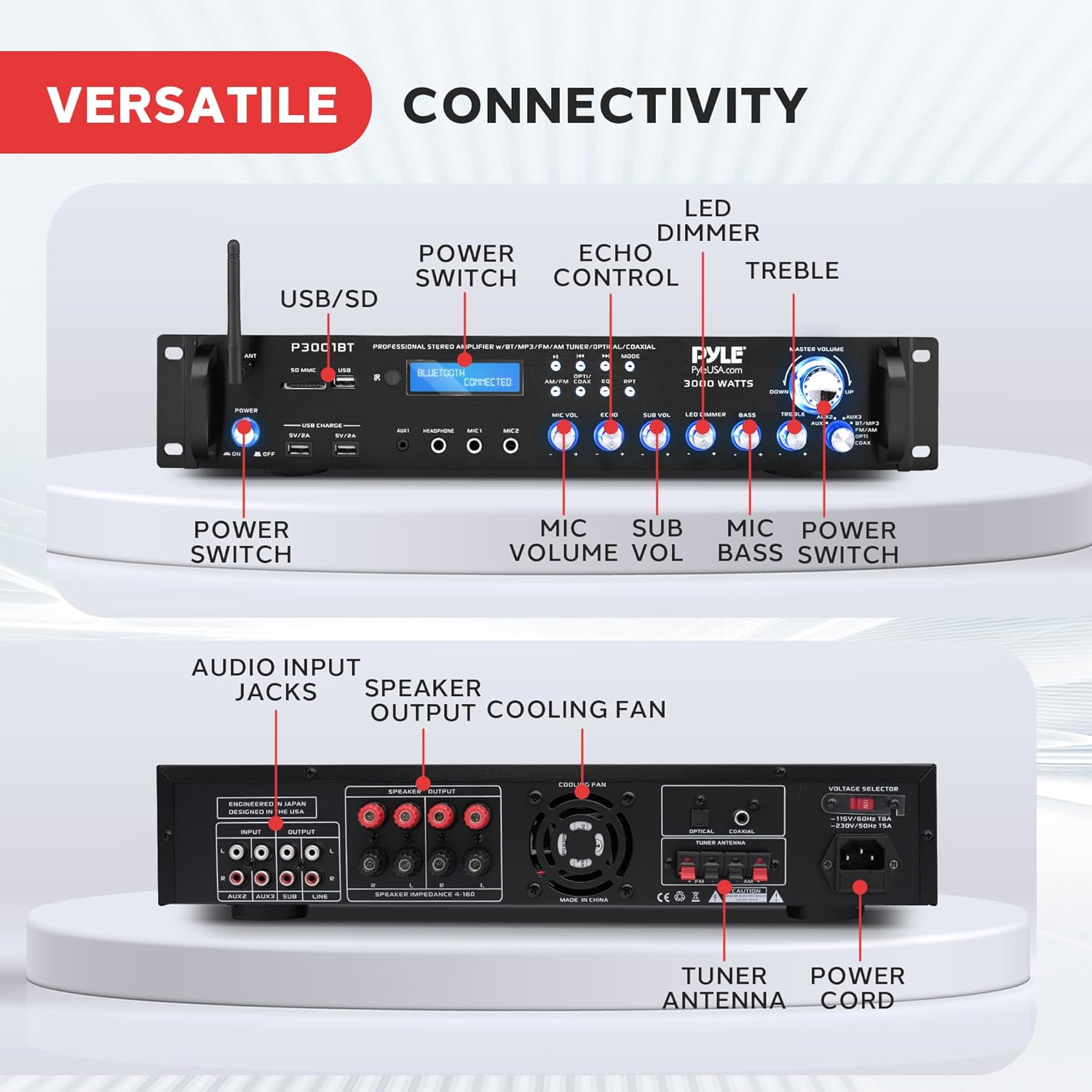
Image 4.2: Rear view of the Pyle P3001BT amplifier, highlighting audio input jacks, speaker output terminals, cooling fan, tuner antenna, and power cord connection.
- Audio Input Jacks (RCA L/R): Connect external audio sources like CD players, DVD players, or other devices.
- Subwoofer Output Jacks (RCA L/R): Dedicated output for connecting an active subwoofer.
- Speaker Output Terminals: Screw-type binding posts for connecting passive speakers.
- Optical/Coaxial Digital Inputs: For connecting digital audio sources.
- FM/AM Antenna Terminals: Connect the included FM and AM antennas for radio reception.
- Power Cord Input: Connects the amplifier to an AC power outlet.
- Voltage Selector: Switch to select between 120V and 240V power supply. Ensure this is set correctly for your region.
- Cooling Fan: Provides necessary ventilation for internal components.
5. Setup
5.1 Rack Mounting (Optional)
The Pyle P3001BT is designed for universal rack mounting. Attach the included rack-mount brackets to the sides of the amplifier using the provided screws. Once attached, the unit can be installed into a standard audio equipment rack.

Image 5.1: The Pyle P3001BT amplifier shown with rack-mount brackets, illustrating its compatibility with professional and home rack systems.
5.2 Connecting Speakers
- Ensure the amplifier is turned off and unplugged from the power outlet.
- Connect your passive speakers to the speaker output terminals on the rear panel. Match the positive (+) terminal of the amplifier to the positive (+) terminal of the speaker, and the negative (-) terminal of the amplifier to the negative (-) terminal of the speaker.
- Ensure all connections are secure to prevent short circuits. The amplifier supports speakers with 2-8 ohms impedance.
5.3 Connecting Audio Sources
- RCA Inputs: Use RCA cables to connect external audio devices (e.g., CD player, DVD player, TV) to the "AUDIO INPUT" RCA jacks on the rear panel.
- Aux Input: For devices with a 3.5mm output, use a 3.5mm to RCA cable to connect to one of the RCA inputs, or use the 3.5mm AUX input jack on the front panel.
- Digital Inputs (Optical/Coaxial): Connect digital audio sources to the respective optical or coaxial inputs on the rear panel.
- USB/SD: Insert a USB flash drive or SD memory card into the corresponding slot on the front panel for MP3 playback.
5.4 Connecting Microphones
Connect up to two 1/4-inch microphones to the MIC1 and MIC2 input jacks on the front panel.
5.5 Power Connection
- Before connecting power, ensure the voltage selector on the rear panel is set to the correct voltage for your region (120V or 240V).
- Connect the power cable to the amplifier's power input and then to a suitable AC power outlet.
5.6 Antenna Connection
Connect the included AM and FM antennas to their respective terminals on the rear panel for optimal radio reception.
6. Operating Instructions
6.1 Power On/Off
Press the POWER switch on the front panel to turn the amplifier on or off.
6.2 Source Selection
Use the input selector buttons on the front panel (e.g., BT/MP3, FM/AM, OPTICAL/COAXIAL, AUX1, AUX2) to choose your desired audio source.
6.3 Volume and Tone Control
- Master Volume: Rotate the large MASTER VOLUME knob to adjust the overall output volume.
- Bass/Treble: Use the BASS and TREBLE knobs to adjust the low and high frequency response of the audio.
- Subwoofer Volume: Adjust the SUB VOL knob to control the output level of the connected subwoofer.
6.4 Microphone Controls
- MIC VOL: Adjusts the volume of the connected microphones.
- ECHO: Controls the echo effect applied to the microphone audio.
6.5 Bluetooth Wireless Streaming
- Press the BT/MP3 input selector button to switch to Bluetooth mode. The display will show "BLUETOOTH CONNECTED" or "PAIRING".
- Enable Bluetooth on your device (smartphone, tablet, computer) and search for available devices.
- Select "PYLE P3001BT" from the list of devices to pair. Once connected, the display will confirm "BLUETOOTH CONNECTED".
- You can now stream audio wirelessly from your device to the amplifier.

Image 6.1: The Pyle P3001BT amplifier demonstrating wireless music streaming via Bluetooth 5.0, showing a smartphone connected to the unit.
6.6 USB/SD Playback
Insert a USB flash drive or SD memory card containing MP3 audio files into the respective slot on the front panel. The amplifier will automatically switch to USB/SD mode and begin playback. Use the front panel controls or remote control to navigate tracks and adjust playback.
6.7 FM Radio Operation
- Press the FM/AM input selector button to switch to FM radio mode.
- Use the tuning buttons on the front panel or remote control to scan for radio stations. The amplifier can store up to 30 radio station presets.
6.8 Headphone Use
Connect headphones to the 1/4-inch headphone jack on the front panel. Audio will be routed to the headphones, typically muting the main speaker outputs.
6.9 Remote Control Usage
The included remote control allows for convenient operation of various functions from a distance, including power, input selection, volume, and radio tuning. Ensure the remote has fresh batteries and is pointed towards the IR receiver on the amplifier's front panel.
7. Maintenance
- Cleaning: Wipe the unit with a soft, dry cloth. Do not use liquid cleaners or aerosol cleaners.
- Ventilation: Regularly check that the cooling fan and ventilation openings are free from dust and obstructions.
- Storage: If storing the unit for an extended period, unplug it from the power outlet and store it in a cool, dry place.
8. Troubleshooting
| Problem | Possible Cause | Solution |
|---|---|---|
| No power | Power cable not connected; Power switch off; Outlet malfunction. | Ensure power cable is securely connected. Turn power switch on. Test outlet with another device. Check voltage selector. |
| No sound output | Incorrect input source selected; Speaker connections loose; Volume too low; Mute activated. | Select the correct input source. Check all speaker wire connections. Increase master volume. Ensure mute is off. |
| Bluetooth not connecting | Amplifier not in Bluetooth mode; Device too far; Interference; Device already paired to another unit. | Switch amplifier to Bluetooth mode. Move device closer. Reduce interference. Disconnect device from other Bluetooth units. |
| Remote control not working | Batteries dead or incorrectly inserted; Obstruction between remote and unit; Remote sensor blocked. | Replace batteries. Ensure line of sight to the IR sensor. Clear any obstructions. |
| Humming noise from speakers | Ground loop issue; Loose connections; Interference from other electronics. | Check all audio cable connections. Try plugging the amplifier into a different outlet. Ensure proper grounding. |
9. Specifications
| Feature | Detail |
|---|---|
| Power Output | 3000 Watt Max (850W @ 2 ohm, 550W @ 4 ohm, 300W @ 8 ohm) |
| Frequency Response | 40Hz-15kHz, +/-2db |
| S/N Ratio | >76db |
| T.H.D. | <1% |
| Bluetooth Version | 2.1 (Note: Product title states 5.0, description states 2.1. Using 2.1 as per technical specs.) |
| Wireless Range | 35+ ft. |
| Radio Station Presets | 30 |
| Tuner Type | Quartz Synthesized Radio |
| Digital Media File Support | MP3, WMA, WAV, APE, FLAC |
| USB Power Output | 5V/2A (x2) |
| Power Supply | 120/240V, Switchable |
| Unit Dimensions (L x W x H) | 18.89'' x 12.04'' x 3.14'' inches |
| Item Weight | 15.56 lbs. |
Note: The product title mentions Bluetooth 5.0, while the technical specifications list Bluetooth Version 2.1. Please refer to the product packaging or manufacturer's website for the most accurate Bluetooth version.
10. Warranty and Support
For warranty information and technical support, please refer to the official Pyle website or contact Pyle customer service directly. Keep your purchase receipt as proof of purchase for any warranty claims.
You can also find additional resources and contact information on the Pyle Store on Amazon.
A PDF user manual is also available for download: Pyle P3001BT User Manual (PDF).


