
1. Introduction
This manual provides essential instructions for the installation, operation, and maintenance of your BAFANG Display Unit. This display is designed for use with BAFANG BBSHD, BBS02B, and BBS01B mid-drive motor kits.
Important Compatibility Note: This display unit requires a BAFANG motor with a UART Protocol (versions 5.0-5.8). The Human Machine Interface (HMI) is compatible with the Bus system RS 232. If your motor does not utilize the UART protocol, the display will not function. Please verify your motor's protocol with your motor supplier if you are unsure.
2. Setup
2.1 Unpacking and Initial Inspection
Carefully remove the display unit from its packaging. Inspect the unit for any visible damage. A protective film is applied to the screen; if you observe scratches, simply peel off this film.
2.2 Installation
The display unit is designed for quick and straightforward installation. It typically mounts to the handlebar or stem of your bicycle. Secure the display firmly using the provided mounting hardware. Connect the display cable to the corresponding port on your BAFANG mid-drive motor kit. Ensure all connections are snug to prevent water ingress.
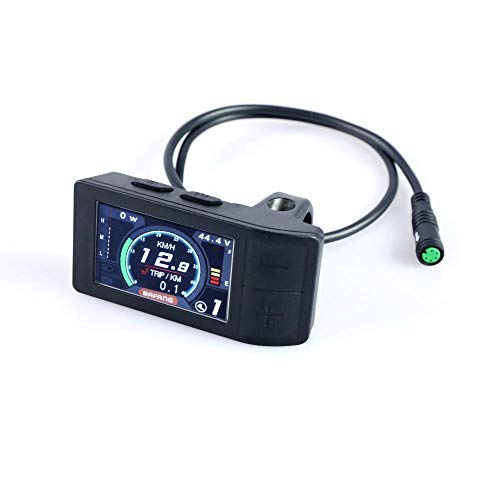
Figure 1: BAFANG Display Unit. This image shows the compact design of the display unit, typically mounted on a bicycle handlebar for easy viewing and access to controls.
2.3 Initial Configuration
Upon first power-on, you may need to configure basic settings. These settings typically include:
- Wheel Size: Set this to match your bicycle's wheel diameter for accurate speed and distance readings.
- Maximum Speed: Adjust this setting according to local regulations or personal preference.
- Units: Select between metric (km/h, km) or imperial (mph, miles) units.
- Backlight Brightness: Adjust for optimal visibility in various lighting conditions.
Refer to the on-screen menu for navigation and adjustment of these parameters. If you encounter difficulties with specific settings, please contact BAFANG support for assistance.
3. Operation
3.1 Powering On/Off
To power on the display, press and hold the power button (usually located on the side or front of the unit) for a few seconds. To power off, repeat the process. The display will typically show a boot-up sequence before becoming fully operational.
3.2 Displayed Information
The LCD screen provides a range of real-time riding data, including:
- Real-time Speed: Current riding speed.
- Average Speed (Avg Speed): Average speed calculated over the current trip.
- Maximum Speed (Max Speed): Highest speed recorded during the current trip.
- Battery Power Indicator: Displays remaining battery charge, often with a percentage or voltage reading.
- Riding Time: Duration of the current trip.
- Clock: Current time.
- Automatic Backlight: The display features an automatic backlight for improved visibility in varying light conditions.
3.3 Navigation and Settings
The display unit is operated via integrated buttons. These buttons allow you to navigate through menus, change assistance levels, reset trip data, and access advanced settings. Consult the on-screen prompts for specific button functions. You can customize various display parameters to suit your preferences.
4. Maintenance
4.1 Cleaning
To clean the display unit, use a soft, damp cloth. Avoid abrasive cleaners or solvents, as these can damage the screen or casing. Ensure the unit is powered off before cleaning.
4.2 Environmental Protection
The BAFANG display unit is designed with an International Protection Rating of IP65, meaning it is protected against contact and ingress of water and dirt. It is also suitable for use in low temperatures, down to -20℃. While robust, avoid submerging the unit in water or exposing it to high-pressure water jets.
5. Troubleshooting
If you encounter issues with your BAFANG display unit, please refer to the following common problems and solutions:
- Display Does Not Power On:
- Check all cable connections between the display and the motor for looseness or damage.
- Ensure the e-bike battery is charged and properly connected.
- Verify the power button is being pressed and held correctly.
- Motor Does Not Respond / Display Shows No Data:
- Confirm that your BAFANG motor uses a UART Protocol (5.0-5.8). This is a critical compatibility requirement.
- Ensure all motor and display cables are securely connected.
- Check for any error codes displayed on the screen and consult the BAFANG support resources for their meaning.
- Incorrect Speed/Distance Readings:
- Verify that the wheel size setting in the display's configuration menu matches your bicycle's actual wheel size.
- Check the speed sensor for proper alignment and cleanliness.
- Scratches on Screen:
- As noted in the setup section, the display comes with a protective film. Gently peel this off to reveal the clear screen underneath.
For advanced troubleshooting or issues not covered here, please contact BAFANG customer support.
6. Specifications
| Brand | BAFANG |
| Model Number (Part Number) | HMI |
| Compatible Motor Protocols | UART 5.0-5.8 (Bus system RS 232) |
| Screen Size | 2.2 Inches |
| Display Type | LCD |
| Display Resolution | 240x320 |
| Sensor Type | Speed Sensor |
| International Protection Rating | IP65 |
| Operating Temperature | Max -20℃ (Suitable for low temperature) |
| Mounting Type | Handlebar Mount, Stem Mount |
| Human Interface Input | Buttons |
| Included Components | Sensor, Manual (referring to the physical manual, not this digital one) |
| Item Dimensions (LxWxH) | 3.11 x 1.57 x 0.71 inches |
| Item Package Dimensions (LxWxH) | 3.8 x 2.9 x 2.2 inches |
| Package Weight | 0.09 Kilograms |
| UPC | 755320236355 |
| Date First Available | August 20, 2018 |
7. Warranty Information
Specific warranty details for your BAFANG display unit may vary by region and retailer. Please retain your proof of purchase. For information regarding warranty coverage, terms, and conditions, please refer to the documentation provided at the time of purchase or contact your authorized BAFANG dealer or BAFANG customer support directly.
8. Customer Support
If you require further assistance, have questions about your display unit, or need help with advanced settings, please contact BAFANG customer support. You can typically find contact information on the official BAFANG website or through your product retailer. When contacting support, please have your product model number (HMI) and purchase details ready.
Note: If you are unsure about specific details or settings, BAFANG support is available to help resolve any issues.


