
1. Product Overview
The Cantonape 1000W Car Power Inverter converts 12V DC power from your vehicle's battery into 110V/120V AC household power. This device is designed to power various electronic appliances and devices, making it suitable for use in cars, trucks, RVs, boats, and during outdoor activities or emergencies. It provides 1000 Watts of continuous power and up to 2000 Watts of peak power, featuring dual AC outlets and dual USB ports for versatile charging.
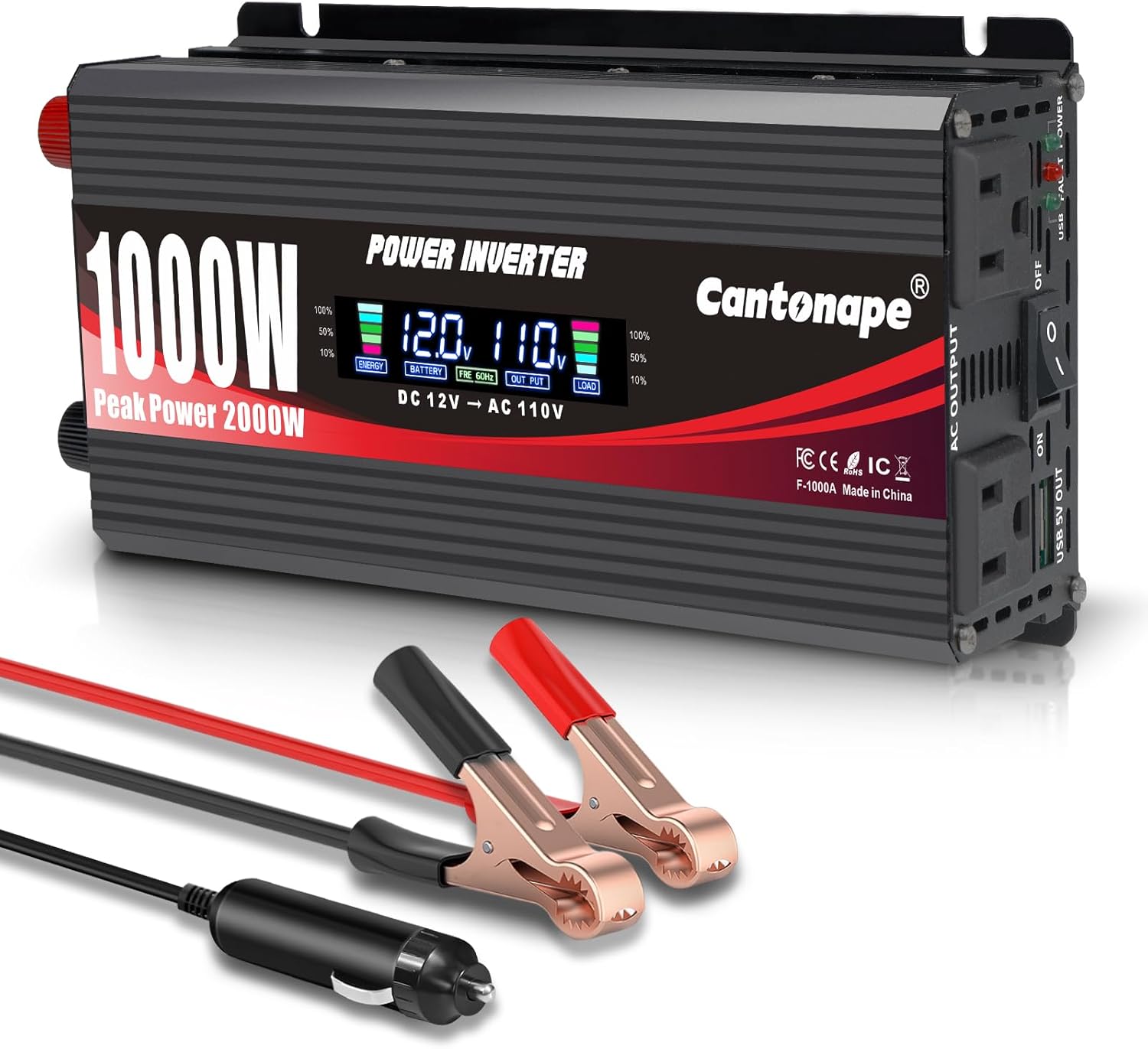
Image: Front view of the Cantonape 1000W Power Inverter, showcasing its compact design, LCD display, and the included battery clips and cigarette lighter plug.
Package Contents:
- 1 x Cantonape 1000W Power Inverter
- 1 x Cigarette Lighter Plug
- 2 x Crocodile Clips (Red and Black)
- 1 x User Manual
2. Safety Instructions
Please read and understand all safety instructions before operating the power inverter. Failure to follow these instructions may result in electric shock, fire, or serious injury.
- Ventilation: Ensure adequate ventilation around the inverter. Do not cover the ventilation openings.
- Environment: Operate the inverter in a dry, well-ventilated area, away from direct sunlight, heat sources, and flammable materials. Avoid exposure to water or moisture.
- Voltage Compatibility: Connect the inverter only to a 12V DC power source. Do not attempt to connect it to a 24V or higher DC source, or directly to AC power.
- Polarity: Always observe correct polarity when connecting to the battery: Red to Positive (+), Black to Negative (-). Incorrect connection can damage the inverter and battery.
- Load Capacity: Do not exceed the inverter's continuous power rating (1000W) or peak power rating (2000W). Overloading can cause damage and trigger protection features.
- Children and Pets: Keep the inverter out of reach of children and pets.
- Disassembly: Do not attempt to disassemble or modify the inverter. Refer all servicing to qualified personnel.
- Inductive Loads: This inverter produces a modified sine wave output. It is not suitable for all inductive loads (e.g., some motors, refrigerators, coffee machines, microwave ovens, power drills, hair dryers) which may require a pure sine wave inverter. Refer to the 'Cannot be used for' image in Section 3 for examples.
3. Product Features
The Cantonape 1000W Power Inverter is equipped with several features to ensure efficient and safe operation:
- Powerful Output: Converts DC 12V to AC 110V/120V 60Hz. Provides 1000 Watts continuous power and 2000 Watts peak power.
- Multiple Outlets: Features 2 standard AC outlets and Dual 3.1A USB ports for charging various devices simultaneously.
- High Efficiency: Conversion efficiency greater than 90%.
- Intelligent LCD Display: Shows input/output voltage, battery capacity, load capacity, output frequency, and error codes.
- Multi-Protection System: Includes 2 built-in 50A fuses and protections against Overload, Short Circuit, Overheat, Reverse Polarity, Under Voltage, and Over Voltage.
- Cooling System: Built-in temperature-controlled cooling fan for optimal performance and longevity.
- Durable Construction: Robust aluminum body for advanced protection and efficient heat dissipation.
- Isolated Ground Neutral: Enhances safety during operation.

Image: Diagram highlighting key components of the inverter, including the intelligent LCD, AC sockets, LED indicator, power switch, USB ports, positive/negative terminals, and fan.

Image: Visual guide showing common applications like charging laptops, fans, and TVs, and explicitly stating that the inverter cannot power inductive electrical appliances such as drills, hair dryers, coffee machines, or microwave ovens.
4. Setup and Installation
Proper installation is crucial for safe and efficient operation.
Connecting to a 12V DC Power Source:
- Preparation: Ensure the inverter is switched OFF. Place the inverter in a cool, dry, and well-ventilated area.
- Option 1: Cigarette Lighter Plug (for loads up to 150W):
- Insert the cigarette lighter plug into your vehicle's 12V accessory socket.
- Connect the other end of the plug to the DC input port on the inverter.
- Option 2: Crocodile Clips (for loads up to 1000W):
- Connect the red crocodile clip to the positive (+) terminal of your 12V battery.
- Connect the black crocodile clip to the negative (-) terminal of your 12V battery.
- Ensure a secure connection to prevent arcing or overheating.
- Connect the other ends of the clips to the corresponding positive (+) and negative (-) terminals on the inverter.
- Verify Connections: Double-check all connections for tightness and correct polarity before proceeding.

Image: The Cantonape 1000W Power Inverter in a car interior, connected via the cigarette lighter plug and charging a laptop and smartphone, demonstrating typical usage.
5. Operating Instructions
Turning On the Inverter:
- After ensuring all connections are secure and correct, press the power switch on the inverter to the 'ON' position.
- The LCD display will illuminate, showing current battery voltage and output information.
Connecting Devices:
- Plug your AC-powered devices into the 110V/120V AC outlets on the inverter.
- For USB-powered devices, connect them to the USB ports.
- Ensure the total power consumption of all connected devices does not exceed 1000 Watts.
Turning Off the Inverter:
- Before turning off, disconnect all connected devices from the inverter.
- Press the power switch to the 'OFF' position.
- If not in use for an extended period, disconnect the inverter from the 12V DC power source.
6. LCD Display and Error Codes
The intelligent LCD display provides real-time operational status and diagnostic information.

Image: A close-up view of the inverter's LCD display, with numbered labels pointing to and explaining each displayed parameter: Battery Capacity, Battery Voltage, Output Frequency (60Hz), Output Voltage, and Load Capacity.
LCD Display Information:
- Battery Capacity: Indicates the remaining charge level of the connected 12V battery.
- Battery Voltage: Displays the current input voltage from the 12V battery.
- Output Frequency: Shows the AC output frequency, typically 60Hz.
- Output Voltage: Displays the AC output voltage, typically 110V or 120V.
- Load Capacity: Indicates the percentage of the inverter's maximum power being used by connected devices.
Error Codes:
When an abnormal condition occurs, the LCD display will show an error code to help diagnose the issue.

Image: A visual representation of the inverter's error codes (E-1 to E-6) and their corresponding protection types: Low Voltage, High Voltage, Overtemperature, Overload, Short Circuit, and Repeated Faults Shutdown (requiring restart).
- E-1: Low Voltage Protection: Input voltage is too low. Recharge or replace the 12V battery.
- E-2: High Voltage Protection: Input voltage is too high. Check the 12V power source.
- E-3: Overtemperature Protection: The inverter is overheating. Reduce load, ensure proper ventilation, and allow it to cool down.
- E-4: Overload Protection: Connected devices exceed the inverter's power rating. Disconnect some devices.
- E-5: Short Circuit Protection: A short circuit has occurred in the output. Disconnect all devices and check for faults.
- E-6: Repeated Faults Shutdown, Restart Required: The inverter has experienced multiple faults and requires a manual restart. Turn off, wait a few minutes, then turn on again.
7. Troubleshooting
If you encounter issues with your Cantonape 1000W Power Inverter, refer to the following troubleshooting guide:
| Problem | Possible Cause | Solution |
|---|---|---|
| Inverter does not turn on. | Loose connections, low battery voltage, blown fuse. | Check all cable connections. Ensure battery voltage is above 11V. Check and replace internal 50A fuses if necessary (refer to maintenance). |
| LCD shows E-1 (Low Voltage). | Battery voltage is below safe operating level. | Recharge or replace the 12V battery. Disconnect non-essential loads. |
| LCD shows E-2 (High Voltage). | Input voltage exceeds safe operating level. | Verify the power source is a standard 12V DC battery. Disconnect immediately if connected to an incorrect voltage source. |
| LCD shows E-3 (Overtemperature). | Inverter is too hot due to overload or poor ventilation. | Reduce the connected load. Ensure the inverter is in a well-ventilated area and its cooling fan is not obstructed. Allow it to cool down. |
| LCD shows E-4 (Overload). | Total power consumption of connected devices exceeds 1000W. | Disconnect some devices to reduce the load below 1000W. Restart the inverter. |
| LCD shows E-5 (Short Circuit). | A short circuit has occurred in the output. | Immediately disconnect all AC and USB devices. Check devices and cables for damage. Restart the inverter. |
| LCD shows E-6 (Repeated Faults). | Multiple protection events have occurred. | Turn off the inverter, disconnect all loads, wait a few minutes, then turn it back on. If the issue persists, contact support. |
| Output power is lower than expected. | Battery voltage drop, cable resistance, or device incompatibility. | Ensure battery is fully charged. Use the crocodile clips for higher loads. Some inductive devices may not operate efficiently with modified sine wave inverters. |
8. Maintenance
Regular maintenance helps ensure the longevity and optimal performance of your inverter.
- Cleaning: Periodically clean the exterior of the inverter with a dry, soft cloth. Do not use liquid cleaners or solvents. Ensure ventilation openings are free from dust and debris.
- Connections: Regularly check all input and output connections to ensure they are tight and free from corrosion.
- Storage: When not in use, store the inverter in a cool, dry place, away from direct sunlight and extreme temperatures.
- Fuse Replacement: The inverter has two internal 50A fuses for protection. If a fuse blows, it indicates an overload or short circuit. Fuse replacement should only be performed by qualified personnel or by following specific instructions from Cantonape support. Incorrect fuse replacement can void the warranty and pose a safety risk.
9. Specifications
Detailed technical specifications for the Cantonape 1000W Car Power Inverter.
| Feature | Specification |
|---|---|
| Model Number | MSW1000W-LCD |
| Continuous Power | 1000 Watts |
| Peak Power | 2000 Watts |
| Input Voltage | DC 12V |
| Output Voltage | AC 110V/120V |
| Output Frequency | 60Hz |
| Output Waveform | Modified Sine Wave |
| USB Output | Dual 3.1A USB Ports |
| Conversion Efficiency | > 90% |
| Product Dimensions (L x W x H) | 10.87 x 4.41 x 2.32 inches (27.6 x 11.2 x 5.9 cm) |
| Item Weight | 1.87 pounds (0.85 kg) |
| Protection Features | Overload, Short Circuit, Overheat, Reverse Polarity, Under/Over Voltage |
| Fuses | 2 x 50A (Internal) |

Image: Diagram illustrating the physical dimensions of the Cantonape 1000W Power Inverter and the lengths of the included cigarette lighter plug cable and crocodile clip cables.
10. Warranty and Support
Warranty Information:
The Cantonape 1000W Car Power Inverter comes with a 12-month warranty from the date of purchase. This warranty covers manufacturing defects and workmanship under normal use. It does not cover damage caused by misuse, accident, unauthorized modification, or improper installation.
Customer Support:
For technical assistance, warranty claims, or any questions regarding your Cantonape product, please contact our customer support team. Refer to the contact information provided with your purchase or visit the official Cantonape website for support details.