
1. Introduction
This manual provides essential instructions for the safe and efficient use of your PEM OF-040 40 cm Pedestal Fan. Please read it thoroughly before assembly, operation, or maintenance. Keep this manual for future reference.

Figure 1: Overview of the PEM OF-040 Pedestal Fan.
2. Safety Instructions
To reduce the risk of fire, electric shock, or injury, always follow these basic safety precautions:
- Always unplug the fan from the power outlet before cleaning, maintenance, or when not in use.
- Do not use this fan in wet or damp locations, such as bathrooms or laundries.
- Keep the fan out of reach of children and pets.
- Ensure that the voltage indicated on the fan's rating label matches your local power supply before connecting.
- Never insert fingers or any objects into the fan grilles while the fan is operating.
- Do not operate the fan with a damaged cord or plug. Contact qualified service personnel for repair.
- Place the fan on a stable, level surface to prevent it from tipping over.
- Do not cover the fan or obstruct its airflow during operation.
3. Package Contents
Verify that all components are present in the package:
- Fan Motor Unit with Blades and Grilles
- Adjustable Height Pole
- X-shaped Base
- Power Cord (integrated or separate)
- Fasteners (nuts, bolts, washers) for assembly
4. Assembly and Setup
Follow these steps to assemble your pedestal fan:
- Assemble the Base: Attach the X-shaped base pieces together and then secure them to the bottom of the adjustable height pole using the provided fasteners. Ensure it is stable.
- Attach the Pole: Insert the adjustable height pole into the base and tighten any securing screws or knobs.
- Mount the Fan Head: Place the fan motor unit onto the top of the adjustable height pole. Secure it firmly with the designated screw or locking mechanism.
- Assemble Grilles: First, attach the rear grille to the motor unit, ensuring it clicks into place or is secured with clips/screws. Then, place the fan blades onto the motor shaft and secure them with the blade cap. Finally, attach the front grille to the rear grille, ensuring all clips or screws are fastened to prevent accidental contact with the blades.
- Adjust Height: Loosen the height adjustment collar on the pole, extend or retract the pole to your desired height, and then firmly tighten the collar to secure the fan in position.

Figure 2: Height adjustment collar for setting fan height.
5. Operating Instructions
Once assembled, your PEM OF-040 fan is ready for use:
- Power Connection: Plug the fan's power cord into a standard electrical outlet.
- Fan Speed Control: Use the push buttons located on the fan's control panel to select the desired speed. '0' typically indicates off, while '1', '2', and '3' represent increasing fan speeds.

Figure 3: Fan speed control buttons.
- Oscillation Function: To activate the automatic oscillation, press down the oscillation knob located on the top-rear of the motor housing. To stop oscillation and fix the fan in one direction, pull the knob up.
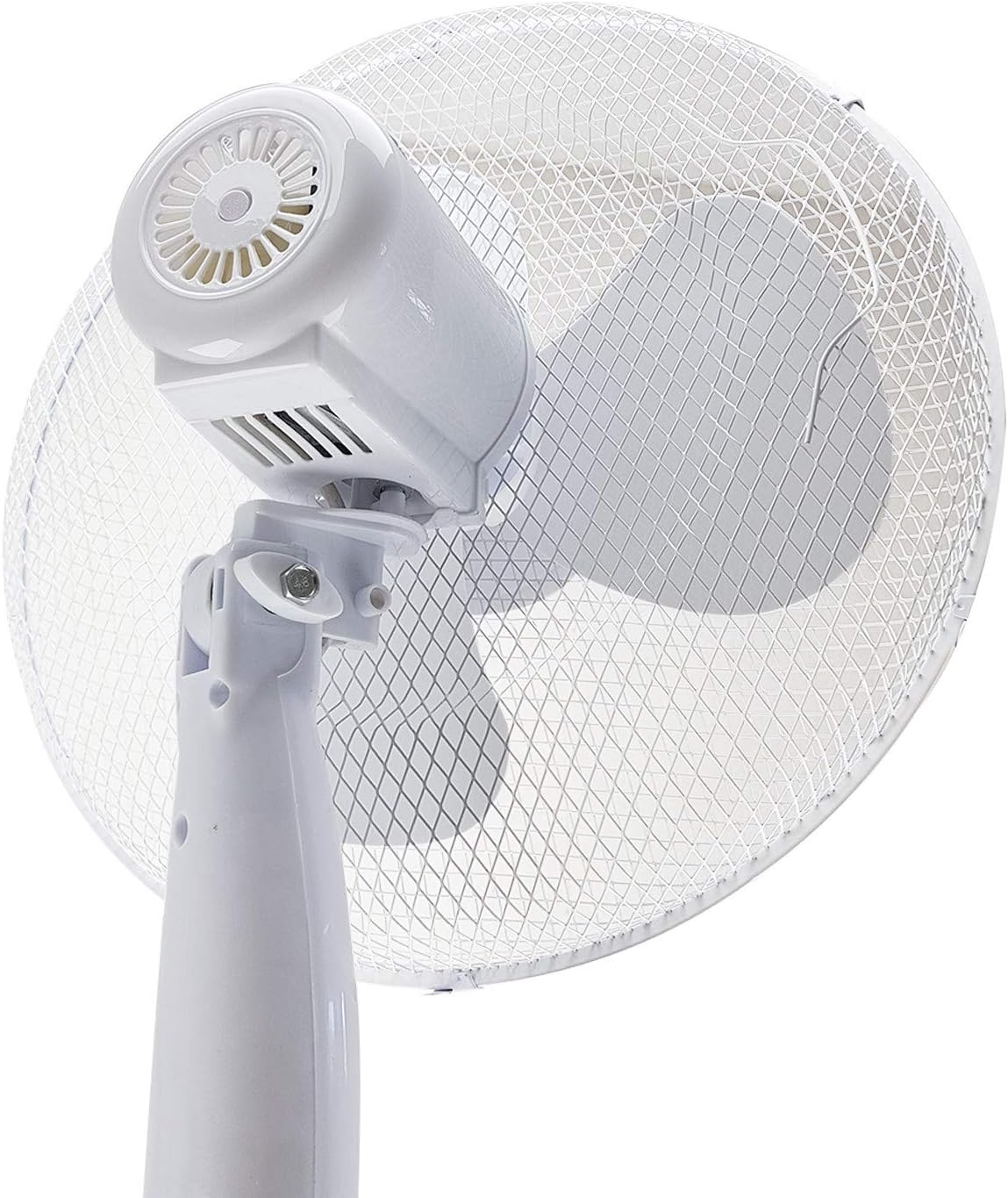
Figure 4: Oscillation knob on the rear of the fan motor housing.
6. Maintenance and Cleaning
Regular cleaning and maintenance will ensure optimal performance and extend the life of your fan:
- Always unplug the fan from the power outlet before cleaning.
- Exterior Cleaning: Wipe the exterior surfaces of the fan with a soft, damp cloth. Do not use abrasive cleaners, solvents, or harsh chemicals, as these can damage the finish.
- Grille and Blade Cleaning: Periodically, dust may accumulate on the fan blades and grilles. To clean, carefully remove the front grille (refer to assembly instructions in reverse). Wipe the blades and grilles with a soft, dry or slightly damp cloth. Ensure all parts are completely dry before reassembling the grille.
- Storage: When not in use for extended periods, store the fan in a cool, dry place, preferably in its original packaging, to protect it from dust and damage.
7. Troubleshooting
If you encounter issues with your fan, refer to the following common problems and solutions:
| Problem | Possible Cause | Solution |
|---|---|---|
| Fan does not turn on | No power supply; Fan unplugged; Speed setting is '0' | Check power outlet and plug connection; Ensure fan is set to speed '1', '2', or '3'. |
| Fan is noisy or vibrates excessively | Loose parts; Fan not on a level surface; Blades are dirty or obstructed | Check all assembly fasteners; Place fan on a stable, flat surface; Clean blades and grilles. |
| Fan does not oscillate | Oscillation knob is not engaged; Mechanism is stuck | Ensure the oscillation knob is pressed down; Gently check for obstructions around the oscillation mechanism (with fan unplugged). |
| Weak airflow | Grilles or blades are dirty; Fan is too far from user | Clean grilles and blades; Adjust fan position. |
If the problem persists after trying these solutions, please contact customer support.
8. Specifications
| Model Name: | OF-040 |
| Brand: | PEM |
| Type: | Pedestal Fan / Floor Fan |
| Diameter: | 40 cm |
| Power: | 40 Watts |
| Number of Speeds: | 3 |
| Oscillation: | Automatic |
| Height Adjustable: | Yes |
| Base Type: | X-shaped |
| Control Method: | Push button |
| Power Source: | Electric Cable |
| Usage: | Indoor |
| Dimensions (D x W x H): | 40 cm x 35 cm x 130 cm |
| Weight: | 2.3 Kilograms |
| Number of Blades: | 3 |
9. Warranty and Support
For warranty information, details on returns, or to contact customer support, please refer to the documentation provided with your purchase or visit the official PEM website. Keep your proof of purchase for any warranty claims.