
Introduction
This manual provides detailed instructions for the assembly, operation, and maintenance of your Yahboom RPI4WD Raspberry Pi Super Starter AI Robot Kit. This kit is designed for educational and DIY enthusiasts to explore robotics, programming, and artificial intelligence concepts. Please read this manual thoroughly before beginning assembly or operation.
Note: A Raspberry Pi (4B, 3B+, or 3B recommended) is NOT included in this kit and is required for the robot to function.
Setup and Assembly
The Yahboom RPI4WD kit is a DIY electronic project that requires assembly. Patience and careful attention to detail are essential during this process. Detailed installation videos and first-time usage videos are provided by Yahboom to assist you.
Kit Components Overview
Before starting, ensure all components listed in the kit are present. Familiarize yourself with the various parts, including the chassis, motors, wheels, expansion board, camera, and sensors.

Image: Layout of the Yahboom RPI4WD Raspberry Pi AI Robot Kit components, including the chassis, motors, wheels, camera, sensors, and various electronic modules.
Hardware Assembly
Follow the step-by-step instructions provided in the official Yahboom tutorials for assembling the robot chassis, mounting the motors, wheels, and the multi-function expansion board. Connect the sensors, such as the ultrasonic module, and the HD camera according to the wiring diagrams.
Camera Installation and Firmware
The kit includes an HD camera supporting 480P resolution with manual focal length adjustment. The camera pan-tilt kit is designed for smart robot applications.

Image: Detailed view of the robot's camera assembly, showing its pan-tilt mechanism and a crucial note regarding camera firmware refresh if no screen display is observed.
Important Note for Camera: If your camera does not display an image, you may need to refresh the camera firmware. Refer to the detailed introduction in the official tutorials. If difficulties persist, contact technical support.
Software Setup
The robot utilizes Python3 as the primary programming language and Open Source CV for image processing. Development is typically done using Jupyter Lab. Yahboom provides basic usage courses and configured image systems. More system versions can be downloaded from the Raspberry Pi official website.

Image: Visual representation of supported operating systems for the Yahboom RPI4WD robot, including Raspberry Pi OS and Windows 10 IoT, with a note about additional system versions available from the Raspberry Pi website.
Operating Instructions
The Yahboom RPI4WD robot offers a wide range of functionalities, from basic navigation to advanced AI capabilities. Ensure your Raspberry Pi is properly installed and configured before operation.
Basic Functions
- Ultrasonic Obstacle Avoidance: The robot uses an ultrasonic module to detect obstacles and navigate around them.
- Line Tracking: Follows a designated line path using its line-seeking sensors.
- Light Following: Detects and moves towards a light source.
- Real-time Image Transmission: Transmits HD video from its camera to a connected device (APP or PC).
- Fire Extinguishing: Utilizes a fan to simulate extinguishing a small flame.
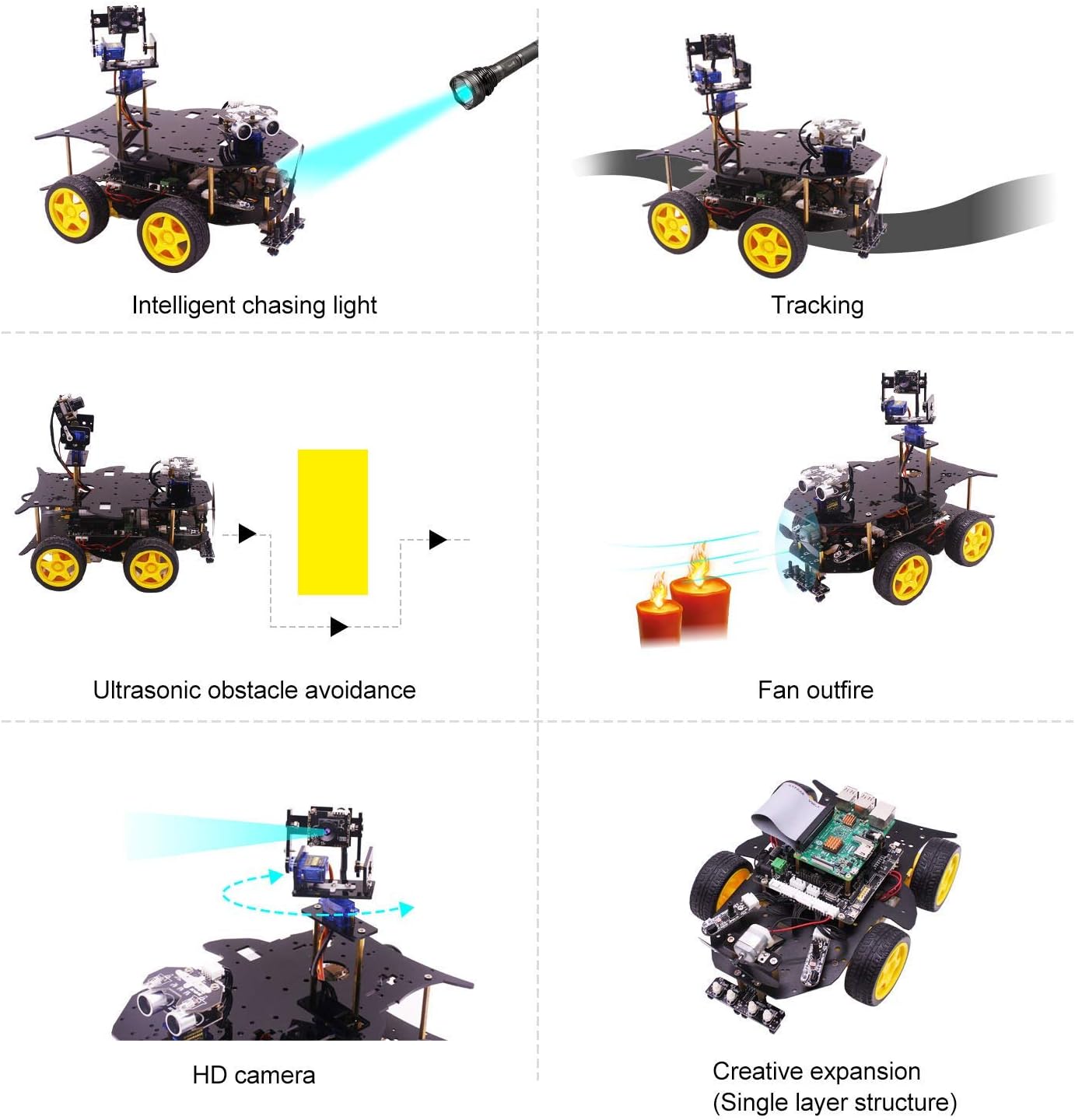
Image: Diagram illustrating the robot's basic functions, including intelligent light chasing, line tracking, ultrasonic obstacle avoidance, fan-based fire extinguishing, and the HD camera's capabilities.
Advanced AI Functions
Leveraging the Raspberry Pi and Open Source CV, the robot can perform various AI-driven tasks:
- Face Detection and Tracking: Identifies and tracks human faces.
- Color Recognition and Tracking: Detects and follows specific colors.
- Object Recognition: Identifies various objects in its environment.
- Gesture Recognition: Responds to predefined hand gestures.
- QR Code Recognition: Reads QR codes to trigger specific actions or movements.

Image: Visual demonstration of the robot's advanced AI capabilities, including face detection, color recognition, object recognition, QR code recognition, and gesture recognition.
Programming and Control
The robot supports programming in Python3 and C language. Yahboom provides comprehensive courses and source code examples. Control can be achieved via a dedicated mobile application (iOS and Android compatible) or a PC interface, allowing for real-time video transmission and command input.

Image: Illustration showing support for both C language and Python programming environments, with examples of code files and development resources provided by Yahboom.

Image: Depiction of the robot's real-time video transmission capabilities via a mobile application and a PC interface, allowing for remote monitoring and control.
Maintenance
Proper maintenance ensures the longevity and optimal performance of your Yahboom RPI4WD robot kit.
Battery Care
The kit includes a customized 18650 power lithium battery pack, offering approximately 120 minutes of effective battery life. This battery pack features stable charging, in-line charging, and overcharge anti-short circuit protection.
- Always use the provided charger for the 18650 battery pack.
- Avoid over-discharging the battery.
- Store the robot and battery in a cool, dry place when not in use.
- If the robot is not used for extended periods, charge the battery periodically to maintain its health.

Image: Comparison highlighting the advantages of Yahboom's customized 18650 power lithium battery solution, emphasizing stable charging, protection, and longer effective battery life compared to other robotic battery solutions.
General Cleaning and Inspection
- Keep the robot clean and free from dust and debris, especially around sensors and moving parts.
- Periodically check all connections to ensure they are secure.
- Inspect wheels and motors for any obstructions or wear.
Troubleshooting
This section addresses common issues you might encounter with your Yahboom RPI4WD robot kit.
- Robot Does Not Power On:
Ensure the 18650 battery pack is fully charged and correctly connected. Verify that the power switch on the expansion board is in the 'ON' position. Remember, the Raspberry Pi must be installed and powered for the robot to function. - Camera Shows No Display:
As noted in the setup section, if your camera has no screen display, you may need to refresh the camera firmware. Refer to the official Yahboom tutorials for detailed instructions on this process. Check all camera connections to the Raspberry Pi and the expansion board. - Robot Does Not Respond to Commands:
Verify that the Raspberry Pi is running the correct software and that the control application (APP or PC) is properly connected via Bluetooth or Wi-Fi. Check for any error messages in the programming environment. Ensure all motor and servo connections are secure. - Inaccurate Sensor Readings (e.g., Obstacle Avoidance, Line Tracking):
Ensure sensors are clean and free from obstructions. Calibrate sensors according to the software instructions if available. Check sensor wiring for loose connections. - Wi-Fi/Bluetooth Connectivity Issues:
Ensure your Raspberry Pi's Wi-Fi and Bluetooth modules are enabled and configured correctly. Check for interference from other devices. Restart both the robot and your control device.
For more complex issues or if the problem persists, refer to the detailed troubleshooting guides available on the Yahboom official website or contact their technical support.
Specifications
Below are the technical specifications for the Yahboom RPI4WD Raspberry Pi AI Robot Kit.

Image: A detailed view of the robot's multi-function expansion board with labels for various interfaces, accompanied by a table summarizing the robot's key specifications.
| Feature | Detail |
|---|---|
| Model Name | RPI4WD |
| Compatible Devices | Raspberry Pi 4B, Raspberry Pi 3B+, UNO, 51 chip, STM32, Personal Computer |
| Operating System | Raspberry Pi OS (Linux), Windows 10 IoT |
| Programming Languages | Python3, C Language |
| Connectivity Technology | Bluetooth, USB, Wi-Fi (5G network support) |
| Wireless Communication Standard | Bluetooth |
| CPU Manufacturer | Broadcom (via Raspberry Pi) |
| Included Components | Robot chassis, motors, wheels, expansion board, HD camera, ultrasonic module, line tracking module, various sensors, customized 18650 power lithium battery pack. (Raspberry Pi NOT included) |
| Product Dimensions | 29 x 20 x 7.7 cm |
| Item Weight | 1.2 kg |
| Battery Type | Customized 18650 power lithium battery pack (3.7V 18650 battery x 3) |
| Effective Battery Life | Approximately 120 minutes |
| Motor | 1:48 gear motor |
| Servo | SG90 servo |
Warranty and Support
Warranty Information
Specific warranty details for the Yahboom RPI4WD Raspberry Pi AI Robot Kit are not provided in the product information. Please refer to the official Yahboom website or contact their customer service for warranty terms and conditions.
Technical Support and Resources
Yahboom offers extensive resources to assist users with their robot kit:
- Online Tutorials and Courses: Access a variety of basic usage courses, including installation videos and first-time usage videos.
- Source Code: Python3 and C language source code are provided for various functions.
- Initial Use Video: A specific video titled "Raspberry Pi 4WD Robot Initial Tutorial Video" is available for initial setup guidance.
- Official Website: For the latest documentation, software updates, and support, visit the official Yahboom website.

Image: A screenshot of the Yahboom official website, showing navigation for downloads, tutorials, and contact information, indicating available support resources for the Raspberry Pi 4WD robot.
For direct technical assistance, please contact Yahboom customer support through their official channels.


