
Osmo 902-00057
Osmo Detective Agency Instruction Manual
Model: 902-00057
1. Introduction
The Osmo Detective Agency game invites young learners aged 5-12 to embark on a global mystery-solving adventure. This interactive game combines physical play pieces with digital technology to foster critical thinking, geographical knowledge, and observational skills. Players will travel virtually to famous cities, inspect clues with a physical magnifying glass, and uncover fascinating facts about world cultures and landmarks.
Please note that an Osmo Base for iPad, iPhone, or Fire Tablet is required to play this game and is sold separately. This manual provides essential information for setting up, operating, and maintaining your Osmo Detective Agency kit.

The Osmo Detective Agency kit, including the game box, interactive map, and magnifying glass.
2. What's in the Box
Your Osmo Detective Agency kit includes the following components:
- Detective Agency Game App (digital download)
- 4 Double-Sided Maps (providing 8 unique locations)
- Map Holder
- Magnifying Glass
3. Compatibility
The Osmo Detective Agency game requires an Osmo Base (sold separately) and is compatible with specific iPad, iPhone, and Fire Tablet models. Please refer to the compatibility chart below for detailed information.

Detailed compatibility information for various devices.
- iPad Compatibility: All iPads except Gen 1-4, Air Gen 1, iPad Mini Gen 1-3. The new iPad 10th Gen, iPad Pro 11" (4th Gen), & iPad Pro 12.9" (6th Gen) are not currently compatible; compatibility is expected later in 2023. iPad Reflector 2021 is required for: iPad Mini 6, iPad Air 4-5, iPad Pro 11-inch (Gen 1-3) & iPad Pro 12.9-inch (Gen 3-5). The minimum iOS version needed is iOS 15.
- iPhone Compatibility: iPhone 12, 12 Pro, 12 Pro Max, 13, 13 Pro, 13 Pro Max, 14, 14 Plus. No other iPhones are compatible. Requires the Osmo iPad base & 2021 reflector hardware. The minimum iOS needed is iOS 14.0.
- Fire Tablet Compatibility: Fire HD 8 (8th, 10th & 12th Gen) & Fire HD 10 (9th & 11th Gen). Fire Reflector 2021, sold separately, is required for the: Fire HD 8 (10th & 12th Gen) & Fire HD 10 (11th Gen). The minimum FireOS version needed is 7. Fire 7 (2022) will not be made compatible with Osmo products.
4. Setup
To begin your detective journey, follow these steps:
- Install the Osmo Base: Place your compatible iPad, iPhone, or Fire Tablet into the Osmo Base. Ensure it is securely seated.
- Attach the Reflector: Position the red reflector over your device's camera. This allows the Osmo system to 'see' the physical game pieces and your interactions.
- Download the App: Download and install the 'Detective Agency' game app from your device's app store.
- Launch and Calibrate: Open the app and follow any on-screen instructions for initial setup or calibration.
- Prepare Your Play Area: Lay out the chosen double-sided map on a flat surface in front of your device, ensuring it is within the camera's view.
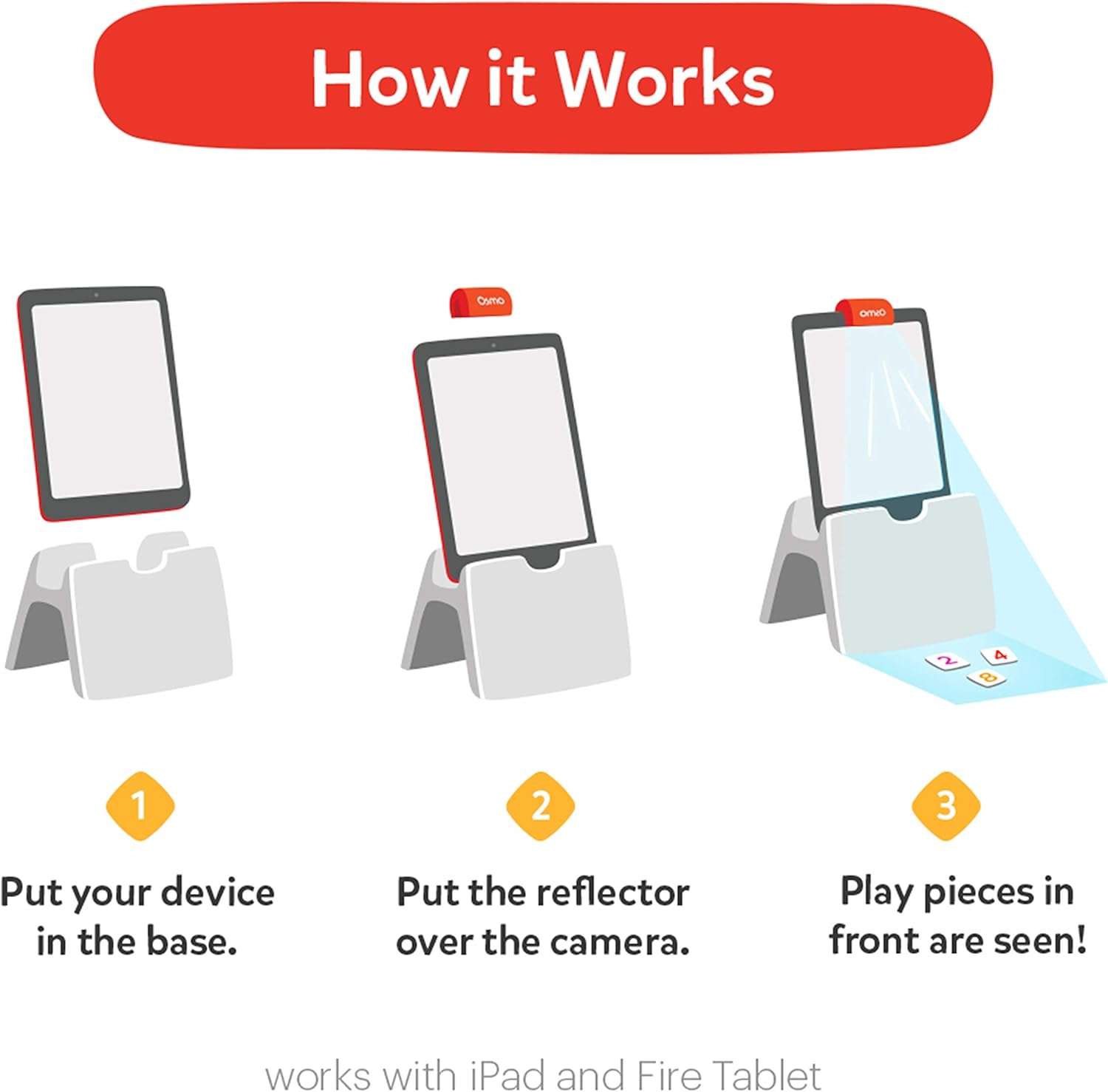
Visual guide for setting up your Osmo device and reflector.

An Osmo Base is essential for gameplay and is sold separately.
5. Operating Instructions
The Osmo Detective Agency game guides you through various mysteries across different cities. Here's how to play:
- Choose a City: The app will prompt you to select a city or location. Place the corresponding map from your kit into the map holder and lay it flat in front of your device.
- Receive Your Case: The app will present you with a case or a specific item to find on the map.
- Use the Magnifying Glass: Physically move the magnifying glass over the map to locate the requested item or clue. The app will display a magnified view on your screen, helping you pinpoint details.
- Confirm Your Find: Once you believe you've found the correct item, position the magnifying glass directly over it. The Osmo system will recognize your selection.
- Learn and Progress: If your selection is correct, the app will provide interesting facts or information related to the item or location, and then present your next challenge.
- Explore and Discover: Continue solving cases to unlock new cities and deepen your understanding of global geography and culture.

A child actively engaging with the Osmo Detective Agency game, using the physical magnifying glass on the map.

The game encourages exploration and discovery by solving cases from around the world.
6. Key Learnings & Skills
Osmo Detective Agency is designed to develop a wide range of skills in children, including:
- Critical Thinking: Analyzing clues and making deductions to solve mysteries.
- Geography: Learning about different countries, cities, and their unique characteristics.
- History: Discovering historical facts and significant landmarks.
- International Landmarks: Identifying and understanding the importance of global landmarks.
- Cultural Awareness: Gaining insights into various local cultures.
- Listening: Paying attention to in-game instructions and narratives.
- Observation Skills: Sharpening visual attention to detail to find hidden items.

Overview of the educational benefits and target age range for Osmo Detective Agency.
7. Maintenance
To ensure the longevity and optimal performance of your Osmo Detective Agency kit:
- Storage: Store all physical components (maps, map holder, magnifying glass) in their original packaging or a safe, dry place when not in use. The included map holder is designed for convenient storage.
- Cleaning: Gently wipe the maps and magnifying glass with a soft, dry cloth if they become dusty. Avoid using harsh chemicals or abrasive materials.
- App Updates: Regularly check for and install updates for the 'Detective Agency' app to ensure you have the latest features and bug fixes.
- Device Care: Follow your device manufacturer's guidelines for cleaning and maintaining your iPad, iPhone, or Fire Tablet.
8. Troubleshooting
If you encounter any issues while using your Osmo Detective Agency kit, consider the following common solutions:
- App Not Launching/Crashing: Ensure your device meets the minimum compatibility requirements (see Section 3). Try restarting the app or your device. Check for app updates.
- Physical Pieces Not Recognized:
- Verify the reflector is correctly placed over your device's camera.
- Ensure adequate lighting in your play area. Avoid direct sunlight or very dim conditions.
- Make sure the map is laid flat and fully within the camera's view.
- Clean the reflector and your device's camera lens.
- Game Freezing/Lagging: Close other applications running in the background on your device to free up memory. Ensure your device's operating system is up to date.
- Missing Osmo Base: Remember that the Osmo Base is a separate purchase and is essential for gameplay. This kit does not include the base.
9. Specifications
| Feature | Detail |
|---|---|
| Product Dimensions | 9 x 6 x 1.25 inches |
| Item Weight | 3.5 ounces |
| Item Model Number | 902-00057 |
| Manufacturer Recommended Age | 5 - 12 years |
| Release Date | October 25, 2018 |
| Manufacturer | Osmo |
10. Safety Information
WARNING: CHOKING HAZARD - Small Parts. Not for children under 3 years.
Please ensure that all small components of the game are kept out of reach of young children to prevent accidental ingestion.
11. Warranty and Support
For information regarding product warranty, returns, or technical support, please visit the official Osmo website or contact their customer service directly. Keep your proof of purchase for any warranty claims.
Official Osmo Website: www.playosmo.com
Ask a question about this manual
Ask about setup, troubleshooting, compatibility, parts, safety, or missing instructions. Manuals+ will review the question and use this page’s manual context to help answer it.