
1. Introduction
The SMARTGEN HMC4000MPU Marine Genset Control Module is an advanced controller designed for marine generator sets. It integrates digitization, intelligentization, and network technology to provide comprehensive automation and monitoring capabilities for single-unit gensets. This module facilitates remote start/stop operations, precise data measurement, and robust alarm protection, ensuring reliable performance in marine environments. Featuring an intuitive LCD display with selectable language interfaces (Chinese and English) and user-friendly push-button operation, the HMC4000MPU is engineered for ease of use and high reliability.
This manual provides detailed instructions for the installation, operation, and maintenance of your HMC4000MPU controller.
2. Key Features
- Display: 132x64 LCD with backlight, offering selectable language interfaces (Chinese and English) and push-button operation.
- Durability: Hard-screen acrylic material protects the screen, providing excellent wear-resisting and scratch-resisting functions. Silicone panel and pushbuttons are designed for extreme temperature environments.
- Connectivity: Equipped with a CANBUS port for communication with J1939 compliant gen-sets.
- Remote Control: RS485 communication interface allows connection with remote control modules, enabling convenient remote engine start/stop. Local start/stop keys are deactivated in remote control mode.
- Override Mode: A dedicated override mode ensures that only over-speed shutdown and emergency shutdown can stop the engine, enhancing safety in critical situations.
- System Compatibility: Suitable for 3-phase 4-wire, 3-phase 3-wire, single phase 2-wire, and 2-phase 3-wire systems with voltage 120V/240V and frequency 50Hz/60Hz.
- Micro-processor Technology: Utilizes micro-processor technology for precision parameter measurement, fixed value adjustment, time setting, and set value adjustment.
- Configuration: All parameters can be configured from the front panel or via a USB interface using a PC.
3. Model Comparison
The SMARTGEN HMC4000 series offers various models with distinct functionalities. Below is a comparison table:
| MODEL | FUNCTION | INPUT | OUTPUT | SENSOR | GENRS485 | HEAD | CANBUS | REMARK |
|---|---|---|---|---|---|---|---|---|
| HMC4000MPU | 364 | ✓ | ✓ | ✓ | ✓ | ✓ | ✓ | Speed collected by head sensor. |
| HMC4000CAN | 364 | ✓ | ✓ | ✓ | ✓ | ✓ | ✓ | Speed collected by J1939 CANBUS. |
| HMC4000RM | 000 | - | ✓ | ✓ | ✓ | ✓ | ✓ | Remote monitoring control module. |
4. Setup and Installation
4.1. Mounting the Controller
The HMC4000MPU should be securely mounted in a location that is protected from direct exposure to harsh marine elements, excessive vibration, and extreme temperatures beyond its operational limits. Ensure adequate ventilation around the unit.
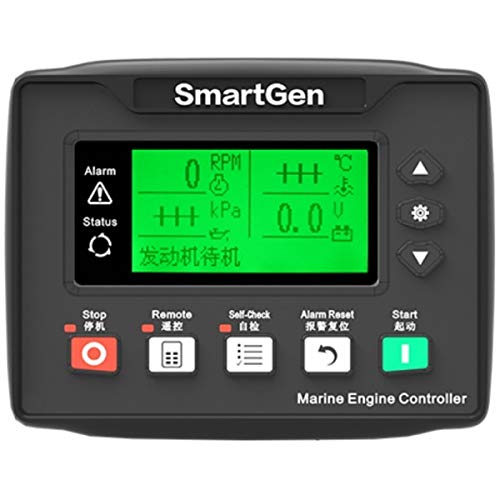
Figure 1: Front view of the SMARTGEN HMC4000MPU Marine Genset Control Module. The module features a green LCD screen displaying RPM, kPa, temperature, and voltage. Below the screen are five control buttons: Stop (red), Remote (with a keypad icon), Self-Check (with a list icon), Alarm Reset (with a curved arrow icon), and Start (green). The brand "SmartGen" is visible at the top, and "Marine Engine Controller" is printed at the bottom.
4.2. Wiring Connections
All wiring should be performed by qualified personnel in accordance with local and international electrical codes. Ensure the genset is completely powered off and isolated before making any connections.
- Power Supply: Connect the module to a stable DC power source (typically 12V or 24V, depending on the system). Observe correct polarity.
- Engine Sensors: Connect engine sensors for parameters such as oil pressure, water temperature, fuel level, and engine speed (via head sensor for HMC4000MPU).
- Generator Inputs: Connect voltage and current transformers as required for generator monitoring.
- Control Outputs: Connect to the engine's starter motor, fuel solenoid, and other control devices.
- Communication Ports:
- RS485: For remote control and monitoring.
- CANBUS (J1939): For communication with compatible engine ECUs.
- USB: For PC configuration and parameter adjustment.
- Emergency Stop: Ensure the emergency stop circuit is correctly wired and functional.
5. Operating Instructions
5.1. Powering On and Initial Display
Upon applying power, the LCD screen will illuminate and display the current status of the genset, including RPM, oil pressure (kPa), engine temperature (°C), and battery voltage (V). The "发动机待机" (Engine Standby) message indicates the genset is ready for operation.
5.2. Manual Start/Stop
- Start: Press the Start button (green button with a vertical line icon) to initiate the engine start sequence. The controller will perform pre-heat (if configured) and then crank the engine.
- Stop: Press the Stop button (red button with a circle icon) to shut down the engine. The controller will execute the cool-down sequence (if configured) before stopping the engine.
5.3. Remote Control Mode
When the controller is connected via the RS485 interface to a remote control module, it can be switched to remote control mode. In this mode, the local Start/Stop buttons on the HMC4000MPU are deactivated, and all engine control commands are received from the remote system. The Remote button (with a keypad icon) may indicate or activate this mode, depending on configuration.
5.4. Self-Check Function
Pressing the Self-Check button (with a list icon) initiates a diagnostic routine to verify the functionality of the controller and connected sensors. Refer to the display for self-check results.
5.5. Alarm Management
The controller continuously monitors various engine and generator parameters. In case of an abnormal condition, an alarm will be triggered, indicated by the "Alarm" icon (triangle with exclamation mark) and potentially an audible alert. The specific alarm message will be displayed on the LCD.
- Alarm Reset: After addressing the cause of an alarm, press the Alarm Reset button (with a curved arrow icon) to clear the alarm indication.
5.6. Override Mode
The override mode is a critical safety feature. When activated, only an over-speed shutdown or an emergency shutdown signal can stop the engine. This mode is typically used in situations where continuous engine operation is paramount, even in the presence of minor faults that would otherwise trigger a shutdown.
6. Maintenance
Regular maintenance ensures the longevity and reliable operation of your HMC4000MPU controller.
- Cleaning: Periodically clean the front panel and screen with a soft, dry cloth. Avoid abrasive cleaners or solvents.
- Connection Checks: Regularly inspect all wiring connections for tightness and signs of corrosion.
- Functional Tests: Periodically perform a self-check and test the start/stop functions to ensure proper operation.
- Firmware Updates: Check the SMARTGEN website or contact support for information on available firmware updates that may enhance performance or add features.
7. Troubleshooting
If you encounter issues with your HMC4000MPU, consider the following basic troubleshooting steps:
- No Power: Check the DC power supply connections and ensure the battery voltage is within the specified range.
- Engine Fails to Start: Verify fuel supply, battery charge, and starter motor connections. Check for active alarms that might be preventing start-up.
- Incorrect Readings: Inspect sensor connections and ensure sensors are correctly calibrated and functioning.
- Communication Issues: For RS485 or CANBUS problems, check wiring, termination resistors, and ensure correct communication parameters are set.
- Persistent Alarms: Identify the specific alarm code displayed and consult the detailed alarm list in the full product manual (if available) or contact technical support.
For complex issues, it is recommended to contact SMARTGEN technical support.
8. Specifications
- Model Number: HMC4000MPU
- Manufacturer: SMARTGEN
- Item Weight: 11.29 ounces
- ASIN: B07GH7Z83T
- First Available: December 13, 2018
- Display: 132x64 LCD with backlight
- Communication: RS485, CANBUS (J1939), USB
- System Compatibility: 3-phase 4-wire, 3-phase 3-wire, single phase 2-wire, 2-phase 3-wire (120V/240V, 50Hz/60Hz)
- Speed Detection: Via head sensor (for HMC4000MPU)
9. Warranty and Support
For warranty information, technical support, or service inquiries regarding your SMARTGEN HMC4000MPU Marine Genset Control Module, please contact SMARTGEN directly or your authorized distributor. Ensure you have your model number and purchase details available when seeking support.
For the most up-to-date information, please visit the official SMARTGEN website.


