
1. Introduction
The SmartGen AIN8 analog input module is an expansion module designed to provide 8 analog input channels. It supports various sensor types, including PT100 resistor-type, (4-20)mA current-type, and (0-5)V voltage-type sensors, configurable for each channel. Data collected by the AIN8 module is transmitted to a host controller via a CANBUS port for processing. This manual provides essential information for the proper installation, operation, and maintenance of the AIN8 module.
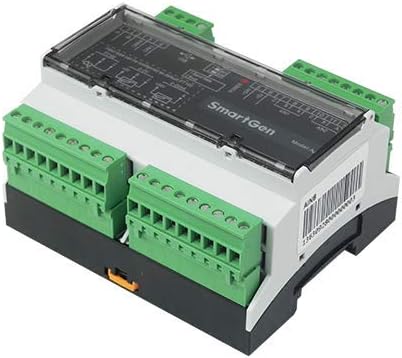
Figure 1: SmartGen AIN8 Analog Input Module. This image displays the compact module with its green pluggable wiring terminals on both sides and a clear cover over the internal circuitry, indicating its industrial application.
2. Features and Characteristics
- Each of the 8 channels can be configured for PT100 resistor-type, (4-20)mA current-type, or (0-5)V voltage-type sensor input.
- Users can define custom names for each channel's sensor.
- Alarm threshold values for each channel are configurable via the host controller.
- Sensor type changes are realized through software configuration, eliminating the need for hardware interface modifications.
- CANBUS communication baud rate is configurable to 250kbps or 125kbps using a DIP switch.
- The AIN8 module requires a host controller for operation.
- Wide power voltage range of (8-35)VDC, suitable for various starter battery voltage requirements.
- Modular structure with a flame-retardant ABS shell, pluggable wiring terminals, and guide rail mounting for easy installation and compact design.
3. Setup
Proper setup is crucial for the reliable operation of the AIN8 module. This section outlines general setup considerations.
- Mounting: Mount the AIN8 module on a standard guide rail in a suitable enclosure, ensuring adequate ventilation and protection from environmental factors.
- Power Connection: Connect the module to a stable power supply within the (8-35)VDC range. Observe correct polarity.
- CANBUS Connection: Connect the CANBUS port to the host controller using appropriate CANBUS cabling. Ensure proper termination if required by the CANBUS network design.
- Sensor Wiring: Connect your analog sensors to the respective input channels using the pluggable wiring terminals. Ensure correct wiring for PT100, (4-20)mA, or (0-5)V sensor types as per your application. Refer to the host controller's documentation for specific wiring diagrams if available.
- DIP Switch Configuration: Set the CANBUS baud rate (250kbps or 125kbps) using the DIP switches on the module, matching the baud rate of your CANBUS network.
- Software Configuration: After physical connections, configure the sensor types, names, and alarm thresholds for each channel via the host controller's software interface.
4. Operating Instructions
Once the AIN8 module is correctly set up and configured, its operation is primarily managed through the connected host controller.
- Power On: Apply power to the AIN8 module and the host controller. The module will initiate communication with the host controller.
- Data Acquisition: The AIN8 module continuously acquires data from the connected analog sensors. This data is then transmitted to the host controller via CANBUS.
- Monitoring: Monitor sensor readings and status through the host controller's display or interface.
- Alarm Management: If a sensor reading exceeds or falls below its configured alarm threshold, the AIN8 module will signal this to the host controller, which will then display the corresponding alarm information.
- Parameter Adjustment: Any adjustments to sensor types, names, or alarm thresholds should be performed through the host controller's software.
5. Maintenance
Regular maintenance helps ensure the longevity and reliable performance of your AIN8 module.
- Cleaning: Keep the module clean and free from dust and debris. Use a soft, dry cloth for cleaning. Do not use liquid cleaners or solvents.
- Connection Checks: Periodically inspect all wiring connections for tightness and signs of corrosion or damage. Ensure pluggable terminals are securely seated.
- Environmental Conditions: Ensure the operating environment remains within the specified temperature and humidity ranges to prevent damage.
- Firmware Updates: Check with SmartGen for any available firmware updates for the AIN8 module or its host controller. Follow update instructions carefully.
- Sensor Calibration: Ensure connected sensors are calibrated according to their manufacturer's recommendations to maintain accuracy.
6. Troubleshooting
This section provides general guidance for common issues. For complex problems, contact technical support.
| Problem | Possible Cause | Solution |
|---|---|---|
| Module not powering on | Incorrect power supply voltage or polarity; loose power connection. | Verify power supply (8-35VDC) and connections. Check polarity. |
| No communication with host controller | Incorrect CANBUS wiring; mismatched baud rate; faulty CANBUS cable; host controller issue. | Check CANBUS wiring and termination. Ensure DIP switch settings match host controller baud rate. Test CANBUS cable. Verify host controller operation. |
| Inaccurate sensor readings | Incorrect sensor type configuration; faulty sensor; incorrect wiring; sensor out of calibration. | Verify sensor type setting in software. Check sensor wiring. Calibrate or replace sensor if necessary. |
| Alarm not triggering or false alarms | Incorrect alarm threshold settings; sensor malfunction; host controller configuration error. | Review and adjust alarm thresholds in the host controller software. Check sensor functionality. Consult host controller manual. |
7. Specifications
- Model: AIN8
- Input Channels: 8 Analog Input Channels
- Supported Sensor Types (per channel): PT100 resistor-type, (4-20)mA current-type, (0-5)V voltage-type
- Communication: CANBUS (Configurable 125kbps / 250kbps)
- Power Supply: (8-35)VDC
- Dimensions: 4.21 x 3.5 x 2.36 inches (107 x 89 x 60 mm)
- Item Weight: 7.7 ounces (0.22 Kilograms)
- Material: Copper (internal components), Flame retardant ABS shell
- Mounting: Guide rail mounting
8. Safety Information
Observe the following safety precautions during installation, operation, and maintenance:
- Ensure all power is disconnected before performing any wiring or maintenance.
- Only qualified personnel should install and service this equipment.
- Do not operate the module in environments exceeding its specified temperature and humidity limits.
- Protect the module from moisture, dust, and corrosive substances.
- Use appropriate personal protective equipment (PPE) when working with electrical systems.
- Adhere to all local and national electrical codes and regulations.
9. Warranty and Support
For warranty information, technical support, or service inquiries, please refer to the official SmartGen website or contact your authorized SmartGen distributor. Keep your purchase receipt as proof of purchase for warranty claims.
Manufacturer: SMARTGEN
Brand: SmartGen


