1. Introduction
Thank you for choosing the Nedis Smart Wi-Fi Speaker. This device combines powerful 15W audio output with smart voice control capabilities, allowing you to stream music, control smart home devices, and access information using your voice. This manual provides essential information for setting up, operating, and maintaining your speaker to ensure optimal performance and longevity.

Image 1.1: Front view of the Nedis Smart Wi-Fi Speaker, showcasing its fabric-covered cylindrical design and illuminated top panel.
2. Product Overview
Familiarize yourself with the various components and controls of your Nedis Smart Wi-Fi Speaker.
2.1 Top Panel Controls

Image 2.1: Top view of the speaker showing control buttons for volume, playback, mode, and microphone.
- Volume Down (-): Decreases the speaker volume.
- Volume Up (+): Increases the speaker volume.
- Play/Pause (►▮▮): Plays or pauses audio playback.
- Mode (M): Switches between different input modes (e.g., Wi-Fi, Bluetooth, USB).
- Microphone Mute (🎤): Toggles the microphone on/off for privacy.
- Action Button (●): Activates the voice assistant or performs specific functions depending on the mode.
2.2 Rear Panel Ports
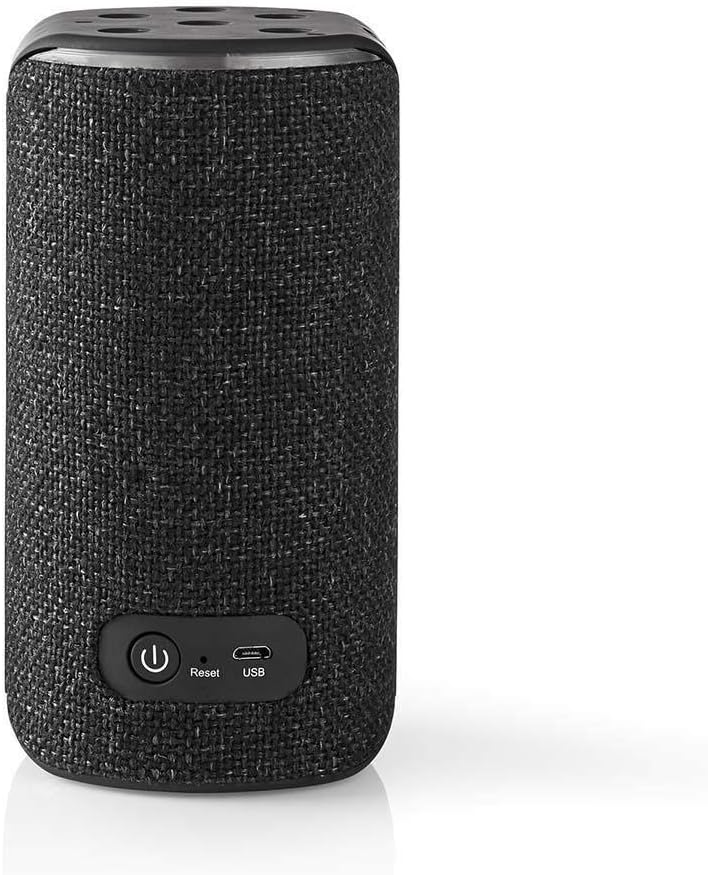
Image 2.2: Rear view of the speaker showing the power button, reset button, and USB port.
- Power Button (⏺): Turns the speaker on or off.
- Reset Button: Resets the speaker to factory settings. Use a small pin or paperclip to press.
- USB Port: For charging the device or playing audio from a USB storage device.
3. Setup
Follow these steps to set up your Nedis Smart Wi-Fi Speaker for the first time.
3.1 Charging the Speaker
- Connect the provided USB cable to the speaker's USB port and the other end to a suitable USB power adapter (not included).
- The LED indicator will show charging status. Allow the speaker to fully charge before first use.
3.2 Initial Power On
- Press and hold the Power Button (⏺) on the rear panel for a few seconds until the speaker powers on.
- The speaker will enter pairing mode, indicated by a flashing LED.
3.3 Connecting to Wi-Fi and Voice Assistant
To utilize the smart features and voice control, you need to connect the speaker to your Wi-Fi network and link it to a compatible voice assistant service (e.g., Amazon Alexa, as indicated on the product packaging).

Image 3.1: Retail packaging highlighting the speaker's compatibility with Amazon Alexa voice control.
- Download the dedicated Nedis SmartLife app (or the app specified in the speaker's quick start guide) from your smartphone's app store.
- Open the app and follow the on-screen instructions to add a new device.
- Select your Nedis Smart Wi-Fi Speaker from the list of discoverable devices.
- Enter your Wi-Fi network credentials when prompted.
- Once connected to Wi-Fi, the app will guide you through linking your voice assistant account (e.g., Amazon Alexa).
- Follow the voice assistant app's instructions to complete the setup.
4. Operating the Speaker
Learn how to use your speaker's various functions.
4.1 Voice Control
Once configured with a voice assistant, you can use voice commands to control your speaker and other smart devices.
- To activate the voice assistant, say the wake word (e.g., "Alexa") or press the Action Button (●) on the top panel.
- Speak clearly and directly towards the speaker.
- Example commands: "Play music," "What's the weather?", "Set a timer for 10 minutes."
4.2 Music Playback
- Wi-Fi Streaming: Use voice commands or the companion app to stream music from supported services.
- Bluetooth Mode: Press the Mode (M) button until the speaker enters Bluetooth pairing mode. Search for the speaker on your device's Bluetooth settings and connect.
- USB Playback: Insert a USB storage device into the USB port. The speaker may automatically switch to USB mode, or you may need to select it using the Mode (M) button.
4.3 Volume Adjustment
Use the Volume Up (+) and Volume Down (-) buttons on the top panel, or use voice commands (e.g., "Alexa, turn up the volume").
5. Maintenance
Proper care ensures the longevity and performance of your speaker.
- Cleaning: Use a soft, dry cloth to wipe the speaker's surface. Do not use liquid cleaners or abrasive materials.
- Storage: Store the speaker in a cool, dry place away from direct sunlight and extreme temperatures when not in use for extended periods.
- Battery Care: To prolong battery life, avoid fully discharging the speaker frequently. Charge it regularly.
6. Troubleshooting
If you encounter issues with your speaker, refer to the following common solutions.
| Problem | Possible Solution |
|---|---|
| Speaker does not power on. | Ensure the speaker is charged. Connect it to a power source and try again. |
| No sound from the speaker. | Check the volume level on the speaker and your connected device. Ensure the correct input mode is selected (Wi-Fi, Bluetooth, USB). |
| Cannot connect to Wi-Fi. | Verify your Wi-Fi password. Ensure the speaker is within range of your router. Try restarting your router and the speaker. Perform a factory reset if necessary. |
| Voice assistant not responding. | Ensure the microphone is not muted. Check your internet connection. Verify that the voice assistant account is correctly linked in the companion app. |
| Bluetooth pairing issues. | Ensure the speaker is in Bluetooth pairing mode. Turn off and on Bluetooth on your device. Forget the speaker from your device's Bluetooth list and try pairing again. |
If the problem persists, please contact Nedis customer support.
7. Specifications
Detailed technical specifications for the Nedis Smart Wi-Fi Speaker.
- Model Number: 5412810292615
- Brand: NEDIS
- Power Source: Battery Powered
- Connectivity Technology: Wi-Fi, Bluetooth
- Max Speaker Output Power: 15 Watts
- Special Features: Bluetooth, Integrated Microphone, USB Port
- Control Method: Voice
- Speaker Type: Bluetooth, Wi-Fi Speaker
- Surround Sound Channel Configuration: 2.0
- Item Weight: 403.66 Grams
- Mounting Type: Tabletop
8. Safety Information
Please read and follow these safety guidelines to prevent damage to the device or injury to yourself.
- Do not expose the speaker to water, moisture, or extreme temperatures.
- Avoid dropping or subjecting the speaker to strong impacts.
- Do not attempt to disassemble or repair the speaker yourself. Refer all servicing to qualified personnel.
- Use only approved charging cables and adapters.
- Keep the speaker away from heat sources and open flames.
- Ensure proper ventilation around the speaker during use.
9. Warranty and Support
For warranty information, technical support, or service inquiries, please refer to the warranty card included with your product or visit the official Nedis website. Keep your proof of purchase for warranty claims.


