
SMARTGEN HAT700B
SMARTGEN HAT700B ATS Controller User Manual
Model: HAT700B
Brand: SMARTGEN
1. Introduction and Overview
The SMARTGEN HAT700 series ATS controller is an intelligent dual-supply module designed for automatic transfer systems (ATS). It features configurable functions, automatic measurement, an LCD display, and digital communication capabilities. This controller integrates digital, intelligence, and networking technologies to provide precise voltage measurement (2-way-3-phase) and accurate judgment for various power conditions.
It is suitable for a wide range of ATS applications, including PC ATS, CB ATS, and CC ATS. Its compact structure, advanced circuitry, simple wiring, and high reliability make it an ideal choice for electrical devices, automatic control, and testing systems in diverse sectors such as electric power, telecommunications, petroleum, coal, metallurgy, railways, and municipal administration.
Key features include:
- Programmable functions for flexible operation.
- Automatic measurement and control to minimize operational errors.
- Clear LCD display for easy monitoring.
- Digital communication for enhanced system integration.
- Precision voltage measurement (2-way-3-phase).

Figure 1: Front panel of the SMARTGEN HAT700B ATS Controller, showing the LCD display, control buttons, and status indicators for Source 1, Load, and Source 2.
2. Product Identification and Model Comparison
The HAT700 series offers various models with specific functionalities. The HAT700B model is distinguished by its AC power supply and current sensing capabilities. Understanding the model designation helps in identifying the specific features of your controller.

Figure 2: Model comparison table for the HAT700 series ATS controllers, detailing features such as DC Power, AC Power Supply, AC Current & Power, Sync Close, Input Ports, Output Ports, and RS485 for models HAT700, HAT700B, HAT700I, HAT700BI, and HAT700S.
The table above provides a detailed comparison of the HAT700 series models, highlighting the specific functions available for each variant. The HAT700B model, for instance, includes AC Power Supply (LN90V-280V), AC Current & Power sensing, and RS485 communication, along with 2+4 input ports and 2+6 output ports.
3. Performance and Characteristics
The HAT700B ATS Controller is engineered with a robust set of features to ensure reliable and efficient automatic transfer operations. Its advanced microprocessor enables precise monitoring and control of power sources.
- System Type Configuration: Supports various system types including S1 (Mains) & S2 (Mains), S1 (Mains) & S2 (Generator), S1 (Generator) & S2 (Mains), and S1 (Generator) & S2 (Generator).
- User Interface: Features a 132x64 LCD with backlight, multilingual interface (English, Chinese, etc.), and push-button operation for ease of use.
- Power Monitoring: Collects and displays 2-way 3-phase Voltage, Frequency, Phase, Active Power, Reactive Power, Apparent Power, Power Factor, and Current.
- Alarm Functions: Provides separate over-current warning/trip alarms for S1/S2.
- Load Management: Includes Non-Essential Load (NEL) trip function.
- Energy Logging: Displays S1/S2 Total kW Energy, Total kvar Energy, and Total Close Times.
- Power Supply Time: Shows continuous power supply time and S1/S2 total power supply time.
- Sync Transfer: Offers Sync Transfer function, displaying Voltage Difference, Frequency Difference, and Phase Difference.
- Stored-Energy ATS Support: For Stored-Energy type ATS, the close relay activates after the PF Input is active.
- Protection Features: Monitors for over/under voltage, loss of phase, reverse phase sequence, and over/under frequency protection.
- Transfer Modes: Supports Automatic/Manual mode. Manual mode allows forced source switching.
- Security: Password authentication ensures authorized staff operation only.
- Genset Control: Genset can be manually tested for start/stop operation.
- ATS Function: Automatic Function of Automatic Re-closing.
- Output Control: Closing output signal can be set as on intervals or continuous output.
- Compatibility: Applicable for PC Three-stage, PC Two-stage, CB and CC switch.
- Neutral Line: Applicable for 2 isolated neutral line.
- Event Log: Real-time clock (RTC) and Event log function (records 99 items circularly).
- Scheduled Operation: Scheduled Run & Scheduled Not Run (can be set as start genset once a day/week/month).
- Multi-Genset Control: Can control two generators to work as Cycle Run mode, Master Run mode, and Balance Run mode.
- Wide Power Supply: DC(8~35V) allows the controller to bear maximum 80V instantaneous current.
- Terminal Space: Large terminal space allows the controller to bear maximum 625V input voltage.
- Communication: RS485 isolated communication interface with remote controlling, measuring, and monitoring via Modbus communication protocol.
- System Compatibility: Suitable for various AC systems (3 phase 4-wires, 3-phase 3-wires, single-phase 2-wire, and 2-phase 3-wire).
- Design: Modular design, self-extinguishing ABS plastic shell, pluggable terminal, built-in mounting, compact structure with easy installation.

Figure 3: Detailed list of performance and characteristics for the HAT700 series ATS controllers, outlining system configuration, monitoring capabilities, and protection features.
4. Setup and Installation
Proper installation is crucial for the safe and reliable operation of the HAT700B ATS Controller. Ensure all connections are secure and follow local electrical codes.
4.1 Connecting Terminals
The rear panel of the controller features clearly labeled terminals for power input, output, and communication. Refer to the diagram below for the correct terminal connections.

Figure 4: Rear view of the HAT700B ATS Controller showing the layout and numbering of connecting terminals for S1/S2 close output, auxiliary outputs, AC voltage input, RS485, and load current.
- Terminals 1-4: S1 Close Output (16A), S2 Close Output (16A).
- Terminals 5-10: AUX OUTPUT1 (16A), AUX OUTPUT2 (16A).
- Terminals 11-18: S1 AC VOLTAGE INPUT (A1, B1, C1, N1) and S2 AC VOLTAGE INPUT (A2, B2, C2, N2).
- Terminals 19-24: S1 CLOSE INPUT, S2 CLOSE INPUT, AUX INPUT1, AUX INPUT2, AUX INPUT3, AUX INPUT4.
- Terminals 25-34: AUX OUTPUT (7A) for various functions.
- Terminals 35-40: LOAD CURRENT (IA, IB, IC, IN).
- RS485: Isolated interface for communication (B(-), A(+)).
4.2 Wiring Diagrams
Refer to the specific wiring diagrams for your ATS configuration (e.g., ATYS3, SGQ-N, SGQ-M, VITEROPHETENG) to ensure correct electrical connections. These diagrams illustrate the connections for S1 and S2 voltage inputs, load, and control signals.
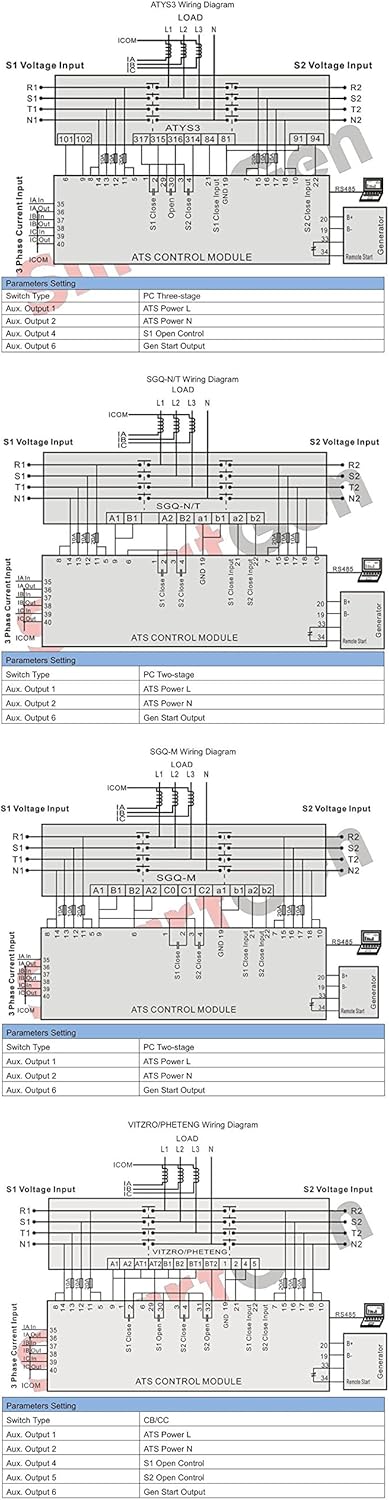
Figure 5: Collection of wiring diagrams for different ATS configurations (ATYS3, SGQ-N, SGQ-M, VITEROPHETENG) showing connections for S1/S2 voltage input, load, and control module. Each diagram includes parameter settings for switch type and auxiliary outputs.
Always ensure that power is disconnected before performing any wiring. Consult a qualified electrician if you are unsure about any wiring procedures.
5. Operating Instructions
The HAT700B controller offers both manual and automatic operation modes. Familiarize yourself with the front panel controls for effective management of your ATS.
5.1 Front Panel Controls
Figure 6: Front panel of the HAT700B ATS Controller, highlighting the LCD display, navigation buttons (Up, Down, OK), and function buttons (Manual, Auto, Start Genset, Lamp Test, Alarm Reset, Menu).
- LCD Display: Shows real-time status, measurements, and menu options.
- Up/Down Buttons: Navigate through menu options or adjust settings.
- OK Button: Confirm selections or enter sub-menus.
- Manual Button: Activates manual control mode for source switching.
- Auto Button: Activates automatic control mode, allowing the controller to manage source transfers based on programmed parameters.
- Start Genset Button: Manually initiates the generator start sequence.
- Lamp Test Button: Tests all indicator lights and the LCD display.
- Alarm Reset Button: Resets active alarms after the fault condition has been cleared.
- Menu Button: Accesses the main menu for configuration and advanced settings.
5.2 Basic Operation
- Power On: Ensure the controller is correctly wired and power is supplied. The LCD will illuminate, displaying the current status.
- Select Mode:
- Press the Auto button for automatic transfer operation. The controller will monitor power sources and switch as configured.
- Press the Manual button for manual control. In this mode, you can use the menu to force source transfers.
- Monitoring: The LCD continuously displays critical parameters such as voltage, frequency, and power status for both Source 1 and Source 2.
- Alarm Handling: If an alarm occurs, the alarm indicator will light up, and a message will appear on the LCD. Address the underlying issue and then press the Alarm Reset button.
- Accessing Menus: Press the Menu button to enter the configuration menus. Use the Up/Down buttons to navigate and the OK button to select. Password authentication may be required for certain settings.
6. Maintenance
The HAT700B ATS Controller is designed for minimal maintenance. Regular checks can help ensure its longevity and reliable performance.
- Cleaning: Keep the controller's front panel clean and free from dust. Use a soft, dry cloth. Do not use abrasive cleaners or solvents.
- Connections: Periodically inspect all wiring connections to ensure they are tight and free from corrosion. Loose connections can lead to intermittent operation or damage.
- Environmental Conditions: Ensure the operating environment remains within the specified temperature and humidity ranges to prevent damage to internal components.
- Firmware Updates: Check the manufacturer's website periodically for any available firmware updates that may improve performance or add new features.
- Battery (if applicable): If the unit contains a backup battery for RTC or settings, ensure it is functioning correctly. Refer to specific battery replacement instructions if needed.
7. Troubleshooting
This section provides guidance on common issues you might encounter with the HAT700B ATS Controller. For complex problems, contact technical support.
| Problem | Possible Cause | Solution |
|---|---|---|
| Controller not powering on | No power supply; loose wiring; blown fuse. | Check power input connections; verify power source; inspect fuses. |
| ATS not transferring automatically | Controller in Manual mode; incorrect parameters; power source issues (e.g., under/over voltage, frequency). | Switch to Auto mode; verify system type and transfer parameters; check power source quality. |
| Alarm indicator active | Over/under voltage; over/under frequency; loss of phase; over current. | Check LCD for specific alarm message; identify and resolve the fault condition; press Alarm Reset. |
| Communication (RS485) issues | Incorrect wiring; wrong communication settings; faulty cable. | Verify RS485 wiring (B(-), A(+)); check baud rate and parity settings; test cable continuity. |
8. Specifications
Detailed technical specifications for the HAT700B ATS Controller are provided below, ensuring compatibility and performance understanding.

Figure 7: Technical specifications table for the HAT700 series ATS controllers, including details on power consumption, AC voltage input, rated frequency, relay outputs, communication, dimensions, working conditions, storage conditions, protection level, insulation strength, and weight.
| Item | Contents |
|---|---|
| Operating Voltage | DC 8.0V~35.0V (continuous power supply); AC90V~280V (during AC power supply L1N1/L2N2 for HAT700B/HAT700BI/HAT700S). |
| Power Consumption | <5W (Standby mode: <2W). |
| AC Voltage Input (HAT700B/HAT700BI/HAT700S) | 3P4W (L-L): (80~480)V; 3P3W (L-L): (80~480)V; 1P2W (L-N): (50~280)V; 2P3W (A-B): (80~480)V. |
| Rated Frequency | 50/60Hz. |
| Close Relay Output | 16A AC250V Volts free output. |
| Auxiliary Relay Output | 16A/7A AC250V Volts free output. |
| Digital Input | GND (B-) connect is active. |
| Communication | RS485 isolated interface, MODBUS Protocol. |
| Case Dimensions | 197mm x 152mm x 47mm. |
| Panel Cutout | 186mm x 141mm. |
| Working Conditions | Temperature: (-25~+70)°C; Humidity: (20~93)%RH. |
| Storage Condition | Temperature: (-25~+70)°C. |
| Protection Level | IP55 Gasket. |
| Insulation Strength | Apply AC2.2kV voltage between high voltage terminal and low voltage terminal; The leakage current is not more than 3mA within 1min. |
| Weight | HAT700/HAT700I: 0.7kg; HAT700B/HAT700BI/HAT700S: 0.8kg. |
Product Dimensions: 7.76 x 5.98 x 1.85 inches (197mm x 152mm x 47mm)
Item Weight: 1.76 pounds (0.8kg)
9. Warranty and Support
For warranty information, technical support, or service inquiries, please contact SMARTGEN customer service or your authorized dealer. Ensure you have your product model number (HAT700B) and purchase details available when contacting support.
Manufacturer: SMARTGEN (ZHENGZHOU) TECHNOLOGY CO., LTD.
For the most up-to-date information and support resources, please visit the official SMARTGEN website.
Related documentsHAT700B


Ask a question about this manual
Ask about setup, troubleshooting, compatibility, parts, safety, or missing instructions. Manuals+ will review the question and use this page’s manual context to help answer it.