
1. Introduction and Overview
The ESYNiC Portable HiFi Headphone Amplifier (Model ESY120uk-JP) is designed to enhance the audio experience for various devices. This compact and lightweight amplifier provides superior sound quality, noise reduction, and improved dynamics for headphones, MP3 players, smartphones, and laptops. Its robust aluminum construction and rechargeable battery make it suitable for both home and portable use.
2. Product Features
- Compact and Portable Design: Easy to carry and use on the go.
- 3.5mm Auxiliary Input and Output: Standard connections for wide compatibility.
- High-Quality Stereo Output: Delivers realistic stereo sound and improved audio clarity.
- Two-Stage Gain Switch: Allows adjustment of amplification level for optimal headphone performance.
- Durable Aluminum Matte Surface: Reduces signal interference and ensures longevity.
- Built-in Rechargeable Battery: Provides over 8 hours of continuous use on a single charge.
- Wide Compatibility: Works with MP3 players, smartphones, computers, laptops, and CD players.
3. Package Contents
Please verify that all items are present in the package:
- 1 x ESYNiC Portable HiFi Headphone Amplifier (Model ESY120uk-JP)
- 1 x 3.5mm Audio Cable
- 1 x USB Power Cable (Micro USB)
- 1 x User Manual

Image: Contents of the ESYNiC headphone amplifier package, including the amplifier, audio cable, USB cable, and user manual.
4. Setup Instructions
- Connect Audio Source: Connect your audio source device (e.g., MP3 player, smartphone, laptop) to the amplifier's INPUT port using the provided 3.5mm audio cable.
- Connect Headphones: Connect your headphones to the amplifier's OUTPUT port.
- Power On: Rotate the volume knob clockwise until you hear a click and the power indicator light illuminates.

Image: The ESYNiC amplifier connected to a smartphone via the input port and headphones via the output port.
5. Operating Instructions
5.1 Power On/Off and Volume Control
To power on the amplifier, rotate the volume knob clockwise until you hear a click and the red power indicator light turns on. To power off, rotate the volume knob counter-clockwise until it clicks off. Adjust the volume to a comfortable listening level by rotating the knob.
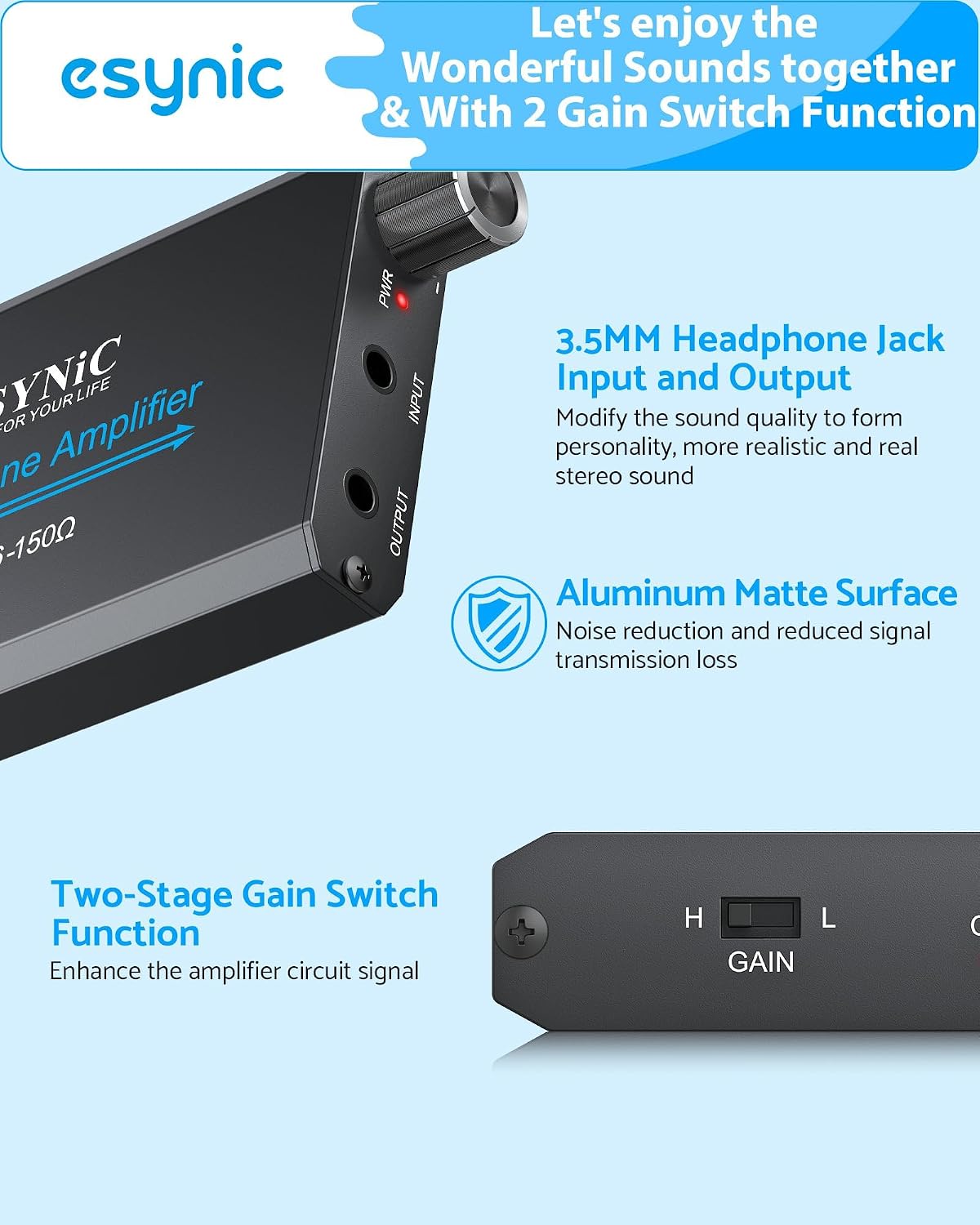
Image: Front view of the amplifier showing the power/volume knob, input, and output ports.
5.2 Gain Switch Function
The amplifier features a two-stage gain switch (H/L) located on the side. This switch allows you to adjust the amplification level to match your headphones' impedance and your desired volume output.
- 'H' (High Gain): Use this setting for higher impedance headphones (e.g., 60-150Ω) or when you require a louder output from your audio source.
- 'L' (Low Gain): Use this setting for lower impedance headphones (e.g., 10-59Ω) or for normal listening levels to prevent distortion and conserve battery life.

Image: Side view of the amplifier highlighting the 'H' and 'L' gain switch.
6. Charging the Amplifier
The ESYNiC headphone amplifier is equipped with a built-in 1000mAh lithium polymer rechargeable battery. To charge the device:
- Connect the provided Micro USB cable to the amplifier's DC 5V charging port.
- Connect the other end of the USB cable to a standard USB power source (e.g., computer USB port, USB wall adapter).
- The charging indicator light will illuminate during charging. Once fully charged, the light may change color or turn off, depending on the unit.
A full charge typically provides over 8 hours of continuous playback, though actual battery life may vary based on volume levels and connected headphone impedance.

Image: The amplifier connected to a power source for charging, with indicators for battery capacity and expected battery life.
7. Compatibility
The ESYNiC Portable HiFi Headphone Amplifier is designed for broad compatibility with various audio devices that feature a 3.5mm audio output. Compatible devices include:
- MP3 Players
- MP4 Players
- Mobile Phones
- Computers (Desktops and Laptops)
- CD Players
- Any device with a 3.5mm audio output jack
8. Maintenance
To ensure the longevity and optimal performance of your ESYNiC headphone amplifier, follow these maintenance guidelines:
- Cleaning: Use a soft, dry cloth to clean the surface of the amplifier. Do not use liquid cleaners, solvents, or abrasive materials, as these can damage the finish or internal components.
- Storage: Store the amplifier in a cool, dry place away from direct sunlight, extreme temperatures, and high humidity when not in use.
- Handling: Avoid dropping the device or subjecting it to strong impacts.
- Battery Care: For optimal battery life, avoid fully discharging the battery frequently. Charge the device regularly, even if not in constant use.
9. Troubleshooting
If you encounter issues with your amplifier, refer to the following common problems and solutions:
| Problem | Possible Cause | Solution |
|---|---|---|
| No Sound |
|
|
| Distorted Sound |
|
|
| Short Battery Life |
|
|
10. Specifications
| Model Number | ESY120uk-JP |
| Battery Capacity | 1000mAh Lithium Polymer |
| Usage Time | >8 hours |
| Internal Voltage | 8.3V/1A |
| Signal-to-Noise Ratio (SNR) | >100dB |
| Total Harmonic Distortion + Noise (THD+N) | 0.0003% |
| Output Power | 40mW (at 16Ω impedance) |
| Adapted Headphone Impedance | 10-150Ω |
| Dimensions (L x W x H) | 95 x 52 x 13 mm (3.74 x 2.05 x 0.51 inches) |
| Weight | 140 grams |
| Material | Aluminum |
| Certifications | CE, RoHS |
| UPC | 670924940555 |
11. Warranty and Support
For warranty information, technical support, or any inquiries regarding your ESYNiC Portable HiFi Headphone Amplifier, please refer to the contact details provided with your purchase documentation or visit the official eSynic website. Keep your purchase receipt for warranty claims.