
Introduction
Thank you for purchasing the VTech VT1091 Cordless Phone. This manual provides essential information for setting up, operating, and maintaining your new phone. Please read these instructions carefully to ensure proper use and to fully benefit from its features.
Package Contents
Before you begin, ensure all items are present in your package:
- Cordless Handset
- Base Unit
- Power Adapter for Base Unit
- Telephone Line Cord
- Rechargeable Batteries (pre-installed or separate)
- User Manual (this document)
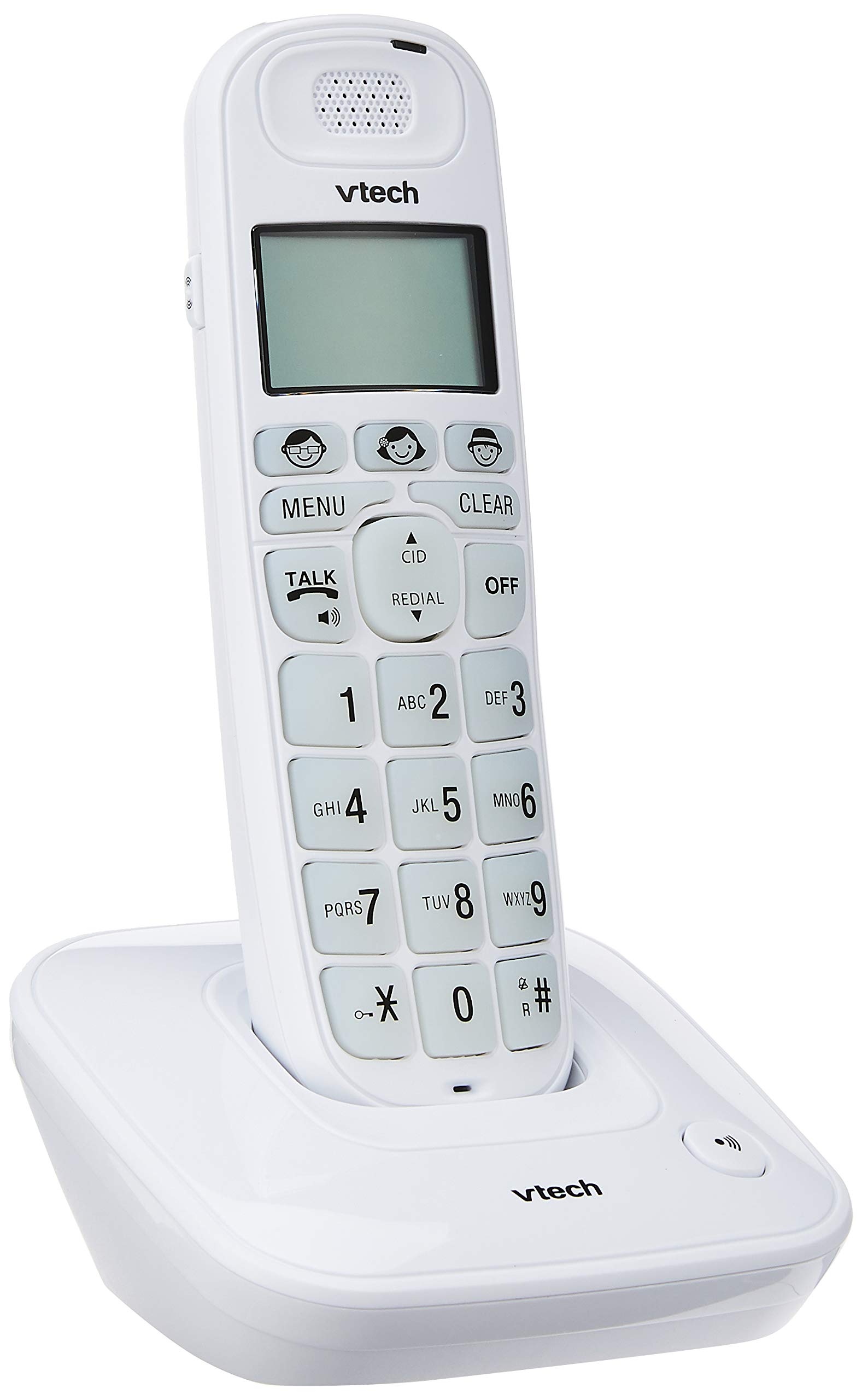
Image: The VTech VT1091 cordless phone handset resting in its base unit, showing the front view of the keypad and screen.
Setup
1. Battery Installation
- Locate the battery compartment cover on the back of the handset.
- Slide the cover downwards to open.
- Insert the supplied rechargeable batteries, observing the correct polarity (+ and -).
- Replace the battery compartment cover.
2. Connecting the Base Unit
- Connect one end of the telephone line cord to the TEL LINE jack on the back of the base unit.
- Connect the other end of the telephone line cord to your telephone wall jack.
- Connect the small end of the power adapter to the DC IN jack on the back of the base unit.
- Plug the large end of the power adapter into a standard electrical outlet.

Image: Rear view of the VTech VT1091 base unit, showing the ports for the telephone line cord and the power adapter.
3. Charging the Handset
Place the handset on the base unit with the display facing forward. The handset will begin charging. For optimal battery performance, allow the handset to charge for at least 16 hours before initial use.

Image: Side view of the VTech VT1091 cordless phone handset securely placed in its charging base.
Key Features
- Amplification: Amplification of incoming sounds by up to 30 decibels.
- Ultra-low Radiation Mode: Operates with reduced radiation levels.
- BOOSTER Button: One-touch button for easy sound amplification.
- Large Keypad: Big buttons with backlit keypad for improved visibility.
- Backlit LCD Display: Large display with orange backlight.
- Handset Speakerphone: For hands-free communication.
- Page/Handset Locator: Helps locate a misplaced handset.
- Auto Answer/Keypad Lock: Convenient call handling and security features.
- Alarm/Secrecy: Includes alarm function and call secrecy feature.
- GAP Compliant: Compatible with other GAP-enabled DECT devices.
- Phonebook Directory: 20 name and number entries.
- Caller ID: Displays the last 10 caller numbers.
- Redial: Stores the last 5 numbers dialed.
- Ringer Melodies: 10 selectable ringer melodies (5 polyphonic and 5 standard).
- Battery Life: Approximately 10 hours talk time / 100 hours standby time.
- Memory Buttons: 3 one-touch memory buttons.
- Speed Dial: 8 number (2-9) speed dial memories.
- Hearing Aid Compatible: Designed for use with hearing aids.
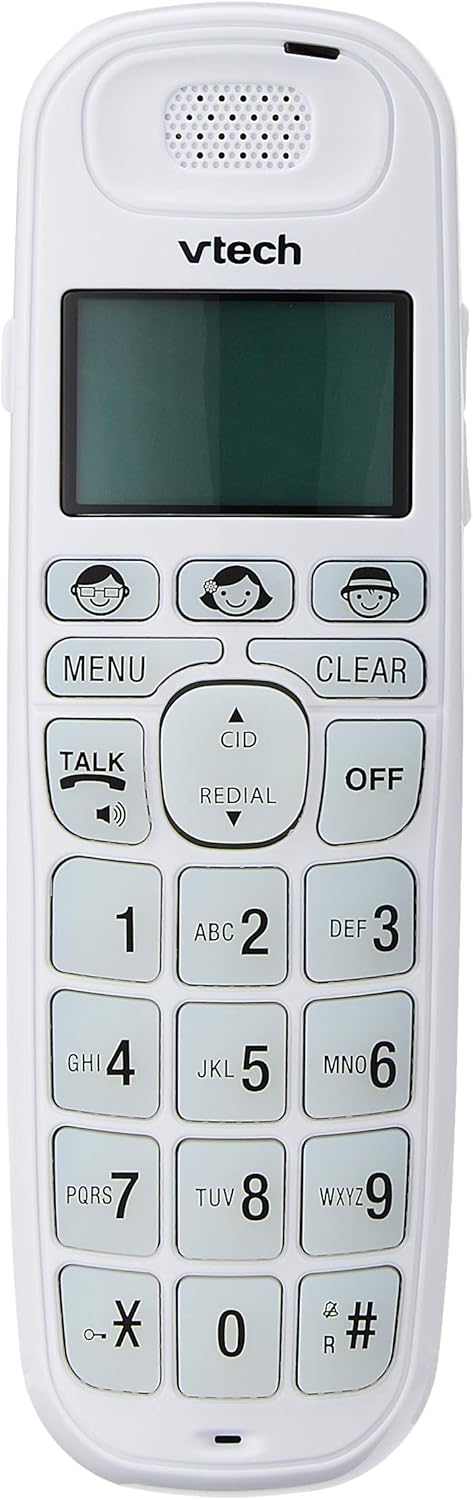
Image: Close-up of the VTech VT1091 handset, highlighting the large backlit keypad, LCD display, and dedicated function buttons.
Operating Instructions
Making a Call
- Press the TALK button to get a dial tone.
- Dial the desired phone number.
- To end the call, press the OFF button or place the handset back on the base unit.
Answering a Call
When the phone rings, press the TALK button to answer the call.
Using the Speakerphone
During a call, press the TALK button again (with the speaker icon) to activate the speakerphone function. Press it again to switch back to the earpiece.
Adjusting Volume
During a call, use the UP and DOWN arrow buttons on the side of the handset to adjust the earpiece or speakerphone volume.
Phonebook Directory
- Press the MENU button.
- Navigate to "Phonebook" using the arrow buttons and press MENU to select.
- Follow the on-screen prompts to add, edit, or delete entries.
Redial Function
Press the REDIAL button to view a list of the last 5 dialed numbers. Use the arrow buttons to select a number and press TALK to dial.
Caller ID
When the phone rings, the caller's number (if available) will be displayed on the screen. Press the CID button to review the caller ID list. Use the arrow buttons to scroll through entries.
BOOSTER Function
During a call, press the dedicated BOOSTER button (if available, often integrated with volume or a specific key) to instantly amplify the incoming audio by up to 30 decibels. Press again to deactivate.
Handset Locator
To locate a misplaced handset, press the PAGE button on the base unit. The handset will ring.
Maintenance
Cleaning
Wipe the handset and base unit with a soft, damp cloth. Do not use cleaning sprays or abrasive cleaners, as these can damage the finish or electrical components.
Battery Care
- Only use the supplied rechargeable batteries.
- If the phone will not be used for an extended period, remove the batteries to prevent leakage.
- Do not dispose of batteries in a fire.
Troubleshooting
| Problem | Solution |
|---|---|
| No dial tone |
|
| Handset does not charge |
|
| Poor sound quality |
|
| Caller ID not displayed |
|
Specifications
| Brand | VTech |
| Model | VT1091 |
| Telephone Type | Cordless |
| Color | White |
| Material | Plastic |
| Power Source | Corded Electric (for base unit) |
| Dialer Type | Single Keypad |
| Answering System Type | Digital (Note: This model's primary features do not highlight an integrated answering machine, but refers to general digital phone capabilities.) |
| Multiline Operation | Single |
| Phone Talk Time | 10 Hours |
| Phone Standby Time | 100 Hours |
| Caller ID | Yes |
| UPC | 735078026569 |

Image: The VTech VT1091 cordless phone in its base, with a measurement overlay indicating a height of 8.3 inches (21 cm).
Warranty and Support
This VTech VT1091 Cordless Phone comes with a 2 Year Local (Singapore) Manufacturer Warranty. For warranty claims or technical support, please refer to the contact information provided with your purchase documentation or visit the official VTech Singapore website.
For further assistance, please contact VTech customer service.


