1. Introduction
This manual provides essential instructions for the safe and effective use of your GreatPowerDirect AC Adapter Charger, designed for the Harman Kardon Onyx Studio 2 II Wireless Portable Speaker. Please read this manual thoroughly before use and retain it for future reference.
2. Product Overview
The GreatPowerDirect AC Adapter Charger is a reliable power supply unit intended to charge your Harman Kardon Onyx Studio 2 II speaker. It features built-in protections to ensure safe operation and is certified to international safety standards.
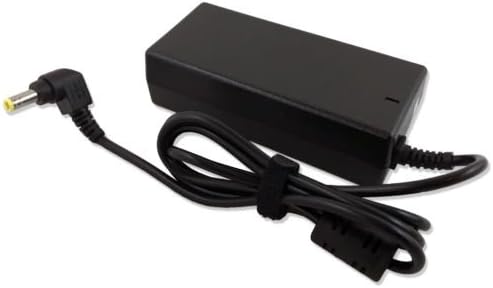
Figure 1: The GreatPowerDirect AC Adapter Charger, showing the main unit, attached power cable, and barrel connector.
2.1 Key Features
- Input Voltage: 100-240VAC, 50/60Hz, suitable for worldwide use.
- Safety Protections: Includes Short-circuit Protection, Over Voltage Protection, and Over Heat Protection.
- Certifications: Meets FCC, CE, and RoHS safety standards.
2.2 Package Contents
- 1x GreatPowerDirect AC/DC Adapter Power Charger
3. Setup
Follow these steps to properly connect your AC adapter charger to your Harman Kardon Onyx Studio 2 II speaker.
- Identify Speaker Power Port: Locate the DC input port on your Harman Kardon Onyx Studio 2 II speaker. This is typically a circular port.
- Connect Adapter to Speaker: Carefully insert the barrel connector of the AC adapter into the DC input port of your speaker. Ensure a snug fit.
- Connect to Power Outlet: Plug the AC power cord (if detachable) into the adapter, then insert the two-prong plug of the AC adapter into a standard wall power outlet (100-240V, 50/60Hz).

Figure 2: The AC adapter showing its label with specifications, the US-style power plug, and a detailed view of the 5.5mm*2.5mm barrel connector.
4. Operating Instructions
Once connected, the adapter will begin supplying power to your speaker. The speaker's internal charging indicator (if present) will show its charging status.
- Ensure the adapter is securely connected to both the speaker and the power outlet.
- The adapter is designed for continuous use, but it is recommended to disconnect it from the power outlet when not in use for extended periods.
- Do not cover the adapter during operation to allow for proper ventilation.
5. Maintenance
Proper maintenance ensures the longevity and safe operation of your AC adapter charger.
- Cleaning: Disconnect the adapter from all power sources before cleaning. Use a soft, dry cloth to wipe the exterior. Do not use liquid cleaners or abrasive materials.
- Storage: Store the adapter in a cool, dry place away from direct sunlight and extreme temperatures. Avoid tightly coiling the cable to prevent damage.
- Handling: Do not drop, disassemble, or attempt to repair the adapter. Avoid exposing it to moisture or liquids.
6. Troubleshooting
If you encounter issues with your AC adapter, refer to the following common problems and solutions.
- No Power to Speaker:
- Ensure the adapter is firmly plugged into both the wall outlet and the speaker.
- Check if the wall outlet is functional by plugging in another device.
- Inspect the adapter cable and connector for any visible damage.
- Adapter Feels Warm:
- It is normal for the adapter to feel warm during operation. If it becomes excessively hot or emits a burning smell, disconnect it immediately and cease use.
- Ensure the adapter is in a well-ventilated area and not covered.
If problems persist, contact the manufacturer for assistance.
7. Specifications
Detailed technical specifications for the GreatPowerDirect AC Adapter Charger.

Figure 3: The AC adapter unit, illustrating the 3-pin input port for the detachable power cord.
| Feature | Detail |
|---|---|
| Brand | GreatPowerDirect |
| Model Number | GPD0808144337 |
| Input Voltage | 100-240VAC |
| Frequency Range | 50/60Hz |
| Output Voltage | DC (Specific voltage not provided in source, typically matches speaker requirement) |
| Connector Type | Barrel Connector |
| Compatible Devices | Harman Kardon Onyx Studio 2 II Wireless Portable Speaker |
| Special Features | Short Circuit Protection, Over Voltage Protection, Over Heat Protection |
| Certifications | CE, FCC, RoHS |
| Item Weight | 8 ounces |
| Power Source | Corded Electric |
8. Safety Information
Adhere to the following safety guidelines to prevent injury or damage to the product and connected devices:
- Use the adapter only with compatible devices as specified.
- Do not expose the adapter to water, rain, or excessive humidity.
- Avoid using the adapter in extreme temperatures or direct sunlight.
- Do not modify or disassemble the adapter. There are no user-serviceable parts inside.
- Keep out of reach of children.
- Disconnect the adapter from the power outlet during lightning storms or when unused for long periods.
9. Warranty and Support
For warranty information or technical support, please refer to the GreatPowerDirect manufacturer's official website or contact their customer service directly. Details regarding specific warranty periods and support procedures are typically provided by the manufacturer at the point of purchase or on their product packaging.