
1. Product Overview
The Eureka Mignon Specialita is a high-performance espresso grinder designed for home baristas. It features advanced silent technology, stepless 55mm flat burrs, and an intuitive touchscreen interface for precise grind control and dosing. Manufactured in Italy, this grinder is built for durability and consistent performance, ensuring optimal coffee extraction for espresso and other brew methods.

Figure 1.1: Front view of the Eureka Mignon Specialita Espresso Grinder in Matte Black.
2. Safety Information
Please read all instructions carefully before using the appliance. Keep this manual for future reference.
- Ensure the grinder is placed on a stable, level surface.
- Do not immerse the grinder in water or any other liquid.
- Unplug the grinder from the power outlet before cleaning or maintenance.
- Keep hands and foreign objects away from the grinding burrs during operation.
- This appliance is for household use only.
- Do not operate the grinder with a damaged cord or plug.
3. Components
Familiarize yourself with the main components of your Eureka Mignon Specialita grinder:
- Bean Hopper: Transparent container for whole coffee beans.
- Hopper Lid: Covers the bean hopper.
- Grind Adjustment Knob: Located on the top right, used to adjust grind fineness.
- Touchscreen Display: Front-mounted interface for controlling grind time and dosing.
- Grind Outlet/Chute: Where ground coffee exits the machine.
- Portafilter Fork: Adjustable support for holding a portafilter during grinding.
- On/Off Switch: Located on the side or back of the unit.
- Power Cord: For connecting to an electrical outlet.

Figure 3.1: Front view highlighting the bean hopper and touchscreen.

Figure 3.2: Side view showing the compact design.

Figure 3.3: Rear view of the grinder.
4. Setup
Follow these steps for the initial setup of your grinder:
- Unpacking: Carefully remove the grinder and all accessories from the packaging. Retain packaging for future transport or storage.
- Placement: Place the grinder on a clean, dry, and stable surface, away from heat sources and direct sunlight. Ensure adequate ventilation around the unit.
- Hopper Installation: Insert the bean hopper into its designated slot on top of the grinder. Ensure it is seated firmly.
- Power Connection: Plug the power cord into a grounded electrical outlet (120 Volts).
- Initial Cleaning: Before first use, wipe down the exterior with a damp cloth. Run a small amount of old coffee beans through the grinder to season the burrs and clear any manufacturing residue. Discard these initial grounds.

Figure 4.1: The bean hopper ready for use.
5. Operating Instructions
Your Mignon Specialita grinder offers precise control for various coffee preparations.
5.1 Grind Adjustment
The grinder features a stepless micrometric grind adjustment system, allowing for infinite precision. The adjustment knob is located on the top right of the unit.
- Turn the knob clockwise for a finer grind (e.g., for espresso).
- Turn the knob counter-clockwise for a coarser grind (e.g., for pour-over or French press).
- Make small adjustments and test the grind to find your desired setting. The adjustment mechanism is located below the motor, preserving your grind setting even after disassembling for cleaning.

Figure 5.1: Close-up of the touchscreen display and grind adjustment knob.
5.2 Dosing and Grinding
The touchscreen allows you to program single, double, or continuous grinding modes.
- Power On: Flip the main power switch located on the side or back of the grinder. The touchscreen will illuminate.
- Select Dose: On the touchscreen, press the single shot icon (_) or double shot icon (__) to select your desired dose.
- Adjust Grind Time: Use the '+' and '-' buttons on the touchscreen to adjust the grinding time for the selected dose. The display shows the time in seconds.
- Continuous Mode: To grind continuously, press the continuous grind icon (square). The grinder will operate as long as the portafilter button is pressed.
- Position Portafilter: Place your portafilter onto the portafilter fork, ensuring it aligns with the grind outlet. The portafilter will activate the grinding cycle.
- Grind: The grinder will automatically start and stop based on the programmed time. For continuous mode, remove the portafilter to stop grinding.

Figure 5.2: Grinding coffee directly into a portafilter.
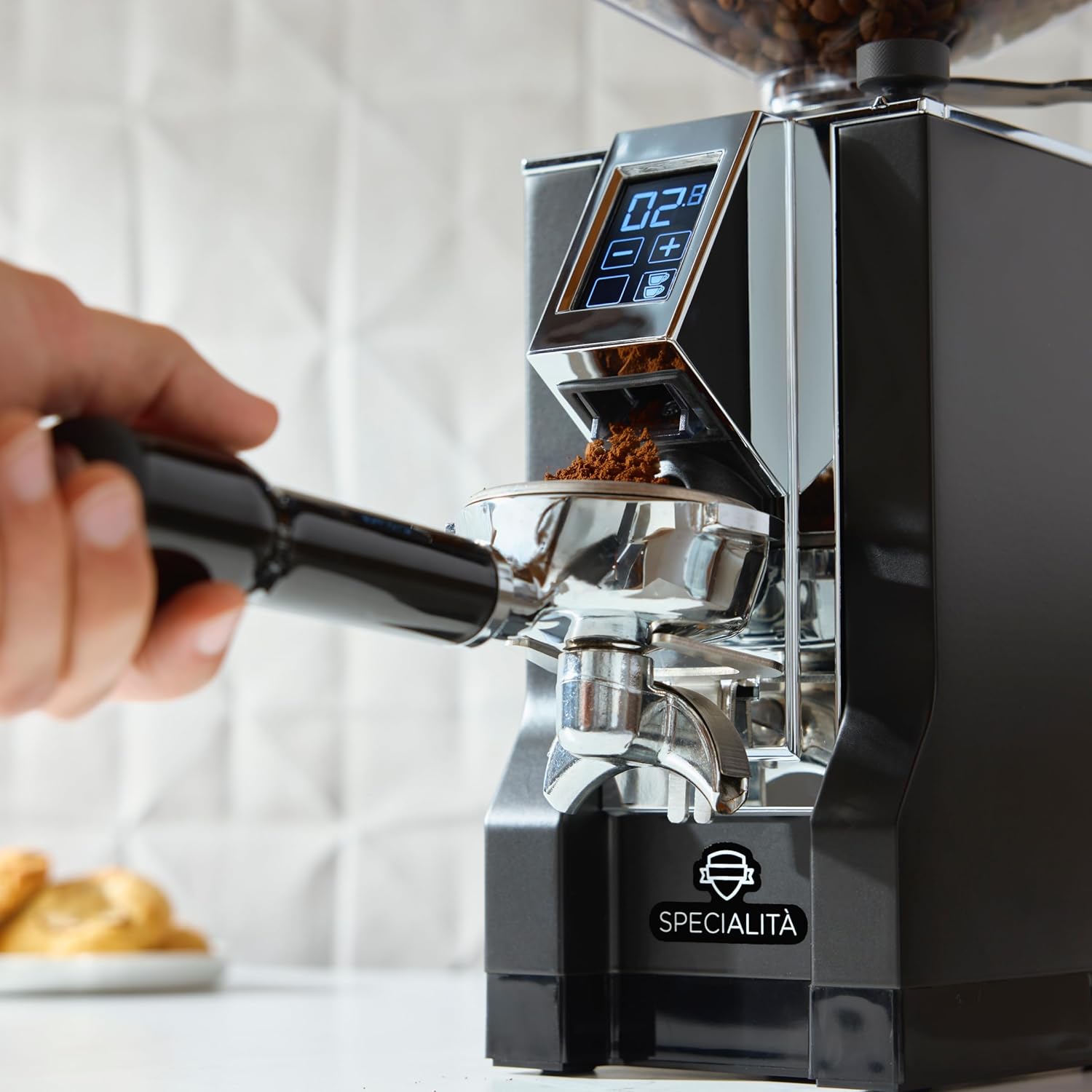
Figure 5.3: Close-up of ground coffee exiting the chute into a portafilter.
6. Maintenance
Regular cleaning and maintenance will ensure the longevity and optimal performance of your grinder.
6.1 Daily Cleaning
- Wipe down the exterior of the grinder with a soft, damp cloth.
- Use a brush to clear any residual coffee grounds from the grind outlet and portafilter fork.
6.2 Burr Cleaning (Monthly/As Needed)
For thorough cleaning, the burrs can be accessed by removing the top casing and upper burr.
- Unplug the grinder from the power outlet.
- Remove the bean hopper.
- Unscrew the top casing (refer to specific model instructions for exact screw locations).
- Carefully lift out the upper burr.
- Use a stiff brush or vacuum cleaner to remove all coffee residue from both burrs and the grinding chamber. Do not use water.
- Reassemble the burrs and casing, ensuring all parts are securely in place.
7. Troubleshooting
Refer to this section for common issues and their solutions.
| Problem | Possible Cause | Solution |
|---|---|---|
| Grinder does not turn on. | No power supply; On/Off switch off. | Check power cord connection; Ensure On/Off switch is in the 'On' position. |
| Inconsistent grind. | Burrs are dirty or worn; Grind setting too coarse/fine. | Clean the burrs thoroughly; Adjust grind setting incrementally. |
| Grinder is clogged. | Excess coffee grounds in chute; Too fine a grind setting. | Unplug and clear the chute with a brush; Adjust to a coarser grind setting. |
| Grinder is unusually loud. | Foreign object in burrs; Loose components. | Unplug and inspect burrs for foreign objects; Contact customer support if noise persists. |
8. Specifications
- Brand: Eureka
- Model: Mignon Specialita
- Color: Matte Black
- Product Dimensions: 6"L x 6"W x 14"H
- Item Weight: 14.55 pounds
- Voltage: 120 Volts
- Burr Type: 55mm Flat Burrs
- Grind Adjustment: Stepless Micrometric
- Control Interface: Touchscreen
- Manufacturer: Eureka
- Origin: Made in Italy
9. Warranty and Support
For warranty information, technical support, or service inquiries, please contact the retailer or the official Eureka customer service. Keep your proof of purchase for any warranty claims.
For additional resources and product information, you may visit the Eureka Store on Amazon.