
SteelSeries 61503

Figure 1: SteelSeries Arctis 3 All-Platform Gaming Headset.
SteelSeries Arctis 3 - All-Platform Gaming Headset Instruction Manual
Model: 61503
Introduction
The SteelSeries Arctis 3 is an all-platform gaming headset designed for superior sound, comfort, and style across various gaming platforms. This includes PC, PlayStation 5, PS4, Xbox One, Nintendo Switch, VR, and mobile devices, all connected via detachable 3.5mm cables.
For optimal performance, it is recommended to ensure the latest firmware is installed using the SteelSeries Engine software.
What's in the Box
- Arctis 3 Headset
- Dual 3.5mm Extension Cable
- Main Cable
- Product Information Guide

Figure 2: Contents of the Arctis 3 package, including the headset, cables, and manual.
Setup
Connecting the Headset
- Identify the Main Cable: Locate the main cable provided with your Arctis 3 headset. This cable has a proprietary connector for the headset on one end and a 3.5mm jack on the other.
- Connect to Headset: Insert the proprietary end of the main cable into the corresponding port on the left earcup of the Arctis 3 headset.
- Connect to Device:
- For PC (with separate mic/audio ports): Use the included Dual 3.5mm Extension Cable. Connect the main cable's 3.5mm jack to the female end of the extension cable. Then, plug the two male 3.5mm jacks (one for audio, one for microphone) into the respective ports on your PC.
- For PC (with combined audio/mic port), PlayStation, Xbox One, Nintendo Switch, VR, and Mobile: Connect the main cable's 3.5mm jack directly into the combined audio/mic port on your device.
- Adjust Microphone: The ClearCast microphone is retractable. Gently pull it out from the left earcup until it is positioned near your mouth for optimal voice clarity.

Figure 3: The retractable ClearCast microphone extended from the left earcup.
Operating the Headset
Volume Control
The volume dial is located on the rear of the left earcup. Rotate the dial upwards to increase volume and downwards to decrease volume.
Microphone Mute
A microphone mute button is located on the rear of the left earcup, below the volume dial. Press the button to toggle the microphone on or off. When muted, a red LED indicator on the microphone tip will illuminate.
Comfort and Fit
The Arctis 3 features an exclusive ski goggle suspension headband that contours across your head, distributing weight evenly and eliminating pressure points. Adjust the Velcro straps on the suspension band to achieve a comfortable and secure fit. The AirWeave ear cushions are designed to keep your ears cool and dry during extended use.
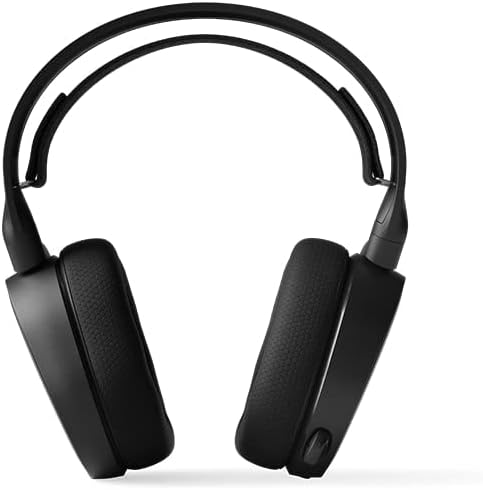
Figure 4: The adjustable ski goggle suspension headband for comfortable fit.
Maintenance
Firmware Updates
Regularly update the headset firmware using the SteelSeries Engine software. This ensures optimal performance and access to the latest features and bug fixes. Visit the official SteelSeries website to download the software.
Cleaning
Use a soft, dry cloth to clean the headset. Avoid using harsh chemicals or abrasive materials. For the ear cushions, gentle wiping with a damp cloth is acceptable, but ensure they are completely dry before use.
Troubleshooting
No Audio / Low Volume
- Ensure the main cable and any extension cables are securely connected to both the headset and the audio source.
- Check the volume dial on the headset and increase it.
- Verify the audio output settings on your device (PC, console, mobile) are correctly configured to use the Arctis 3 headset.
- Test the headset with another device to rule out a device-specific issue.
Microphone Not Working
- Ensure the microphone is not muted (check for the red LED on the mic tip).
- Verify the microphone input settings on your device are correctly configured to use the Arctis 3 microphone.
- Ensure the microphone is fully extended and positioned correctly.
- If using the Dual 3.5mm Extension Cable, ensure both jacks are correctly plugged into the audio and mic ports on your PC.
Specifications
| Feature | Specification |
|---|---|
| Model Name | SteelSeries Arctis 3 |
| Connectivity Technology | Wired |
| Headphones Jack | 3.5 mm Jack |
| Ear Placement | Over Ear |
| Form Factor | Over Ear |
| Noise Control | Active Noise Cancellation |
| Impedance | 32 Ohm |
| Item Weight | 3.53 ounces (100 Grams) |
| Cable Length | 3 Meters |
| Material | Plastic |
| Color | Black |
Warranty and Support
For warranty information and technical support, please refer to the official SteelSeries website or the Product Information Guide included in the box. You can also visit the SteelSeries Store on Amazon for additional resources.
A PDF user guide is also available for download: User Guide (PDF).
Related documents61503


Ask a question about this manual
Ask about setup, troubleshooting, compatibility, parts, safety, or missing instructions. Manuals+ will review the question and use this page’s manual context to help answer it.