
1. Introduction
This manual provides comprehensive instructions for the safe and efficient operation, maintenance, and troubleshooting of your ILIFE V55 Robotic Vacuum Cleaner. Please read this manual thoroughly before using the appliance and retain it for future reference.
2. Product Overview
The ILIFE V55 is a versatile robotic vacuum cleaner designed for both dry vacuuming and wet mopping. It features multiple cleaning modes, intelligent navigation, and scheduling capabilities to maintain clean floors with minimal effort.

Figure 2.1: The ILIFE V55 Robotic Vacuum Cleaner, a versatile device designed for both dry vacuuming and wet mopping.
Video 2.1: A general overview demonstrating robotic cleaning capabilities. Note that specific features and models shown may vary.
3. Setup and Initial Use
3.1 Unboxing and Component Check
Carefully remove all components from the packaging. Verify that all items listed in the packing list are present and undamaged. Retain packaging for future transport or storage.
3.2 Charging the Robot
- Place the charging dock against a wall in an open area, ensuring there are no obstacles within 1 meter to the sides and 2 meters in front.
- Connect the power adapter to the charging dock and plug it into a power outlet. The indicator light on the dock will illuminate.
- Place the V55 onto the charging dock, ensuring the charging contacts align. The robot will emit a sound and the display will show charging status. For first use, charge for at least 12 hours.
- The V55 supports auto-charging. When the battery is low, it will automatically return to the charging dock.
3.3 Installing Side Brushes
Press the side brushes onto the square posts at the bottom of the robot until they click into place. Ensure the L and R markings on the brushes match the corresponding markings on the robot.
3.4 Using the ElectroWall
The ElectroWall creates an invisible barrier to prevent the V55 from entering specific areas. Insert two AA batteries (not included) into the ElectroWall. Place it on the floor at the entrance of the area you wish to block. Ensure the infrared window faces the area to be restricted.
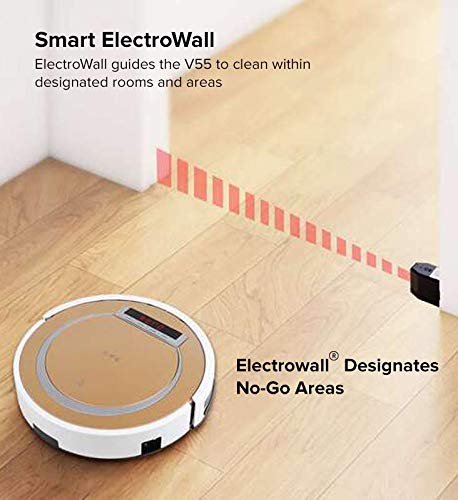
Figure 3.1: The ElectroWall device creates an invisible barrier to restrict the robot's cleaning area, preventing it from entering designated spaces.
4. Operating Modes
The ILIFE V55 offers several cleaning modes to suit different needs:
- Auto Cleaning Mode: The robot automatically cleans the entire floor area, adjusting its path based on obstacles and room layout. Press the "CLEAN" button on the robot or remote control to activate.
- Spot Cleaning Mode: For concentrated cleaning of a specific dirty area. Place the robot near the area and press the "SPOT" button on the remote. The robot will clean in a spiral pattern.
- Edge Cleaning Mode: Designed to clean along walls and corners. Press the "EDGE" button on the remote. The robot will follow the perimeter of the room.
- Schedule Mode: Allows you to set a specific time for the robot to start cleaning automatically each day. Refer to the remote control section for setting the schedule.
- Mopping Function: The V55 can perform wet mopping.
- Remove the dustbin and install the water tank.
- Fill the water tank with clean water.
- Attach the mopping cloth to the bottom of the water tank.
- Start the robot in Auto Cleaning Mode. The robot will automatically begin mopping.
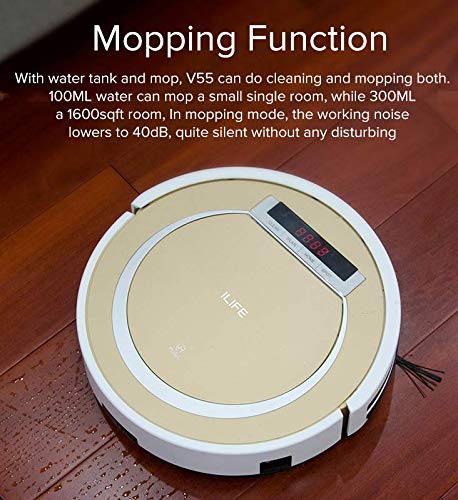
Figure 4.1: The ILIFE V55 features a mopping function with a water tank for wet cleaning, suitable for hard floors.
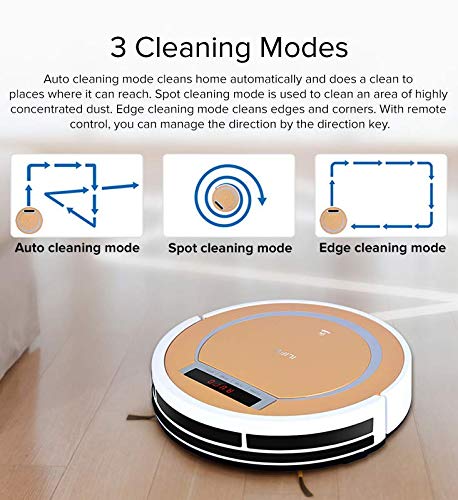
Figure 4.2: Visual representation of the V55's Auto, Spot, and Edge cleaning modes, illustrating their distinct cleaning patterns.
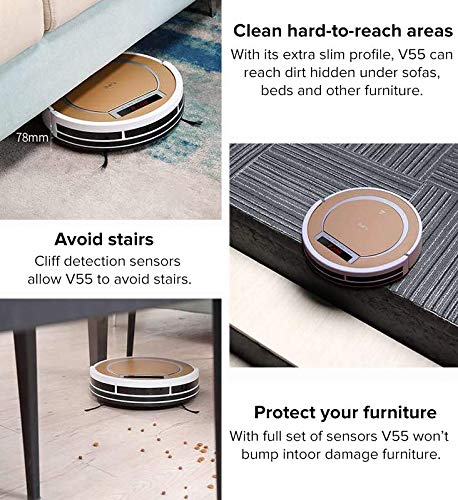
Figure 4.3: The schedule mode allows for automated cleaning at pre-set times, ensuring your floors are cleaned regularly even when you are away.
5. Key Features
- HEPA Filter: Equipped with a high-efficiency particulate air (HEPA) filter to capture fine dust and allergens.
- Slim Profile: With a height of 78mm, the V55 can easily clean under sofas, beds, and other low-clearance furniture.
- Cliff Detection Sensors: Integrated sensors prevent the robot from falling down stairs or off elevated surfaces.
- Anti-Collision Sensors: A full set of sensors helps the V55 navigate around obstacles and avoid bumping into furniture.
- Touch Screen: An LCD touch screen provides a clear operation interface for easy control.
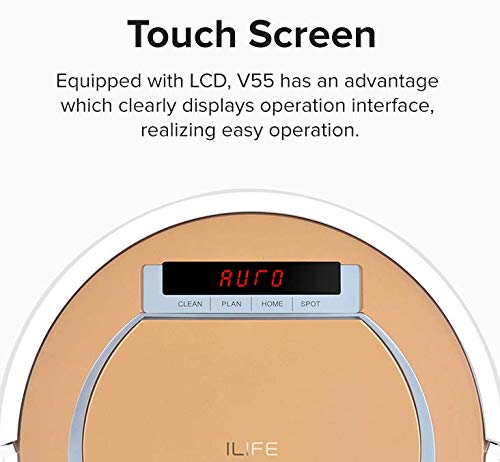
Figure 5.1: The V55's slim design allows it to clean under furniture, while its cliff detection and anti-collision sensors ensure safe and thorough cleaning.
Figure 5.2: The V55 is equipped with an LCD touch screen, providing a clear and intuitive interface for controlling the robot's functions.
6. Maintenance
Regular maintenance ensures optimal performance and extends the lifespan of your ILIFE V55. Always power off the robot before performing any maintenance.
6.1 Cleaning the Dustbin and Filters
- Press the "PUSH" button on the top cover to open it and remove the dustbin.
- Empty the dustbin.
- Remove the primary filter and HEPA filter. Tap them gently to remove dust. Do not wash the HEPA filter.
- Rinse the dustbin and primary filter with water. Ensure they are completely dry before reinstallation.
6.2 Cleaning Side Brushes
Regularly check side brushes for tangled hair or debris. Use a cleaning tool or scissors to remove any obstructions. If brushes are worn, replace them.
6.3 Cleaning the Water Tank and Mopping Cloth
After mopping, empty any remaining water from the tank. Rinse the water tank and mopping cloth thoroughly with clean water. Allow them to air dry completely before storing or re-using.
6.4 Cleaning Sensors and Charging Contacts
Wipe the cliff sensors, anti-collision sensors, and charging contacts on both the robot and the charging dock with a clean, dry cloth to ensure proper function.
7. Troubleshooting
If your V55 encounters an issue, refer to the following common problems and solutions:
| Problem | Possible Cause | Solution |
|---|---|---|
| Robot does not turn on. | Low battery; Power switch off. | Charge the robot; Ensure power switch is ON. |
| Robot does not charge. | Charging contacts dirty; Charging dock not powered. | Clean charging contacts; Ensure dock is plugged in. |
| Robot gets stuck frequently. | Obstacles on floor; Rugs/cables. | Clear floor of small items; Use ElectroWall for problem areas. |
| Poor cleaning performance. | Full dustbin; Dirty filters; Worn brushes. | Empty dustbin; Clean/replace filters; Replace brushes. |
| Robot falls down stairs. | Cliff sensors dirty. | Clean cliff sensors. |
If the problem persists, please contact customer support.
8. Specifications
The following table outlines the technical specifications for the ILIFE V55 Robotic Vacuum Cleaner:
| Feature | Detail |
|---|---|
| Brand | ILIFE |
| Model Number | V55 |
| Special Feature | HEPA |
| Filter Type | Cloth |
| Is It Cordless? | No |
| Capacity | 0.3 litres |
| Wattage | 150 Watts |
| Form Factor | Robotic |
| Colour | V55 |
| Noise Level | 80 Decibels |
| Battery Life | 5 Years |
| Controller Type | Push Button |
| Motor Horsepower | 3 Horsepower |
| Connectivity Technology | USB |
| Portable | Yes |
| Item Weight | 2 kg 300 g |
| Item Dimensions LxWxH | 30 x 30 x 78 Centimeters |
9. Warranty and Support
The ILIFE V55 Robotic Vacuum Cleaner comes with a standard manufacturer's warranty. Please refer to the warranty card included in your product packaging for specific terms and conditions. For technical support, service, or warranty claims, please contact ILIFE customer service through their official website or the retailer where the product was purchased.
For more information, visit the official ILIFE Store.


